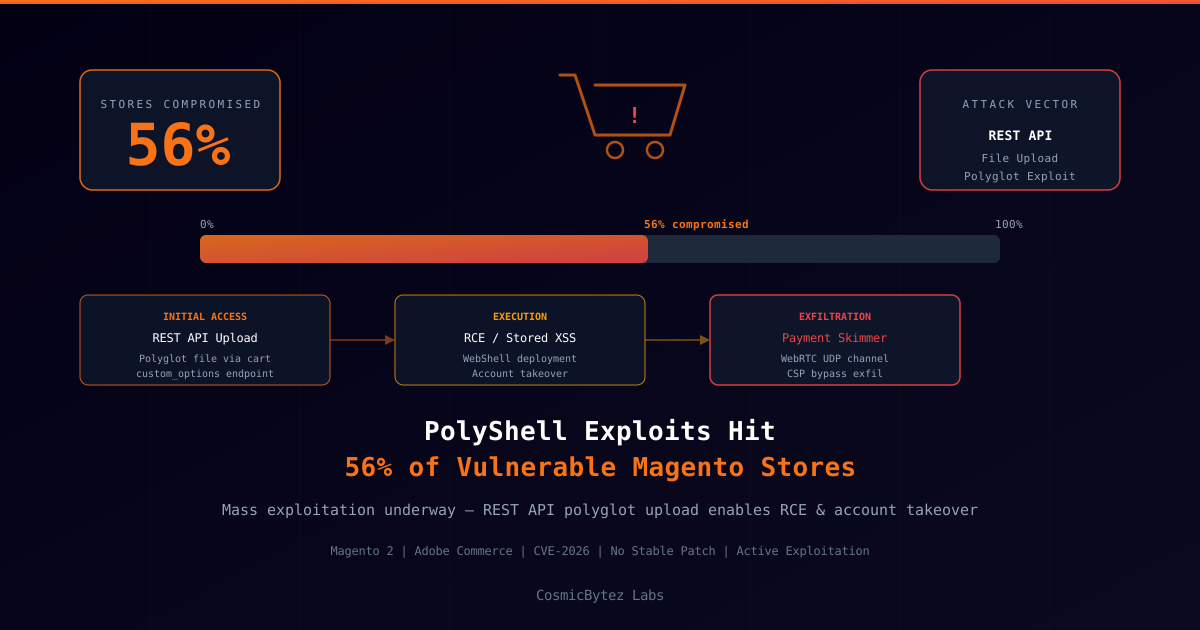
Active mass exploitation is underway against Magento 2 Open Source and Adobe Commerce storefronts via a technique researchers have dubbed PolyShell — a polyglot file upload attack that abuses the platform's REST API to achieve remote code execution and account takeover. Security researchers confirm that attackers have already compromised more than 56% of all vulnerable installations identified during active scanning campaigns.
What Is the PolyShell Attack?
PolyShell exploits the way Magento 2 handles file uploads submitted through the cart's custom_options REST endpoint. By crafting a polyglot file — a single binary that simultaneously satisfies the validation rules of two different file formats (for example, a valid JPEG that is also a valid PHP script) — attackers can upload a file that bypasses Magento's extension and content-type checks while remaining executable as server-side code.
Once uploaded to a web-accessible path, the attacker can trigger execution by issuing a direct HTTP request to the file's storage location, effectively converting the compromised store's web server into a full webshell environment.
Attack chain summary:
- Reconnaissance — Automated scanners identify Magento 2 stores with the vulnerable REST endpoint exposed
- Upload — Polyglot PHP/image file submitted via the
custom_optionscart API - Execution — Attacker issues HTTP GET to the uploaded file's public URL
- Persistence — Additional backdoors written to disk; Magento admin accounts cloned or hijacked
- Monetisation — JavaScript payment skimmer injected into checkout pages; harvested card data exfiltrated via WebRTC data channels to bypass Content Security Policy controls
Scale of Active Exploitation
Researchers monitoring exploitation activity report that attacks began as targeted, low-volume probes before escalating to automated mass scanning campaigns across the entire Magento ecosystem. Exploitation tooling has been observed circulating in underground forums, dramatically lowering the skill threshold required to exploit vulnerable stores.
The 56% compromise rate among vulnerable installations is strikingly high and reflects both the simplicity of the exploit and the large surface area of unpatched Magento deployments — many of which are operated by small and medium-sized e-commerce businesses without dedicated security teams or rapid patching workflows.
Magento's Patching Landscape
A persistent challenge in the Magento ecosystem is the prevalence of heavily customised installations where owners defer updates due to concerns about breaking compatibility with third-party extensions. This lag between patch availability and patch application has historically made Magento a high-value target for payment card skimming operations.
Adobe has not issued a separate emergency advisory as of publication; the recommendation is to ensure installations are running the latest stable Magento 2 release and to verify that the REST API endpoint handling custom_options file uploads is properly restricting executable content.
Post-Compromise Indicators
Security teams and store owners investigating potential compromise should look for:
- Unexpected PHP files in media or upload directories (
/pub/media/,/var/,/pub/static/) - Modified checkout templates containing obfuscated JavaScript
- New or recently modified admin accounts not created by authorised staff
- Outbound WebRTC or UDP connections from the web server process — an indicator of the novel exfiltration technique being used by the associated payment skimmer
- Unusual REST API activity in access logs, particularly POST requests to
V1/guest-carts/*/itemsor custom options endpoints with multipart bodies
Recommended Actions
- Patch immediately — Upgrade to the latest Magento 2 release; do not delay for compatibility testing in the current threat environment
- Audit uploaded files — Scan media and upload directories for PHP, PHTML, or executable content; any PHP file in a public upload path should be treated as a potential webshell
- Review admin accounts — Audit all administrator accounts and revoke any that cannot be attributed to a known authorised individual
- Implement file upload restrictions at the web server layer — Configure Nginx or Apache to deny execution of scripts in upload directories regardless of extension
- Deploy a Web Application Firewall (WAF) — Inspect and block malicious
custom_optionspayloads at the network edge - Monitor for skimmer injection — Perform regular integrity checks of checkout page JavaScript using subresource integrity (SRI) or file hash monitoring
Store owners who believe they have been compromised should treat the incident as a payment card data breach and follow applicable notification obligations under PCI DSS and relevant data protection regulations.