Funnel Builder WordPress Plugin Actively Exploited to Skim Credit Cards
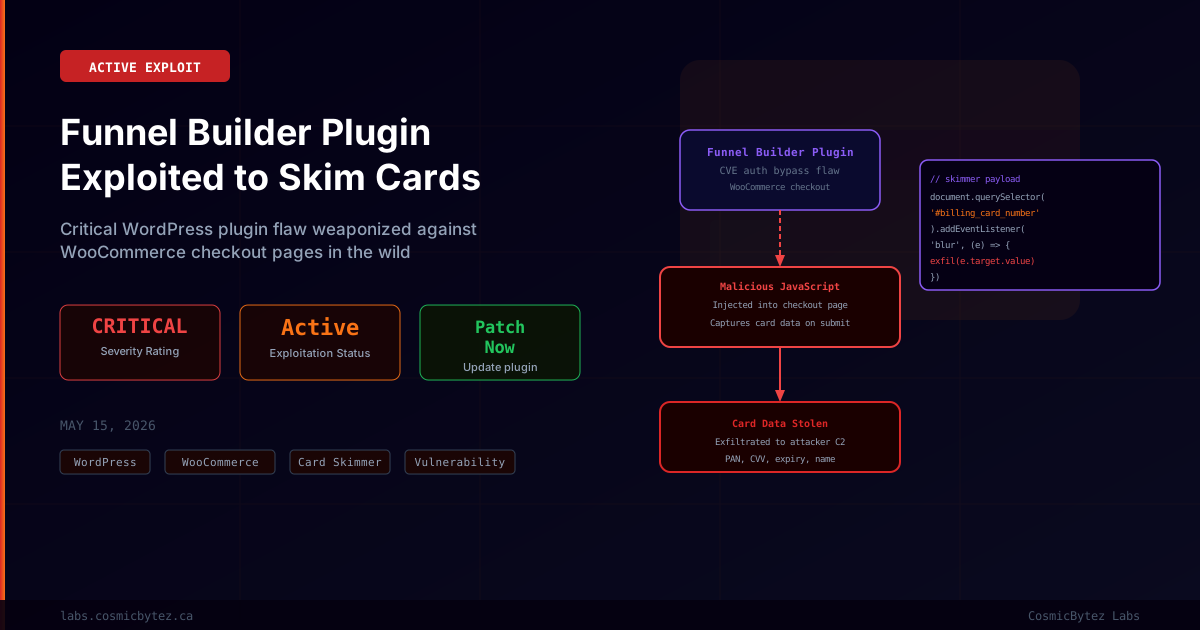
A critical vulnerability in the Funnel Builder plugin for WordPress — also known as WPFunnels — is being actively weaponized in the wild to inject malicious JavaScript skimmer code into WooCommerce checkout pages. Threat actors are exploiting the flaw to intercept payment card data entered by shoppers at the point of purchase, exfiltrating card numbers, CVV codes, expiry dates, and billing details to attacker-controlled servers.
Security researchers tracking the campaign describe this as a Magecart-style skimming attack enabled by a server-side vulnerability rather than the client-side compromise techniques typically seen in these operations.
What Is Funnel Builder?
Funnel Builder (WPFunnels) is a WordPress plugin designed to help merchants build sales funnels, checkout flows, and lead generation pages directly within WordPress. It integrates deeply with WooCommerce's checkout system, making it a high-value target for attackers seeking to position malicious code within the payment flow.
The plugin has a substantial install base among WooCommerce merchants, and its deep integration with checkout pages makes any exploitable vulnerability particularly dangerous from a payment security standpoint.
The Vulnerability
The exploited vulnerability allows attackers to inject arbitrary JavaScript into WooCommerce checkout pages managed by Funnel Builder, without requiring authentication. The exact technical mechanism involves a flaw in how the plugin handles certain inputs or requests — researchers describe it as an authorization bypass that permits unauthenticated modification of page content or plugin settings.
Once the malicious JavaScript is injected, it is embedded in the checkout page served to legitimate customers.
| Attribute | Value |
|---|---|
| Plugin | Funnel Builder (WPFunnels) for WordPress |
| Impact | Unauthenticated malicious JS injection into checkout pages |
| Exploitation | Actively observed in the wild |
| Target | WooCommerce checkout pages |
| Payload | Credit card skimmer JavaScript |
| Severity | Critical |
How the Attack Works
1. Attacker identifies WordPress sites running a vulnerable Funnel Builder version

2. The authorization bypass flaw is exploited to inject a malicious JavaScript
   snippet into the WooCommerce checkout page template managed by the plugin

3. Shoppers visit the compromised store and proceed to checkout — the page
   appears completely normal with no visible signs of compromise

4. When the shopper enters their payment details, the skimmer script captures:
   - Full card number (PAN)
   - Card expiry date
   - CVV / CVC security code
   - Cardholder billing name and address

5. The captured data is silently transmitted to an attacker-controlled server
   via a background fetch() or XHR request

6. The legitimate payment transaction completes normally, giving the victim
   no indication that their card data has been stolen

7. Stolen card data is used for fraudulent transactions or sold on underground
card marketplacesWhy This Is Particularly Dangerous
This attack is especially insidious for several reasons:
Invisible to victims: The checkout page functions normally — payments process correctly, orders are fulfilled — so neither the merchant nor the customer is immediately aware that data has been stolen.
Targets high-value data: Payment card data is among the most monetizable categories of stolen information, with stolen cards typically sold within hours of capture on underground markets.
Merchant liability: Merchants whose checkout pages are compromised face significant consequences under PCI DSS compliance requirements. A skimming compromise on a merchant's checkout page constitutes a reportable breach and may result in fines, card scheme penalties, and loss of payment processing capability.
Silent persistence: Once injected, the skimmer continues operating until the vulnerable plugin is updated and the injected content is removed — potentially exposing every checkout over an extended period.
Remediation
1. Update Funnel Builder Immediately
Navigate to WordPress Admin > Plugins > Installed Plugins, locate Funnel Builder (WPFunnels), and update to the latest available version which contains the security fix.
# Via WP-CLI
wp plugin update wpfunnels

# Verify the installed version
wp plugin get wpfunnels --field=version2. Check for Injected Skimmer Code
After updating, inspect your checkout page templates and plugin files for unauthorized JavaScript:
# Search for common skimmer patterns in WordPress files
grep -r "fetch\|XMLHttpRequest\|atob\|eval\|document.cookie" \
  /var/www/html/wp-content/plugins/wpfunnels/ | \
  grep -v ".git"

# Check for unauthorized script tags in database content
wp db query "SELECT post_content FROM wp_posts WHERE post_content LIKE '%<script%' AND post_status = 'publish'"3. Verify Checkout Page Integrity
Use a browser developer tools network inspector on your checkout page and monitor for unexpected outbound requests when payment fields are filled. Any requests to unrecognized external domains during checkout should be investigated immediately.
4. Review Server Logs
# Look for unexpected POST requests to plugin endpoints
grep "wpfunnels\|wc-ajax\|checkout" /var/log/nginx/access.log | \
  grep "POST" | \
  grep -v "127.0.0.1\|your-server-ip" | \
tail -2005. Engage PCI Incident Response
If you suspect your checkout was compromised, treat this as a PCI DSS security incident:
- Engage your acquiring bank immediately
- Preserve logs for forensic investigation
- Consider engaging a qualified security assessor (QSA) for a formal incident assessment
- Notify affected customers per applicable data breach notification laws
Indicators of Compromise
Monitor for the following patterns:
- Unexpected JavaScript files in the Funnel Builder plugin directory with recent modification dates
- Unfamiliar external domains appearing in Content Security Policy violation reports
- Outbound HTTPS requests from your server to unknown endpoints during checkout processing
- WooCommerce settings or page content modified without admin action
- Plugin option values in the WordPress database containing base64-encoded strings or obfuscated JavaScript
Broader Context: Magecart Skimming Trends
Payment card skimming via WordPress plugin vulnerabilities has become a consistent attack vector. Unlike traditional Magecart attacks that compromise JavaScript hosted on CDNs or third-party services, plugin-based injection provides attackers with a server-side foothold, making the malicious code harder to detect with client-side integrity checking alone.
Security firms tracking skimming campaigns note that attackers routinely scan for newly disclosed WordPress plugin vulnerabilities and launch automated exploitation campaigns within hours of public disclosure — making rapid patching essential.
Key Takeaways
- Update Funnel Builder (WPFunnels) immediately — active exploitation of this vulnerability is confirmed
- Inspect your checkout pages for injected JavaScript after updating — the update alone does not remove already-injected payloads
- Card data skimming is PCI DSS reportable — engage your acquiring bank if compromise is suspected
- Enable a WAF with WordPress-aware rules to block exploitation of plugin vulnerabilities
- Monitor outbound network requests from checkout pages as a standard defense against Magecart-style attacks