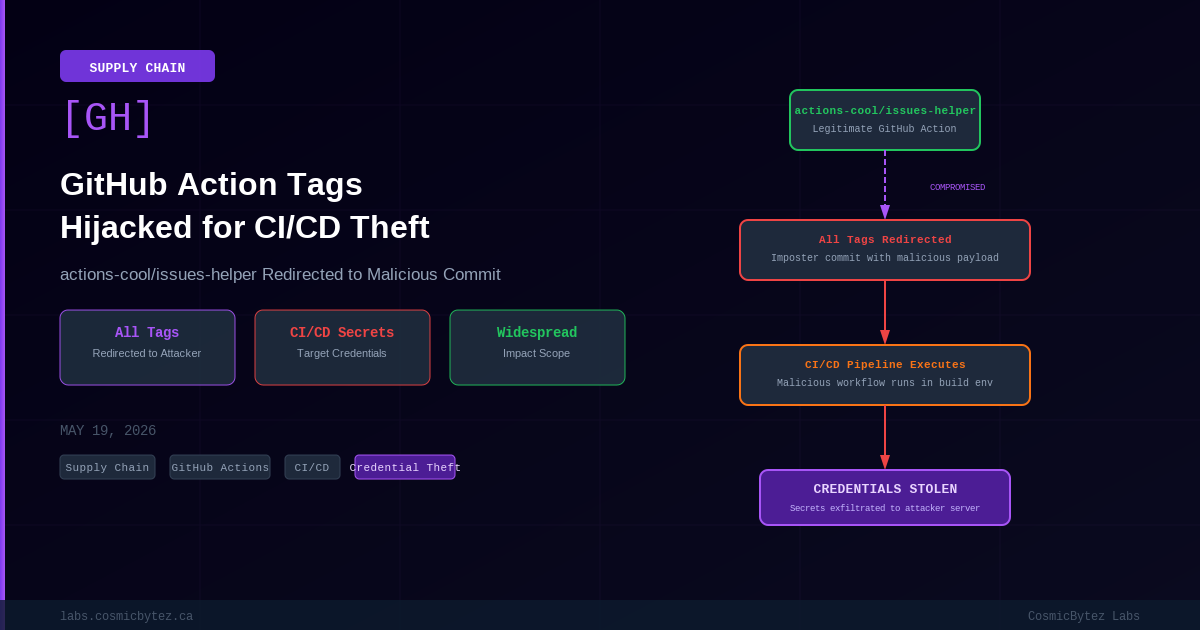
Threat actors have compromised actions-cool/issues-helper, a popular GitHub Actions workflow used by thousands of repositories to automate GitHub issue management, redirecting every existing version tag to a malicious imposter commit designed to steal CI/CD secrets from any pipeline that executes the action.
The attack represents the latest escalation in a campaign of software supply chain compromises targeting developer tooling and CI/CD infrastructure — a trend that accelerated dramatically following the release of the Shai-Hulud worm source code in May 2026.
What Is actions-cool/issues-helper?
actions-cool/issues-helper is a widely-adopted GitHub Actions workflow that provides a comprehensive set of automated operations for managing GitHub issues: auto-labeling, automatic closure of stale issues, comment automation, and issue triage workflows. Its popularity stems from being a drop-in solution for common issue management tasks that would otherwise require custom scripts.
The action is referenced in thousands of repositories across the GitHub ecosystem using version tags like @v3, @v2, or specific semver tags in workflow files such as:
- uses: actions-cool/issues-helper@v3Any repository with this reference in a GitHub Actions workflow automatically pulls and executes the action when the workflow runs.
The Attack: All Tags Redirected
According to The Hacker News, threat actors gained control of the actions-cool/issues-helper repository and executed a targeted supply chain attack:
"Every existing tag in the repository has been redirected to a malicious imposter commit."
Rather than creating new malicious versions, the attackers moved all existing tags — including stable production versions that organizations rely on — to point to a single malicious commit. This technique is particularly dangerous because:
- Pinning to a tag does not protect you — tags are mutable references in Git, and any tag (including
@v3.17.6or similar specific versions) can be moved to point to a different commit without the consumer being notified - The attack is retroactive — every repository that previously referenced the action, including those that hadn't run their workflows recently, would execute malicious code on the next pipeline run
- Trust exploitation — repositories that audited the action at one point in time and considered it safe now unknowingly execute attacker-controlled code
The malicious commit includes code that harvests sensitive credentials from the CI/CD environment and exfiltrates them to an attacker-controlled server. In GitHub Actions, available secrets include:
GITHUB_TOKEN— the automatically-provisioned token with repository read/write access- Any custom secrets configured in the repository or organization (AWS keys, API tokens, deployment credentials, signing keys)
- Environment variables that may contain sensitive configuration
CI/CD Credential Theft at Scale
The implications of this type of attack extend well beyond the compromised action itself. Organizations using actions-cool/issues-helper in workflows that also have access to sensitive secrets could lose:
- Cloud provider credentials (AWS, Azure, GCP) stored as repository secrets for deployment workflows
- Container registry credentials (Docker Hub, GHCR) for pushing images
- Package publishing tokens (npm, PyPI, Maven) for releasing software
- Database connection strings used in integration testing
- Internal API keys for services accessed during CI/CD
- Code signing certificates used in build pipelines
With stolen CI/CD credentials, attackers can deploy malicious code to production, publish compromised packages, access production databases, or escalate access across an organization's cloud infrastructure.
Why Tag Pinning Is Not Enough
This attack highlights a widely misunderstood security gap in GitHub Actions security guidance. Many security teams advise "pin to a specific version" — but pinning to a tag (e.g., @v3) provides no real security guarantee because:
- Tags in Git are mutable — they can be moved or deleted and recreated pointing to different commits
- Repository owners (or attackers who compromise repository access) can silently redirect any tag
- The consuming workflow has no mechanism to detect that the tag's target commit has changed
The only real protection is pinning to a specific commit SHA:
# Vulnerable: tag can be moved to malicious commit
- uses: actions-cool/issues-helper@v3

# Safer: commits are immutable; SHA cannot be redirected
- uses: actions-cool/issues-helper@<full-40-char-commit-sha>Even SHA pinning is not fully protective if the repository is entirely replaced (though this is detectable), but it eliminates the silent tag redirect attack vector.
Recommended Response
Immediate Actions
1. Audit your workflows for the compromised action
# Search all workflow files in your repositories
grep -r "actions-cool/issues-helper" .github/workflows/2. Disable affected workflows immediately
If your repository references actions-cool/issues-helper, disable or remove the workflow file and prevent any further pipeline runs until you have rotated all secrets.
3. Rotate all secrets exposed during affected workflow runs
Assume any secret accessible to the workflow has been compromised:
- Revoke and reissue all GitHub Personal Access Tokens
- Rotate AWS/Azure/GCP credentials
- Regenerate npm/PyPI/package registry tokens
- Rotate any database credentials used in testing
- Review
GITHUB_TOKENpermissions and audit recent API calls made with it
4. Review recent workflow run logs
Check GitHub Actions run history for the affected workflows and look for unexpected network connections or unusual behavior:
- Go to Actions → select the affected workflow
- Review recent runs and expand steps to look for unexpected external requests
- Check runner logs for outbound connections to unknown hosts
Long-Term Mitigations
Pin all third-party actions to commit SHAs
Update your workflow files to pin actions to immutable commit SHAs rather than tags. Use tools like Dependabot or Renovate to automate SHA pinning with PR-based updates:
# Before (vulnerable)
- uses: actions-cool/issues-helper@v3

# After (safer)
- uses: actions-cool/issues-helper@abc123def456... # v3.17.6Minimize secret access in workflows
Apply the principle of least privilege to GitHub Actions:
- Grant the
GITHUB_TOKENonly the minimum permissions needed - Do not pass production secrets to workflows that use third-party actions
- Use OIDC token federation (AWS, Azure, GCP) instead of long-lived credentials stored as secrets
Enable GitHub Actions security policies
Consider requiring that all Actions used in your organization come from a verified vendor list or be explicitly approved via your organization's policy settings.
Broader Context: CI/CD Supply Chain Under Siege
This compromise follows a pattern of increasingly sophisticated attacks against CI/CD infrastructure in 2026. The Trivy GitHub Actions compromise in March 2026, the TanStack npm supply chain attack in April-May 2026, and now the actions-cool compromise all demonstrate a sustained campaign targeting the mechanisms developers trust to build and deploy software.
The common thread: developer trust is the vulnerability. Developers and organizations reasonably assume that tools they have evaluated and used reliably for months or years remain trustworthy. Supply chain attackers exploit this trust by compromising the distribution mechanism — tags, package registries, GitHub repositories — rather than attacking consumers directly.
References
- The Hacker News — Popular GitHub Action Tags Redirected to Imposter Commit
- CosmicBytez Labs — Shai-Hulud Worm Clones Spread After Code Release
- CosmicBytez Labs — Mini Shai-Hulud Worm Compromises TanStack, Mistral AI
- CosmicBytez Labs — Living Off the Pipeline: Defending Against CI/CD Subversion