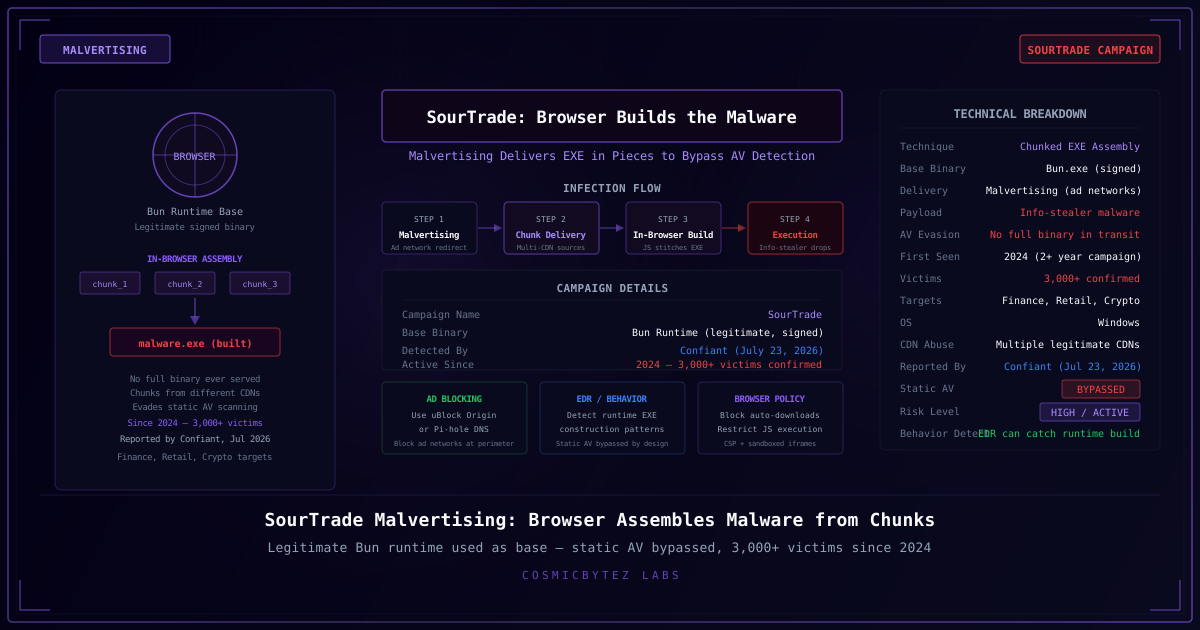
A malvertising operation tracked as SourTrade has been quietly victimizing over 3,000 users since 2024 using an innovative technique: rather than delivering a complete malicious executable, the campaign sends the malware in discrete chunks that the victim's own browser assembles into the final payload. Security firm Confiant detailed the campaign on July 23, 2026.
The SourTrade Technique
Traditional malware delivery works by serving a complete binary file from a fixed URL — a pattern that antivirus engines and security products can inspect and flag. SourTrade sidesteps this in a fundamentally different way:
- The victim is redirected via a compromised ad network to a malicious landing page
- Multiple chunk files are fetched from separate, legitimate-looking CDN endpoints — no single source contains a complete binary
- JavaScript in the browser stitches the chunks together in memory to form a valid Windows executable
- The assembled EXE is written to disk and executed by the browser
Because no complete malicious file ever exists on the network or passes through a single inspection point, static antivirus engines that scan files in transit or at rest are effectively blinded.
The Bun Runtime Trick
A key component of the SourTrade campaign is its use of Bun, a legitimate, digitally-signed JavaScript runtime, as the base binary. Bun is a real, widely used developer tool with a valid code-signing certificate from its publisher.
By using Bun as a foundation and building the malicious payload around it, the attackers ensure that:
- The base binary passes signature verification checks
- Security products that allowlist signed binaries do not block execution
- The payload appears to leverage a legitimate developer tool rather than an obvious piece of malware
The final assembled executable functions as an info-stealer, targeting credentials, session tokens, and financial data.
Delivery Infrastructure
Confiant's investigation found that SourTrade abuses multiple legitimate CDN services to distribute the chunks. Each CDN serves only a portion of the final payload, making takedowns more complex — removing one CDN endpoint does not neutralize the campaign if others remain operational.
The campaign primarily targets users browsing on Windows and focuses on sectors including finance, retail, and cryptocurrency.
Why Static AV Fails Here
The SourTrade technique exploits a fundamental assumption in traditional antivirus: that malware will be present as a recognizable binary at some point during delivery. By keeping the components fragmented and innocuous in isolation, the campaign defeats:
- Network-level scanning: No complete binary passes the wire
- Download scanning: Each chunk appears benign
- Signature matching: The base Bun binary is legitimately signed
- Hash-based blocklists: The assembled EXE is built dynamically and may vary per victim
How to Protect Yourself
For End Users
Use an ad blocker. Extensions like uBlock Origin prevent the malvertising redirect from ever reaching the malicious landing page. This is the single most effective defense against malvertising campaigns.
Be cautious on unfamiliar websites, particularly those served through advertising networks. Malvertising can appear on legitimate, high-traffic sites if their ad networks are compromised.
For Organizations
Deploy endpoint detection and response (EDR) tools configured to detect behavioral patterns — specifically, browser processes writing and executing new EXEs, or assembling file content from multiple network sources. Static AV will not catch this campaign; behavioral analysis is required.
Enforce application allowlisting on endpoints to prevent unauthorized executables from running, even if assembled in memory.
Implement DNS filtering and content inspection at the network perimeter to block known malvertising infrastructure. Threat intelligence feeds for malicious CDN patterns can help.
Restrict outbound connections from browsers to necessary destinations, making it harder for fragmented chunk delivery to complete.
For Enterprise Security Teams
Audit browser telemetry for unusual patterns: multiple sequential downloads from CDN subdomains followed by a local process execution. SourTrade's chunk-delivery pattern leaves a distinctive behavioral signature even when file-level detection fails.
Broader Implications
The SourTrade campaign illustrates a growing trend in malware delivery: treating the victim's own computing environment as an assembly plant. As AV products improve at detecting complete binaries, threat actors are increasingly moving the final assembly step client-side. Researchers at Confiant note that this technique is not unique to SourTrade and expect wider adoption as the approach becomes more widely understood among cybercriminal communities.
Key Details
| Field | Value |
|---|---|
| Campaign Name | SourTrade |
| Technique | Chunked in-browser EXE assembly |
| Base Binary | Bun runtime (legitimate, signed) |
| Final Payload | Info-stealer malware |
| Active Since | 2024 |
| Victims Confirmed | 3,000+ |
| Primary OS | Windows |
| Reported By | Confiant, July 23, 2026 |
If your organization runs advertising-supported content or relies on CDN-distributed assets, reviewing your supply chain for injection points that could be leveraged by campaigns like SourTrade is a worthwhile security exercise.