Browser Sessions Are Now the Primary Battleground for Initial Access and Data Theft
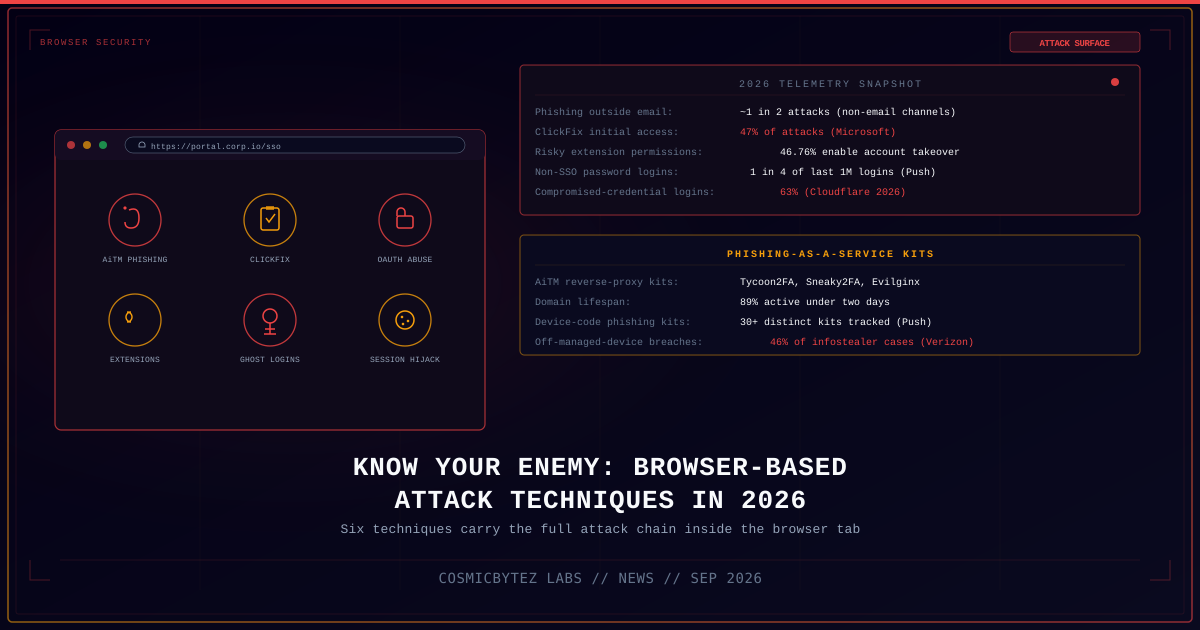
Business applications live almost entirely inside the browser tab today, and threat actors have followed them there. A September 30, 2026 analysis published by The Hacker News, drawing on telemetry from browser-security vendor Push Security alongside data from Microsoft, Verizon's 2026 Data Breach Investigations Report (DBIR), and Cloudflare's 2026 Threat Report, lays out six browser-native attack techniques that now carry an entire intrusion — from initial access through credential theft to session replay — without the traffic ever crossing the email, network, or endpoint layers that most organizations still rely on for detection. As the report puts it, most breaches today begin in a browser session, and increasingly they never leave it.
Details
| Attribute | Value |
|---|---|
| Report focus | Browser-based attack techniques observed across 2026 |
| Primary source | Push Security telemetry, cited by The Hacker News (Sept 30, 2026) |
| Techniques identified | Six — AiTM phishing kits, ClickFix, authorization phishing, malicious extensions, credential stuffing/"ghost logins," session hijacking |
| Named AiTM phishing kits | Tycoon2FA, Sneaky2FA, Evilginx |
| ClickFix share of initial access (Microsoft) | 47% of attacks; 52% of Q2 2026 Push detections |
| Risky extension permissions (Push) | 46.76% of extensions carry permission combinations enabling account takeover with no user interaction |
| Ghost-login exposure (Push, last 1M logins observed) | 1 in 4 were non-SSO password logins; 2 in 5 of those lacked MFA |
| Compromised-credential login rate (Cloudflare 2026) | 63% of human logins involve previously compromised credentials |
| Off-managed-device infostealer link (Verizon DBIR 2025) | 46% of infostealer-driven corporate breaches originate on non-managed devices |
The Six Techniques Defining Browser-Based Attacks
1. Adversary-in-the-Browser (AiTM) Phishing
Modern phishing kits no longer just harvest a username and password — they sit as a reverse proxy between the victim and the real login page, relaying the session live and capturing the resulting authentication token, defeating traditional one-time-passcode multi-factor authentication (MFA) in the process. Turnkey kits such as Tycoon2FA, Sneaky2FA, and Evilginx package this reverse-proxy AiTM approach as phishing-as-a-service, complete with anti-bot and anti-scanner evasion. Roughly 1 in 2 phishing attacks are now delivered through channels outside email entirely — instant messaging, social media, SMS, malicious ads, and in-app messaging — and 89% of phishing domains stay active for fewer than two days, making blocklist-based detection largely reactive by the time a domain is flagged.
2. ClickFix: Malicious Copy-and-Paste
ClickFix tricks users into copying and manually executing a malicious command themselves, typically framed as a fake CAPTCHA solve or browser "verification" step. Microsoft identified ClickFix as the single most common initial access vector observed in 2026, accounting for 47% of attacks, and it became the dominant technique in Push's own detection data, making up 52% of total detections in Q2 2026. Roughly 4 in 5 ClickFix payloads are delivered through compromised legitimate websites, malvertising, or SEO-poisoned search results rather than direct phishing links. Newer variants extend the same social-engineering pattern: InstallFix disguises the lure as a fake developer-tool installer pushed through malvertising, while LLMShare abuses shared AI chatbot conversation links to deliver the same copy-paste trap.
3. Authorization Phishing
Rather than stealing a password, authorization phishing targets what happens after login, bypassing MFA entirely by abusing legitimate authorization mechanisms. Push describes three subtechniques: consent phishing, where a victim is tricked into granting a malicious third-party application OAuth access to their account; device code phishing, which abuses the RFC 8628 device authorization flow and is now supported by more than 30 distinct commodity phishing kits tracked by Push; and ConsentFix, a hybrid that blends the ClickFix social-engineering pattern with OAuth consent abuse. ConsentFix was first observed in Russian state-linked APT29 campaigns and has since been commoditized for use by lower-tier criminal actors.
4. Malicious Browser Extensions
Browser extensions operate with broad access to page content, form fields, and session cookies, making them an effective platform for stealing data, logging keystrokes, and intercepting credentials and tokens in transit. Push's analysis found that 46.76% of extensions carry permission combinations capable of enabling full account takeover with zero user interaction beyond the initial install. The problem is compounded by unsanctioned AI tooling: Verizon's 2026 DBIR found more than 15% of corporate users had installed unauthorized AI browser extensions, with an average of 17 unique AI extensions per company and at least one organization running 163. The report notes that static extension risk-scoring poorly predicts supply-chain compromise, and that a default-deny allowlisting model outperforms reactive, score-based removal.
5. Credential Stuffing and "Ghost Logins"
Plain password-based compromise remains the leading cause of breaches, and browser telemetry is exposing a specific blind spot: "ghost logins" — backup or shadow credentials that exist entirely outside an organization's single sign-on (SSO) deployment and are therefore invisible to identity-provider logs and conditional access policies. Of the last one million logins Push observed across its customer base, 1 in 4 were direct password logins rather than SSO, 2 in 5 of those lacked any MFA protection, and 1 in 5 used a weak, previously breached, or reused password. Cloudflare's 2026 Threat Report puts the scale of the underlying problem starkly: 63% of human logins it observed involve credentials that were already compromised in a prior breach.
6. Session Hijacking and Token Replay
The final technique skips authentication altogether. Once an attacker obtains a valid session token — through malware, a stolen browser profile, or one of the phishing techniques above — they can replay it directly, bypassing login prompts, MFA, and even phishing-resistant passkeys, none of which protect a session once it has already been established. Verizon's DBIR 2025 found that 46% of infostealer infections leading to corporate breaches originated on non-managed devices — personal computers, developer workstations, and contractor laptops without endpoint detection and response (EDR) coverage. Browser sync features add a further bridge: a compromise on a personal device or account can sync cookies, saved credentials, and active sessions directly into a corporate browser profile, carrying the compromise across the boundary organizations assume separates "personal" from "corporate."
Impact Assessment
| Impact Area | Description |
|---|---|
| Detection gap | All six techniques execute primarily inside the browser process itself, largely invisible to email gateways, network firewalls, and traditional endpoint agents |
| MFA bypass | AiTM phishing, authorization phishing, and session hijacking each defeat MFA — including phishing-resistant passkeys in the session-hijacking case — by attacking the session or token rather than the credential |
| Identity visibility | "Ghost logins" outside SSO are invisible to identity-provider audit logs, undermining conditional access and risk-based authentication policies that assume all logins flow through the IdP |
| Supply chain exposure | Malicious and over-permissioned browser extensions create a persistent, update-based compromise vector that static risk scoring fails to catch reliably |
| BYOD/personal-device risk | Nearly half of infostealer-driven breaches trace back to non-managed devices, and browser sync features can carry a personal compromise straight into a corporate session |
| Speed of infrastructure turnover | With 89% of phishing domains active for under two days, domain- and URL-reputation blocklists are structurally unable to keep pace |
Recommendations
For Security Teams
- Deploy browser-layer detection and response tooling capable of inspecting page content, extension behavior, and session/token activity directly in the browser — not just at the network or endpoint layer.
- Monitor for anomalous session token reuse (impossible-travel token replay, token use from unexpected device fingerprints) as a primary detection signal, since it catches AiTM, authorization phishing, and session hijacking with a single control.
- Build detection coverage specifically for device-code and OAuth consent-grant abuse, including alerting on new third-party application authorizations and unusual device-code flow initiations.
- Treat ClickFix-style "paste this command" prompts as a standing phishing-awareness training topic; correlate its variants (ClickFix, InstallFix, ConsentFix, LLMShare) since they share the same underlying social-engineering pattern.
For IT and Browser Administrators
- Move to a default-deny, allowlist-based browser extension policy rather than relying on marketplace risk scores or reactive removal after compromise is discovered.
- Audit for shadow AI browser extensions specifically; the DBIR's average of 17 (and outlier of 163) unique AI extensions per organization indicates this category is under-inventoried in most environments.
- Identify and eliminate "ghost login" paths — accounts and applications with direct password authentication that bypass SSO — and bring them under identity-provider visibility or retire them.
- Restrict or monitor browser profile sync between personal and corporate contexts on managed devices, and extend EDR/browser-security coverage to BYOD and contractor devices that access corporate applications.
For End Users
- Never copy and paste a command into a terminal, "Run" dialog, or browser console because a website told you to, regardless of how the prompt is framed (CAPTCHA, verification, error fix).
- Treat OAuth consent prompts ("This app wants to access your account") with the same suspicion as a password entry field — review the requesting application and the permissions requested before approving.
- Report unfamiliar or unexpected active sessions and "stay signed in" prompts, particularly on personal devices that also access work accounts.
- Keep browser extensions to the minimum necessary, and remove any AI or productivity extension that was installed without going through an organizational approval process.
Key Takeaways
- Six distinct browser-native techniques — AiTM phishing, ClickFix, authorization phishing, malicious extensions, credential stuffing/ghost logins, and session hijacking — now carry complete intrusions end-to-end inside the browser.
- Commodity AiTM kits (Tycoon2FA, Sneaky2FA, Evilginx) and ClickFix (47% of attacks per Microsoft) have made MFA bypass and social-engineered malware delivery a turnkey, low-skill operation.
- Authorization phishing — consent phishing, device code phishing, and the APT29-linked ConsentFix hybrid — targets the post-login authorization layer, sidestepping MFA entirely.
- 46.76% of browser extensions carry permission combinations that enable account takeover with no user interaction, and static risk scoring does not reliably catch this exposure.
- "Ghost logins" outside SSO and the 63% compromised-credential login rate reported by Cloudflare show password-based access remains a massive, under-monitored attack surface even in organizations with mature SSO deployments.
- Because these techniques execute inside the browser process itself, detection requires purpose-built browser-layer security tooling — traditional email, network, and endpoint controls largely cannot see them.