Overview
Flying blind on your infrastructure is a liability. Without metrics you are left guessing whether a host is healthy, when a disk will fill, or whether a service silently died overnight. Prometheus and Grafana solve this with a pull-based metrics pipeline that is easy to deploy, cheaply self-hosted, and battle-tested at scale.
By the end of this project you will have a running observability stack that collects Linux host metrics, Docker container stats, and HTTP endpoint health, visualises everything through curated Grafana dashboards, and pages you over email or Slack when something goes wrong. The entire stack runs in Docker Compose — no Kubernetes required — and can be stood up on a single $5/month VPS or an old homelab node.
What you will build
- Prometheus — time-series database that scrapes metrics on a configurable interval
- Node Exporter — exposes CPU, memory, disk, and network metrics from the Linux host
- cAdvisor — exposes per-container resource usage metrics from the Docker daemon
- Blackbox Exporter — probes HTTP/HTTPS endpoints and returns availability and latency metrics
- AlertManager — receives firing alerts from Prometheus and routes them to email or Slack
- Grafana — query engine and dashboard UI backed by Prometheus as a data source
Architecture
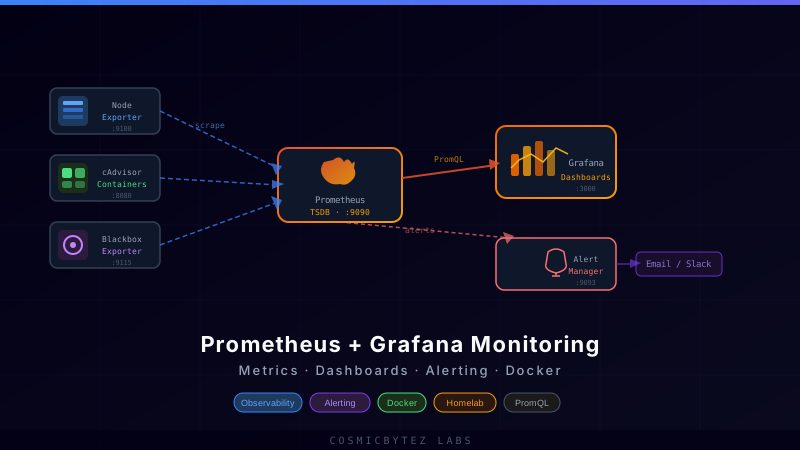
  ┌──────────────────────────────────────────────────────────────┐
  │  Docker host                                                  │
  │                                                               │
  │  Node Exporter :9100  ──┐                                    │
  │  cAdvisor      :8080  ──┼──► Prometheus :9090 ──► Grafana :3000
  │  Blackbox Exp  :9115  ──┘         │                          │
  │                                   └──► AlertManager :9093    │
  │                                              │                │
  └──────────────────────────────────────────────┼────────────────┘
                                                 ▼
                                       Email / Slack webhook
Prometheus pulls (scrapes) metrics from each exporter on a configurable interval (default 15 s). This inversion of control means exporters are stateless — they just expose an HTTP endpoint — and Prometheus owns the retention policy. Grafana sits in front of Prometheus's query API and turns PromQL results into panels. AlertManager receives rule violations from Prometheus and handles deduplication, silencing, and routing.
All five services share a single Docker network (monitoring) so they can resolve each other by container name. Only Grafana and Prometheus expose ports to the host; everything else is internal.
Prerequisites
- Docker Engine 24+ and Docker Compose v2
- A Linux host (bare-metal, VM, or VPS) — 2 vCPU / 2 GB RAM is sufficient
- A domain or local DNS for the Grafana reverse proxy (optional but recommended)
- An SMTP account or Slack incoming webhook for alert routing
Step 1 — Project layout
Create the directory tree before writing any configs:
mkdir -p monitoring/{prometheus,alertmanager,grafana/provisioning/{datasources,dashboards}}
cd monitoringFinal layout:
monitoring/
├── docker-compose.yml
├── prometheus/
│   ├── prometheus.yml
│   └── rules/
│       └── alerts.yml
├── alertmanager/
│   └── alertmanager.yml
└── grafana/
    └── provisioning/
        ├── datasources/
        │   └── prometheus.yml
        └── dashboards/
            └── dashboards.yml
Step 2 — Docker Compose
docker-compose.yml:
version: "3.9"

networks:
  monitoring:
    driver: bridge

volumes:
  prometheus_data: {}
  grafana_data: {}

services:

  prometheus:
    image: prom/prometheus:v2.52.0
    container_name: prometheus
    restart: unless-stopped
    networks: [monitoring]
    ports:
      - "9090:9090"
    volumes:
      - ./prometheus/prometheus.yml:/etc/prometheus/prometheus.yml:ro
      - ./prometheus/rules:/etc/prometheus/rules:ro
      - prometheus_data:/prometheus
    command:
      - "--config.file=/etc/prometheus/prometheus.yml"
      - "--storage.tsdb.path=/prometheus"
      - "--storage.tsdb.retention.time=30d"
      - "--web.enable-lifecycle"

  node-exporter:
    image: prom/node-exporter:v1.8.1
    container_name: node-exporter
    restart: unless-stopped
    networks: [monitoring]
    pid: host
    volumes:
      - /proc:/host/proc:ro
      - /sys:/host/sys:ro
      - /:/rootfs:ro
    command:
      - "--path.procfs=/host/proc"
      - "--path.sysfs=/host/sys"
      - "--collector.filesystem.mount-points-exclude=^/(sys|proc|dev|host|etc)($$|/)"

  cadvisor:
    image: gcr.io/cadvisor/cadvisor:v0.49.1
    container_name: cadvisor
    restart: unless-stopped
    networks: [monitoring]
    privileged: true
    devices:
      - /dev/kmsg
    volumes:
      - /:/rootfs:ro
      - /var/run:/var/run:ro
      - /sys:/sys:ro
      - /var/lib/docker:/var/lib/docker:ro
      - /cgroup:/cgroup:ro

  blackbox-exporter:
    image: prom/blackbox-exporter:v0.25.0
    container_name: blackbox-exporter
    restart: unless-stopped
    networks: [monitoring]

  alertmanager:
    image: prom/alertmanager:v0.27.0
    container_name: alertmanager
    restart: unless-stopped
    networks: [monitoring]
    ports:
      - "9093:9093"
    volumes:
      - ./alertmanager/alertmanager.yml:/etc/alertmanager/alertmanager.yml:ro

  grafana:
    image: grafana/grafana:11.1.0
    container_name: grafana
    restart: unless-stopped
    networks: [monitoring]
    ports:
      - "3000:3000"
    environment:
      - GF_SECURITY_ADMIN_USER=admin
      - GF_SECURITY_ADMIN_PASSWORD=changeme          # change this
      - GF_USERS_ALLOW_SIGN_UP=false
      - GF_SERVER_ROOT_URL=https://grafana.example.com
    volumes:
      - grafana_data:/var/lib/grafana
- ./grafana/provisioning:/etc/grafana/provisioning:roSecurity note: In production, move
GF_SECURITY_ADMIN_PASSWORDto a.envfile excluded from version control, and put Grafana behind a reverse proxy with TLS (Traefik or Nginx).
Step 3 — Prometheus configuration
prometheus/prometheus.yml:
global:
  scrape_interval: 15s
  evaluation_interval: 15s

alerting:
  alertmanagers:
    - static_configs:
        - targets: ["alertmanager:9093"]

rule_files:
  - "/etc/prometheus/rules/*.yml"

scrape_configs:
  - job_name: prometheus
    static_configs:
      - targets: ["localhost:9090"]

  - job_name: node
    static_configs:
      - targets: ["node-exporter:9100"]

  - job_name: cadvisor
    static_configs:
      - targets: ["cadvisor:8080"]

  - job_name: blackbox_http
    metrics_path: /probe
    params:
      module: [http_2xx]
    static_configs:
      - targets:
          - https://labs.cosmicbytez.ca
          - https://grafana.example.com
    relabel_configs:
      - source_labels: [__address__]
        target_label: __param_target
      - source_labels: [__param_target]
        target_label: instance
      - target_label: __address__
replacement: blackbox-exporter:9115The blackbox_http job is a multi-target scrape pattern: for each URL in targets, Prometheus relabels the address to point at the Blackbox Exporter and passes the real URL as a query parameter. The exporter performs an HTTP probe and returns PASS/FAIL plus response time.
Step 4 — Alert rules
prometheus/rules/alerts.yml:
groups:
  - name: host
    rules:
      - alert: HostDown
        expr: up == 0
        for: 2m
        labels:
          severity: critical
        annotations:
          summary: "Exporter {{ $labels.job }} is down"
          description: "Target {{ $labels.instance }} has been unreachable for more than 2 minutes."

      - alert: HighCPU
        expr: 100 - (avg by(instance) (rate(node_cpu_seconds_total{mode="idle"}[5m])) * 100) > 90
        for: 5m
        labels:
          severity: warning
        annotations:
          summary: "High CPU on {{ $labels.instance }}"
          description: "CPU usage is {{ $value | printf \"%.1f\" }}% (threshold 90%)."

      - alert: DiskFillingUp
        expr: |
          (node_filesystem_avail_bytes{mountpoint="/"} / node_filesystem_size_bytes{mountpoint="/"}) * 100 < 15
        for: 10m
        labels:
          severity: warning
        annotations:
          summary: "Disk filling up on {{ $labels.instance }}"
          description: "Root filesystem has {{ $value | printf \"%.1f\" }}% free space remaining."

      - alert: MemoryPressure
        expr: |
          (node_memory_MemAvailable_bytes / node_memory_MemTotal_bytes) * 100 < 10
        for: 5m
        labels:
          severity: warning
        annotations:
          summary: "Low memory on {{ $labels.instance }}"
          description: "Available memory is {{ $value | printf \"%.1f\" }}% of total."

      - alert: HTTPEndpointDown
        expr: probe_success == 0
        for: 3m
        labels:
          severity: critical
        annotations:
          summary: "HTTP probe failed for {{ $labels.instance }}"
          description: "{{ $labels.instance }} has been unreachable for more than 3 minutes."

      - alert: SSLCertExpiringSoon
        expr: probe_ssl_earliest_cert_expiry - time() < 86400 * 14
        for: 1h
        labels:
          severity: warning
        annotations:
          summary: "SSL cert expiring soon for {{ $labels.instance }}"
description: "Certificate expires in {{ $value | humanizeDuration }}."Step 5 — AlertManager routing
alertmanager/alertmanager.yml:
global:
  smtp_smarthost: "smtp.example.com:587"
  smtp_from: "alerts@example.com"
  smtp_auth_username: "alerts@example.com"
  smtp_auth_password: "your-smtp-password"   # use env var in production

route:
  receiver: default
  group_by: [alertname, instance]
  group_wait: 30s
  group_interval: 5m
  repeat_interval: 3h
  routes:
    - match:
        severity: critical
      receiver: critical-alerts
      continue: true

receivers:
  - name: default
    email_configs:
      - to: "you@example.com"
        send_resolved: true

  - name: critical-alerts
    email_configs:
      - to: "oncall@example.com"
        send_resolved: true
    slack_configs:
      - api_url: "https://hooks.slack.com/services/YOUR/WEBHOOK/URL"
        channel: "#alerts"
        title: "{{ .CommonAnnotations.summary }}"
        text: "{{ range .Alerts }}{{ .Annotations.description }}\n{{ end }}"
        send_resolved: true

inhibit_rules:
  - source_match:
      severity: critical
    target_match:
      severity: warning
equal: [alertname, instance]The inhibit_rules block suppresses warning-level alerts for the same instance when a critical alert is already firing — this prevents alert storms where a downed host generates both a HostDown critical and multiple metric-based warnings simultaneously.
Step 6 — Grafana provisioning
Grafana supports automatic provisioning of data sources and dashboard playlists via YAML files, eliminating manual UI setup after restarts.
grafana/provisioning/datasources/prometheus.yml:
apiVersion: 1

datasources:
  - name: Prometheus
    type: prometheus
    access: proxy
    url: http://prometheus:9090
    isDefault: true
    jsonData:
      timeInterval: "15s"
httpMethod: POSTgrafana/provisioning/dashboards/dashboards.yml:
apiVersion: 1

providers:
  - name: default
    type: file
    updateIntervalSeconds: 30
    options:
      path: /var/lib/grafana/dashboards
foldersFromFilesStructure: trueTo import community dashboards (JSON files exported from grafana.com), download them and mount under /var/lib/grafana/dashboards. The most useful ones for this stack:
| Dashboard ID | Name |
|---|---|
| 1860 | Node Exporter Full |
| 14282 | Kubernetes / Container (cAdvisor) |
| 7587 | Prometheus Blackbox Exporter |
| 9578 | Node Exporter for Prometheus Dashboard |
Download via the Grafana UI at Dashboards → Import → Enter ID, or pull the JSON directly:
curl -o grafana/dashboards/node-exporter.json \
"https://grafana.com/api/dashboards/1860/revisions/latest/download"Then add a volume mount in docker-compose.yml:
grafana:
  volumes:
    - ./grafana/dashboards:/var/lib/grafana/dashboards:ro
- ./grafana/provisioning:/etc/grafana/provisioning:roStep 7 — Start the stack
# Pull all images first (optional but faster on first run)
docker compose pull

# Start everything detached
docker compose up -d

# Watch startup logs
docker compose logs -f --tail=50Check that all six containers are healthy:
docker compose psExpected output (all running):
NAME                STATUS
alertmanager        running
blackbox-exporter   running
cadvisor            running
grafana             running
node-exporter       running
prometheus          running
Testing
1. Verify Prometheus targets
Open http://<host>:9090/targets. All four targets (prometheus self, node-exporter, cadvisor, blackbox) should show green UP status. A red DOWN means a network or port issue; check docker compose logs <container>.
2. Run a manual PromQL query
In the Prometheus UI at http://<host>:9090/graph, run:
100 - (avg by(instance) (rate(node_cpu_seconds_total{mode="idle"}[5m])) * 100)You should see a time-series value representing current CPU utilisation percentage. A result of 0.8 means the host is 0.8% busy — healthy for an idle node.
3. Verify Grafana login
Navigate to http://<host>:3000, log in with the admin credentials from docker-compose.yml, and confirm the Prometheus data source shows a green checkmark under Connections → Data sources → Prometheus → Test.
4. Import and verify the Node Exporter Full dashboard
Go to Dashboards → Import, enter ID 1860, and select the Prometheus data source. You should immediately see CPU, memory, disk I/O, and network panels populated with live data.
5. Trigger a test alert
Temporarily lower the CPU alert threshold to 0 to force it to fire:
expr: 100 - (avg by(instance) (rate(node_cpu_seconds_total{mode="idle"}[5m])) * 100) > 0After reloading Prometheus config with:
curl -X POST http://localhost:9090/-/reloadCheck http://<host>:9090/alerts — the HighCPU alert should appear in PENDING state (it fires after the for: 5m hold period). Revert the threshold and reload again.
6. Verify Blackbox probes
curl "http://localhost:9115/probe?target=https://labs.cosmicbytez.ca&module=http_2xx"Look for probe_success 1 in the output. A 0 means the target is unreachable or returned a non-2xx status.
Hardening for production
Prometheus and AlertManager should not be publicly accessible. Two options:
-
Bind only to localhost: In
docker-compose.yml, change port bindings to127.0.0.1:9090:9090and127.0.0.1:9093:9093. Access via SSH tunnel or a VPN. -
Put behind Traefik with basic auth: If you followed the Traefik reverse proxy project, add Traefik labels to the Prometheus service and restrict with a basic-auth middleware:
prometheus:
  labels:
    - "traefik.enable=true"
    - "traefik.http.routers.prometheus.rule=Host(`prometheus.example.com`)"
    - "traefik.http.routers.prometheus.tls.certresolver=letsencrypt"
    - "traefik.http.routers.prometheus.middlewares=prometheus-auth"
- "traefik.http.middlewares.prometheus-auth.basicauth.users=admin:$$apr1$$..."Generate the bcrypt hash with: htpasswd -nb admin yourpassword
Grafana hardening checklist:
- Change the default
adminpassword immediately - Set
GF_AUTH_ANONYMOUS_ENABLED=false - Enable
GF_SECURITY_COOKIE_SECURE=truewhen behind TLS - Rotate API keys and revoke unused service accounts regularly
- Review Grafana's RBAC — viewers should not have Edit permission on dashboards
Retention and storage sizing
Prometheus compresses time-series data aggressively. As a rough guide:
| Hosts monitored | Scrape interval | 30-day storage |
|---|---|---|
| 1 host, 3 exporters | 15 s | ~500 MB |
| 5 hosts, 3 exporters each | 15 s | ~2.5 GB |
| 20 hosts | 15 s | ~10 GB |
The --storage.tsdb.retention.time=30d flag in the Compose file controls how far back Prometheus stores data. Adjust to 15d for smaller disks or 90d if you have the space. For long-term retention (years), add Thanos or VictoriaMetrics as a remote write target.
Extensions and next steps
Add more exporters:
mysqld_exporter/postgres_exporter— database metricsredis_exporter— cache hit rates and memorysnmp_exporter— network switch and router metrics via SNMPsmartctl_exporter— hard disk S.M.A.R.T. data
Upgrade alerting:
- Integrate PagerDuty or OpsGenie for on-call escalation
- Add silence/inhibit rules in AlertManager to suppress planned-maintenance noise
- Use Grafana Oncall (open-source) for a full on-call schedule UI
Long-term storage with VictoriaMetrics: Replace the Prometheus TSDB with VictoriaMetrics as a drop-in remote write target for 10x better compression and multi-year retention without a Thanos sidecar:
victoriametrics:
  image: victoriametrics/victoria-metrics:v1.101.0
  command:
    - "--retentionPeriod=12"    # months
  volumes:
- vm_data:/storageThen add to prometheus.yml:
remote_write:
- url: http://victoriametrics:8428/api/v1/writeAutomate dashboard-as-code with Grafonnet: Manage dashboards in Jsonnet source files instead of JSON blobs, enabling diff-friendly version control and templated multi-environment dashboards.
Pair with a log stack: Prometheus handles metrics; logs need a separate pipeline. Add Loki + Promtail alongside this stack for correlated metrics-and-logs investigations directly inside Grafana — both data sources render in the same Explore view.