CVE-2026-3564: ConnectWise ScreenConnect Authentication Bypass
ConnectWise has disclosed a critical authentication bypass vulnerability in ScreenConnect, its widely deployed remote access and support platform, tracked as CVE-2026-3564 (CVSS 9.0, Critical). The flaw affects all ScreenConnect versions prior to 26.1 and stems from insecure storage of server-level cryptographic keys used for authentication token generation.
If an attacker obtains access to these machine keys — through configuration file exposure, a prior server compromise, or a chained vulnerability — they can forge authentication tokens to gain unauthorized access to ScreenConnect, potentially including elevated privileges. ConnectWise released ScreenConnect 26.1 on March 17, 2026, introducing encrypted key storage and hardened cryptographic key management.
ScreenConnect has a significant prior exploitation history. Both CVE-2024-1709 (authentication bypass) and CVE-2025-3935 (ViewState code injection via machine keys) were actively exploited in the wild and added to CISA's Known Exploited Vulnerabilities (KEV) catalog. Organizations should treat CVE-2026-3564 as high priority.
Vulnerability Overview
| Attribute | Value |
|---|---|
| CVE ID | CVE-2026-3564 |
| CVSS Score | 9.0 (Critical) |
| CVSS Vector | CVSS:3.1/AV:N/AC:H/PR:N/UI:N/S:C/C:H/I:H/A:H |
| CWE Classification | CWE-347 — Improper Verification of Cryptographic Signature |
| Affected Software | ConnectWise ScreenConnect < 26.1 |
| Fixed Version | ScreenConnect 26.1 |
| Attack Vector | Network (requires server cryptographic material as prerequisite) |
| Authentication Required | None (at network level — key material access is the prerequisite) |
| Scope | Changed — cross-privilege boundary escalation |
| In-the-Wild Exploitation | Not confirmed for CVE-2026-3564; prior similar CVEs were actively exploited |
| Patch Available | Yes — March 17, 2026 |
Technical Analysis
Machine Key Exposure and Token Forgery
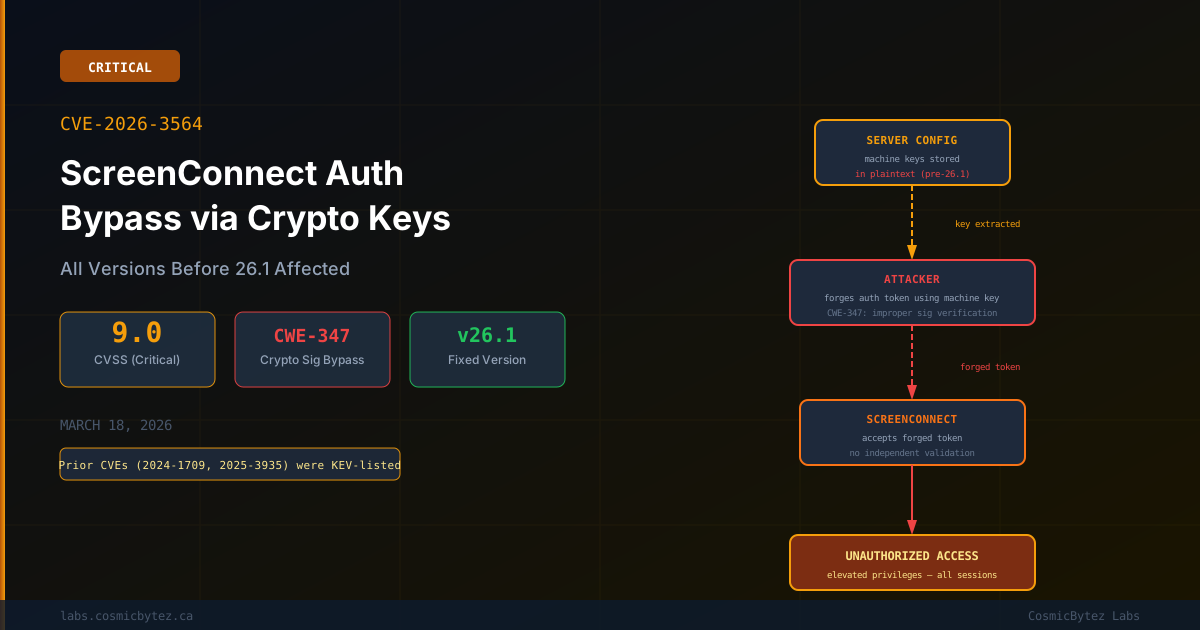
Pre-26.1 versions of ScreenConnect store unique per-instance machine authentication keys in plaintext within server configuration files. These machine keys are used to sign and validate authentication tokens for ScreenConnect sessions.
The vulnerability follows a pattern closely related to CVE-2025-3935 (the ViewState machine key abuse flaw):
-
Server configuration files containing the machine key are accessible via:
- Direct filesystem access (prior server compromise)
- Configuration backup exposure
- Path traversal or file read vulnerabilities chained with this CVE
- Misconfigured web server permissions exposing config directories
-
An attacker with the machine key can construct cryptographically valid authentication tokens for arbitrary ScreenConnect user accounts
-
These forged tokens authenticate successfully, potentially granting access to any session including administrative privileges
ScreenConnect 26.1 Hardening
The 26.1 release introduces:
- Encrypted storage for server-level machine keys at rest
- Hardened key management preventing key extraction from standard configuration file reads
- Rotation mechanisms for existing deployments to invalidate any previously exposed keys
Historical Context: ScreenConnect Exploitation Pattern
ConnectWise ScreenConnect has been a repeated target for threat actors due to its wide deployment across MSPs, enterprise IT teams, and help desks — making it a high-value initial access vector:
| CVE | Year | Type | KEV Listed | Exploited By |
|---|---|---|---|---|
| CVE-2024-1709 | 2024 | Auth Bypass (setup wizard) | Yes | Nation-state + ransomware groups |
| CVE-2025-3935 | 2025 | ViewState Machine Key RCE | Yes | Multiple threat actors |
| CVE-2026-3564 | 2026 | Auth Bypass (crypto key forgery) | Pending | Not confirmed yet |
The prior exploitation of machine-key-based attacks (CVE-2025-3935) makes CVE-2026-3564 a high-concern disclosure — threat actors are already familiar with this attack surface.
Impact Assessment
| Impact Area | Description |
|---|---|
| Unauthorized Access | Forged tokens grant full access to ScreenConnect instance including all managed sessions |
| Remote Desktop Takeover | Attackers can silently access and control any endpoint with an active ScreenConnect agent |
| Lateral Movement | ScreenConnect agents deployed across enterprise endpoints become a pivot point for network-wide compromise |
| Data Exfiltration | Full interactive access to managed systems enables unrestricted data theft |
| MSP/Help Desk Risk | MSPs using ScreenConnect to manage hundreds of clients face cascading downstream compromise |
| Persistence | ScreenConnect's legitimate remote access capabilities can be used to maintain persistent access that blends with normal traffic |
Remediation
Primary Fix: Upgrade to ScreenConnect 26.1
ConnectWise strongly urges all customers to upgrade immediately.
For cloud-hosted ScreenConnect: ConnectWise cloud instances are updated automatically — no action required.
For on-premises deployments:
- Download ScreenConnect 26.1 from the ConnectWise Partner Portal
- Back up your current ScreenConnect configuration directory before upgrading
- Run the installer — the upgrade preserves existing sessions and configurations
- Verify the new version in the ScreenConnect web admin panel under Admin > About
Post-Upgrade: Key Rotation
After upgrading to 26.1, rotate your ScreenConnect machine keys to invalidate any cryptographic material that may have been exposed:
- Navigate to Admin > Security in the ScreenConnect web panel
- Select Regenerate Security Keys
- Confirm — all active sessions will require re-authentication
Immediate Mitigations (Pre-Patch)
If patching cannot be applied immediately:
- Audit access to ScreenConnect configuration files — verify that the ScreenConnect installation directory is not web-accessible and that only administrative accounts can read config files
- Review ScreenConnect access logs for unusual authentication patterns or unexpected geographic logins
- Restrict ScreenConnect web interface access to known IP ranges via firewall rules
- Enable MFA on all ScreenConnect administrative accounts
Detection
Monitor for authentication anomalies that may indicate token forgery:
# Review ScreenConnect authentication logs
# Default log location (Windows)
# C:\Program Files (x86)\ScreenConnect\App_Data\Session.db (SQLite)

# Check for logins from unexpected IPs or unusual session creation times
# Via ScreenConnect Admin > Reports > Session ActivityWatch for:
- Successful logins from IPs not associated with known administrators
- Session connections to endpoints without corresponding support tickets
- Administrative action logs showing bulk operations or configuration changes
Key Takeaways
- CVE-2026-3564 allows authentication token forgery in ScreenConnect if server-level machine keys are obtained — a prerequisite met by any prior server compromise or file exposure
- CVSS 9.0 (Critical) — no authentication required at the network level; scope change means impacts extend beyond the ScreenConnect server to all managed endpoints
- Prior ScreenConnect CVEs (2024-1709, 2025-3935) were actively exploited and KEV-listed — threat actors are already familiar with this attack surface and this disclosure will attract significant interest
- Cloud-hosted instances are auto-patched — on-premises deployments require immediate manual upgrade to ScreenConnect 26.1
- Rotate security keys after upgrading to invalidate any cryptographic material that may have been previously exposed
- MSPs and enterprise IT teams using ScreenConnect to manage large endpoint fleets face cascading compromise risk and should prioritize this remediation
Sources
- CVE-2026-3564 — NIST NVD
- ConnectWise Security Bulletin — ScreenConnect 26.1 (2026-03-17)
- ScreenConnect Critical Unauthorized Access via Cryptographic Material — TheHackerWire
- CVE-2026-3564 — THREATINT