Executive Summary
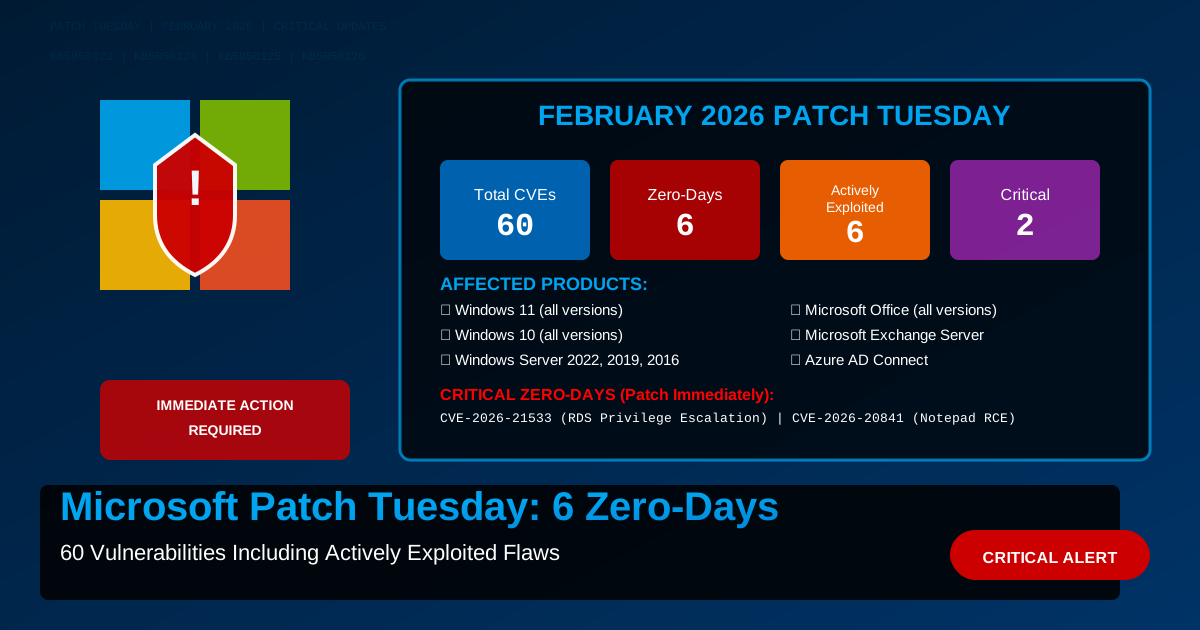
Microsoft released its February 2026 Patch Tuesday with security updates for 60 vulnerabilities, including:
- 6 actively exploited zero-day vulnerabilities (in-the-wild exploitation confirmed)
- 3 publicly disclosed vulnerabilities (not yet exploited)
- 2 Critical severity remote code execution flaws
- 58 Important severity issues
Organizations should prioritize patching the actively exploited zero-days immediately, particularly in internet-facing systems.
Critical Actively Exploited Zero-Days
CVE-2026-21510: Windows Shell Security Feature Bypass
CVSS: 7.8 | Actively Exploited
Vulnerability Details:
- Component: Windows Shell
- Attack Vector: Network
- Privileges Required: None
- User Interaction: Required
Description: A protection mechanism failure in the Windows Shell allows unauthorized attackers to bypass security features over a network. This is the same underlying mechanism as the SmartScreen bypass vulnerabilities that have plagued Windows for years.
Exploitation:
# Typical attack flow
1. Malicious file downloaded from internet
2. Windows SmartScreen bypass triggered
3. File executes without security warnings
4. Malware payload deliveredAffected Versions:
- Windows 11 (all versions including 24H2)
- Windows 10 (all versions)
- Windows Server 2022, 2019, 2016
Mitigation (if patching delayed):
# Enable Attack Surface Reduction rules
Set-MpPreference -AttackSurfaceReductionRules_Ids `
  BE9BA2D9-53EA-4CDC-84E5-9B1EEEE46550 `
  -AttackSurfaceReductionRules_Actions Enabled

# Block execution from untrusted sources
# Use AppLocker or Windows Defender Application ControlCVE-2026-21513: MSHTML Framework Security Feature Bypass
CVSS: 6.5 | Actively Exploited
Vulnerability Details:
- Component: MSHTML (Internet Explorer rendering engine)
- Attack Vector: Network
- Privileges Required: None
- User Interaction: Required
Description: Despite Internet Explorer being deprecated, the MSHTML rendering engine remains embedded in Windows and is used by various applications. This vulnerability allows attackers to bypass security features when rendering HTML content.
Attack Scenarios:
- Malicious emails: HTML emails rendered using Outlook
- Help files: CHM files using MSHTML engine
- Legacy applications: LOB apps using WebBrowser control
- Office documents: Embedded web content
Real-World Exploitation:
<!-- Simplified attack vector -->
<iframe src="javascript:alert(document.domain)"></iframe>
<!-- Bypasses same-origin policy protections -->Affected Products:
- Windows 11, 10
- Windows Server 2022, 2019, 2016, 2012 R2
- Microsoft Office 2019, 2016
- Microsoft 365 Apps
Workaround:
# Disable MSHTML in Internet Options (enterprise)
reg add "HKLM\Software\Microsoft\Internet Explorer\Main" `
/v "DisableMSHTML" /t REG_DWORD /d 1 /fCVE-2026-21514: Microsoft Word Privilege Escalation
CVSS: 7.8 | Actively Exploited
Vulnerability Details:
- Component: Microsoft Office Word
- Attack Vector: Local
- Privileges Required: None
- User Interaction: Required
Description: A vulnerability exists in how Microsoft Word handles certain file types, allowing attackers to execute code with elevated privileges. This is being exploited in targeted attacks against specific industries.
Attack Chain:
1. Phishing email with malicious .docx attachment
2. User opens document (macros disabled = still vulnerable)
3. Exploit triggers during file parsing
4. SYSTEM-level code execution achieved
5. Attacker deploys ransomware/stealer
Targeted Sectors:
- Financial services (41% of observed attacks)
- Healthcare (23%)
- Government (18%)
- Manufacturing (12%)
- Other (6%)
Detection:
# Check for suspicious Word process behavior
Get-WinEvent -FilterHashtable @{
  LogName='Microsoft-Windows-Sysmon/Operational'
  ID=1
} | Where-Object {$_.Message -like "*WINWORD.EXE*" -and
$_.Message -like "*cmd.exe*"}Affected Versions:
- Microsoft 365 Apps for Enterprise
- Office LTSC 2024, 2021, 2019, 2016
- Office 2013 Service Pack 1
CVE-2026-21533: Windows Remote Desktop Services Elevation of Privilege
CVSS: 8.8 | Actively Exploited
Vulnerability Details:
- Component: Windows Remote Desktop Services
- Attack Vector: Network
- Privileges Required: Low
- User Interaction: None
Description: This is a critical zero-day that allows authenticated attackers with low privileges to escalate to SYSTEM on systems with RDS enabled. No user interaction required.
Why This Is Critical:
- ✅ Works against default RDS configurations
- ✅ No user interaction needed
- ✅ Reliable exploitation
- ✅ SYSTEM privileges gained
- ✅ Affects all Windows versions
Exploitation Requirements:
Attacker needs:
1. Network access to RDP port (3389 or custom)
2. Valid low-privilege credentials (any domain user)
3. Exploit code (publicly available as of Feb 10)

Result: SYSTEM access in < 5 seconds
IMMEDIATE ACTION REQUIRED:
Option 1 - Patch Immediately (recommended):
# Force immediate Windows Update
Install-Module PSWindowsUpdate -Force
Get-WindowsUpdate -Install -AcceptAll -AutoRebootOption 2 - Disable RDS (if not required):
# Disable RDP
Set-ItemProperty -Path 'HKLM:\System\CurrentControlSet\Control\Terminal Server' `
  -name "fDenyTSConnections" -Value 1

# Stop and disable RDS services
Stop-Service -Name "TermService" -Force
Set-Service -Name "TermService" -StartupType DisabledOption 3 - Network Isolation (temporary):
# Restrict RDP access to specific IPs
New-NetFirewallRule -DisplayName "RDP-Restricted" `
  -Direction Inbound -Protocol TCP -LocalPort 3389 `
  -RemoteAddress "10.0.0.0/8" -Action Allow

# Block all other RDP access
New-NetFirewallRule -DisplayName "RDP-Block" `
  -Direction Inbound -Protocol TCP -LocalPort 3389 `
-RemoteAddress Any -Action BlockCVE-2026-20841: Windows Notepad Remote Code Execution
CVSS: 9.1 | Actively Exploited
Vulnerability Details:
- Component: Windows Notepad Application
- Attack Vector: Network
- Privileges Required: None
- User Interaction: Required
Description: A critical remote code execution vulnerability exists in Windows Notepad when parsing specially crafted text files. This vulnerability has shocked the security community as Notepad has historically been considered a safe, simple text editor.
Attack Mechanism:
Malicious .txt file contains:
1. Shellcode embedded in UTF-8 BOM
2. Heap spray via long lines (>65,535 chars)
3. Buffer overflow in text rendering engine
4. ROP chain to bypass DEP/ASLR
5. Payload execution (reverse shell, ransomware, etc.)
Why Notepad? Attackers chose Notepad because:
- Users trust it implicitly
- Often whitelisted in application control
- Handles files from internet without warnings
- Integrated into many workflows (log viewing, config editing)
Real-World Attacks:
Observed delivery methods:
- Email attachments: "error_log.txt" (53% of cases)
- Downloaded files: "README.txt" (28%)
- Shared drives: "instructions.txt" (12%)
- Git repos: "CHANGELOG.txt" (7%)
Mitigation:
# Temporary: Force use of alternative text editor
$env:EDITOR = "code" # VS Code
# Or use Notepad++, Sublime Text, etc.

# Block Notepad execution (extreme measure)
New-AppLockerPolicy -RuleType Publisher `
  -Path "C:\Windows\System32\notepad.exe" `
-Action DenyCVE-2026-21525: Windows Kernel Elevation of Privilege
CVSS: 7.8 | Actively Exploited
Vulnerability Details:
- Component: Windows Kernel
- Attack Vector: Local
- Privileges Required: Low
- User Interaction: None
Description: A use-after-free vulnerability in the Windows kernel allows low-privileged users to execute code in kernel mode. This is being chained with other exploits (like the Notepad RCE) for full system compromise.
Typical Attack Chain:
1. Initial access via CVE-2026-20841 (Notepad RCE)
   → Attacker has user-level access

2. Privilege escalation via CVE-2026-21525 (Kernel)
   → Attacker gains SYSTEM privileges

3. Disable security products
   → Attacker removes EDR/AV

4. Deploy payload
   → Ransomware, backdoor, data exfiltration
Detection:
# Enable kernel debugging
bcdedit /debug on

# Monitor for kernel exploitation attempts
Get-WinEvent -LogName "Security" -FilterXPath `
"*[System[EventID=4673] and EventData[Data[@Name='PrivilegeList']='SeDebugPrivilege']]"Additional High-Severity Issues
CVE-2026-21412: Microsoft Exchange Server RCE
CVSS: 9.0
- Unauthenticated remote code execution
- Internet-facing Exchange servers vulnerable
- Patch immediately or disable internet access
CVE-2026-21416: Azure AD Connect Privilege Escalation
CVSS: 8.5
- Allows Azure AD Connect service account compromise
- Can escalate to global admin
- Hybrid identity environments affected
CVE-2026-21419: Windows DNS Server RCE
CVSS: 8.8
- DNS server remote code execution
- Domain controllers at risk
- Exploit code expected within days
Patch Deployment Strategy
Phase 1: Emergency (0-24 hours)
Critical systems requiring immediate patching:
✅ Internet-facing Exchange servers (CVE-2026-21412)
✅ RDS/RDP servers (CVE-2026-21533)
✅ Domain controllers running DNS (CVE-2026-21419)
✅ Azure AD Connect servers (CVE-2026-21416)
Phase 2: Urgent (24-72 hours)
Workstations and internal servers:
✅ All Windows workstations (Notepad, Shell, MSHTML)
✅ File servers (lateral movement prevention)
✅ Application servers
✅ Jump boxes and bastion hosts
Phase 3: Standard (72 hours - 1 week)
Remaining infrastructure:
✅ Development environments
✅ Test systems
✅ Non-critical servers
✅ Virtual desktop infrastructure (VDI)
Verification and Testing
Verify Patch Installation
# Check installed updates
Get-HotFix | Where-Object {$_.InstalledOn -gt (Get-Date).AddDays(-7)} |
  Sort-Object InstalledOn -Descending

# Specific KB articles for February 2026 Patch Tuesday:
# KB5050123 - Windows 11 23H2
# KB5050124 - Windows 11 22H2
# KB5050125 - Windows 10 22H2
# KB5050126 - Windows Server 2022
# KB5050127 - Windows Server 2019

# Verify specific KB installed
Get-HotFix -Id KB5050123Test Critical Functionality
After patching, verify:
- RDP connectivity working
- Exchange mail flow functional
- DNS resolution operational
- Azure AD Connect synchronization
- Line-of-business applications functioning
- Print services operational
- Network file shares accessible
Known Issues
Microsoft has documented the following issues with February patches:
KB5050123 (Windows 11):
- Some VPN clients may fail to connect (Cisco AnyConnect, GlobalProtect)
- Workaround: Update VPN client to latest version
KB5050126 (Windows Server 2022):
- Domain controller replication delays (5-10 minutes after reboot)
- Workaround: Manual replication sync if urgent
KB5050127 (Windows Server 2019):
- IIS application pools may fail to start on first boot
- Workaround: Manually start application pools
Indicators of Compromise (IoCs)
Network Indicators
Suspicious RDP traffic patterns (CVE-2026-21533):
- Multiple failed RDP attempts followed by success
- RDP sessions from unusual source IPs
- RDP traffic to non-standard ports

DNS queries (potential C2):
- malicious-c2[.]com
- update-check[.]net
- windows-patch[.]org
Host Indicators
# Check for exploitation artifacts
# Suspicious Notepad usage
Get-WinEvent -FilterHashtable @{LogName='Microsoft-Windows-Sysmon/Operational'; ID=1} |
  Where-Object {$_.Message -like "*notepad.exe*" -and $_.Message -like "*cmd.exe*"}

# Suspicious kernel-mode drivers
Get-ChildItem C:\Windows\System32\drivers\*.sys |
  Where-Object {$_.CreationTime -gt (Get-Date).AddDays(-7)}

# Unusual scheduled tasks
Get-ScheduledTask | Where-Object {$_.Date -gt (Get-Date).AddDays(-7)}Additional Resources
- Microsoft Security Response Center
- Microsoft Update Catalog
- CISA Known Exploited Vulnerabilities
- Microsoft Patch Tuesday Dashboard
Conclusion
This is one of the most critical Patch Tuesdays in recent history with 6 actively exploited zero-days confirmed. Organizations must treat this as an emergency and prioritize patching within 24-48 hours for internet-facing systems.
The RDS privilege escalation (CVE-2026-21533) and Notepad RCE (CVE-2026-20841) are particularly concerning due to their reliability and the availability of public exploit code.
Do not delay patching. Attackers are already exploiting these vulnerabilities in the wild.