Overview
This checklist covers the full lifecycle of backup and disaster recovery readiness — from strategy and scheduling through cloud configuration, test restores, and DR site validation. Use it during initial DR program setup, quarterly audits, or after any significant infrastructure change that affects data protection scope.
Note: Completing this checklist does not replace a tested DR plan. Every item marked done must have a corresponding log entry, documented result, or artefact. Untested backups are not backups.
1. Backup Strategy
Establish the foundational rules that govern what gets backed up, how many copies exist, and how long data is retained before you configure any tooling.
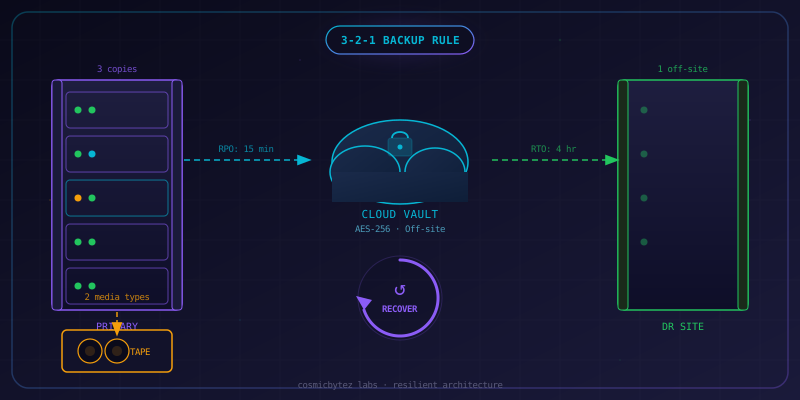
- Implement the 3-2-1 rule — Maintain at least 3 copies of data, on 2 different media types, with 1 copy stored off-site or in a separate cloud region
- Classify data by tier — Label all data assets as Tier 1 (critical, mission-affecting), Tier 2 (important, recoverable), or Tier 3 (low priority, reproducible)
- Document retention policies per tier — Define minimum retention periods (e.g., Tier 1: 90 days daily + 1 year monthly; Tier 2: 30 days daily; Tier 3: 7 days)
- Enable immutable backups — Configure object-lock or WORM storage for at least one copy to prevent ransomware from deleting or encrypting backups
# AWS S3 Object Lock (Compliance mode — cannot be overridden by any user) aws s3api put-object-lock-configuration \ --bucket my-backup-bucket \ --object-lock-configuration '{"ObjectLockEnabled":"Enabled","Rule":{"DefaultRetention":{"Mode":"COMPLIANCE","Days":90}}}' - Define backup scope inventory — List every system, database, file share, and SaaS export included in backup scope; note any explicit exclusions
- Require encryption in transit — Confirm all backup agents and replication channels use TLS 1.2 or higher
- Assign backup ownership — Each backup job has a named owner responsible for monitoring and restores
2. RTO/RPO Definitions
Recovery Time Objective (RTO) and Recovery Point Objective (RPO) must be agreed, documented, and signed off before a DR event — not discovered during one.
- Define RTO per system — Maximum tolerable downtime before business impact is unacceptable (e.g., ERP: 4 h, email: 8 h, file server: 24 h)
- Define RPO per system — Maximum acceptable data loss measured in time (e.g., database: 15 min, file server: 4 h, archival storage: 24 h)
- Document priority tiers — Group systems into Tier 1 (recover first), Tier 2 (recover within 8 h), Tier 3 (recover within 48 h)
- Get SLA sign-off — RTO/RPO targets are reviewed and signed by the business owner for each system, not just IT
- Map dependencies — Identify upstream/downstream dependencies so recovery order does not break dependent services (e.g., restore AD before Exchange)
Recovery Order Template: 1. Core infrastructure (DNS, AD, networking) 2. Authentication services (IdP, certificate authority) 3. Tier 1 databases and storage 4. Tier 1 application servers 5. Tier 2 systems... - Review RTO/RPO annually — Business requirements change; ensure targets are still realistic and funded
3. Backup Configuration
Correct scheduling, encryption-at-rest, compression, and deduplication settings are the difference between a working backup and a storage bill with no recovery value.
- Schedule full backups weekly — Run full image or full database backups at least weekly during a low-traffic window
- Schedule incremental/differential backups daily — Capture daily changes between fulls to reduce RPO without consuming full-backup storage every day
- Enable encryption at rest — All backup repositories use AES-256 encryption; store encryption keys separately from the backup data
# Verify Veeam backup job encryption is enabled (PowerShell) Get-VBRJob | Select-Object Name, @{N="Encrypted";E={$_.BackupStorageOptions.StorageEncryptionEnabled}} - Enable compression — Use at minimum "optimal" compression; verify CPU overhead is acceptable on source systems
- Enable deduplication — Source-side deduplication reduces transfer size; confirm dedup is not interfering with encrypted data (encrypt after dedup)
- Verify backup completion alerts — Monitoring platform sends alerts on backup failure or missed schedule; do not rely on manual log checks
- Separate backup credentials — Backup service accounts are dedicated, not shared with other services, and follow least-privilege
- Test backup job logs weekly — Review job summaries for warnings, skipped files, or partial failures that do not trigger error alerts
4. Cloud Backup
Cloud vaults, cross-region replication, and lifecycle policies protect against regional failures and provide cost-efficient long-term retention.
- Configure cloud backup vault — Provision a dedicated backup vault in Azure Backup or AWS Backup; do not use production storage accounts
# Azure: Create Recovery Services Vault az backup vault create \ --resource-group rg-backups \ --name rsv-prod-backups \ --location canadaeast # AWS: Create Backup Vault aws backup create-backup-vault \ --backup-vault-name prod-backup-vault \ --encryption-key-arn arn:aws:kms:ca-central-1:123456789:key/key-id - Enable cross-region replication — Replicate vault data to a secondary region; minimum one region-pair separation (e.g., Canada East → Canada Central)
# Azure: Enable geo-redundant storage on Recovery Services Vault az backup vault backup-properties set \ --name rsv-prod-backups \ --resource-group rg-backups \ --backup-storage-redundancy GeoRedundant - Configure lifecycle policies — Move backups to cold/archive storage after 30 days; delete after retention period expires automatically
- Enable soft delete — Cloud vault soft-delete protects against accidental or malicious deletion of backup data (minimum 14-day retention on delete)
- Restrict vault access with RBAC — Only backup service principals and named DR admins have contributor rights on the backup vault; use PIM for elevated access
- Enable backup vault alerts — Configure diagnostic settings to send vault health, policy compliance, and job failure alerts to your SIEM or monitoring platform
- Validate backup policy assignment — Confirm every in-scope VM, database, and file share has an active backup policy assigned and is not in a protection error state
# Azure: List unprotected VMs in a subscription
az backup protectable-item list \
  --resource-group rg-prod \
  --vault-name rsv-prod-backups \
  --workload-type VM \
  --query "[?protectionState=='NotProtected'].name"
5. Test Restore Procedures
A backup that has never been restored is an assumption, not a guarantee. Test restores must be scheduled, documented, and reviewed — not performed ad hoc.
- Perform monthly test restores — Restore at least one randomly selected backup per system tier each month; rotate through all systems over a quarter
- Document restore results — Record the backup date used, restore duration, data integrity check result, and operator name for every test restore
Restore Test Log Template: Date: _______________ System: _______________ Backup Point Used: _______________ Restore Duration: _______________ Integrity Check: [ ] Pass [ ] Fail Notes: _______________ Operator: _______________ - Test database restores with consistency checks — After restoring a database backup, run DBCC CHECKDB (SQL Server) or
pg_dump | pg_restoreround-trip to confirm data integrity-- SQL Server: Post-restore integrity check DBCC CHECKDB ('RestoredDatabase') WITH NO_INFOMSGS, ALL_ERRORMSGS; - Test bare-metal recovery (BMR) — At least annually, perform a full bare-metal restore of a Tier 1 server to a clean VM to validate OS + application + data recovery
- Validate application functionality post-restore — Do not mark a restore test as passed until the application can authenticate, read/write data, and process transactions
- Test restore to an isolated environment — Restore to a network-isolated VLAN or sandbox; never restore test data onto a production system
- Measure actual RTO against target — Time each restore test from "recovery initiated" to "application functional"; compare to documented RTO target
- Remediate and re-test any failures — A failed restore test is a critical finding; root cause must be addressed and the test repeated before the next review cycle
6. DR Site & Failover
DR site readiness, failover automation, and DNS cutover procedures must be tested before they are needed — not read for the first time during an outage.
- Classify site type — Document whether each DR site is hot (fully running, near-zero RTO), warm (resources provisioned, not running), or cold (hardware reserved, manual build required)
- Verify warm/hot site resource parity — Confirm DR site compute, storage, and network capacity matches production requirements for Tier 1 systems
- Automate failover where possible — Use Azure Site Recovery, AWS Elastic Disaster Recovery, or equivalent to automate VM replication and failover runbooks
# Azure Site Recovery: Test failover for a single VM az recoveryservices replication-protected-item failover-cancel \ --fabric-name <source-fabric> \ --protection-container <source-container> \ --replicated-protected-item <vm-name> \ --resource-group rg-asr \ --vault-name rsv-asr-vault - Test failover annually — Execute a planned test failover (not a real cutover) to the DR site; validate all Tier 1 services start and are reachable
- Document DNS failover procedure — Record exact steps to update DNS records (TTL reduction, zone file changes, Cloudflare/Route53 updates) to point traffic at DR site
- Pre-stage DNS TTLs before planned maintenance — Lower TTLs to 60–300 seconds at least 48 hours before any planned failover to ensure rapid propagation
# Cloudflare: Update DNS record TTL via API curl -X PATCH "https://api.cloudflare.com/client/v4/zones/ZONE_ID/dns_records/RECORD_ID" \ -H "Authorization: Bearer $CF_API_TOKEN" \ -H "Content-Type: application/json" \ --data '{"ttl":60}' - Test failback procedure — Failing over to DR is only half the story; document and test the process to fail back to primary once it is restored
- Validate certificate validity at DR site — Confirm TLS certificates are present, valid, and auto-renewed at the DR site before cutover
7. Communication & Escalation
When a DR event occurs, communication failures cause as much damage as technical failures. Contact trees, escalation paths, and vendor SLAs must be documented and rehearsed.
- Maintain an up-to-date contact tree — Name, phone (mobile), email, and after-hours escalation path for every role in the DR plan; review quarterly
DR Contact Tree: | Role | Name | Mobile | Email | Escalation | |-----------------------|------|--------|-------|------------| | Incident Commander | | | | | | IT Operations Lead | | | | | | DR Coordinator | | | | | | Network Engineer | | | | | | Database Admin | | | | | | Executive Sponsor | | | | | | Communications Lead | | | | | | Legal / Compliance | | | | | - Assign an Incident Commander role — One person owns the DR event; all decisions and communications route through them to avoid conflicting actions
- Define vendor escalation paths — For each critical vendor (cloud provider, ISP, hardware OEM), document SLA tier, support contract number, and escalation contact
- Prepare stakeholder notification templates — Pre-write internal (staff) and external (customer, regulator) notification drafts so they are not written under pressure
- Define communication channel hierarchy — Primary channel (e.g., Teams/Slack), backup channel (SMS bridge), and out-of-band channel (phone bridge) in case primary systems are affected
- Document public status page update procedure — Who updates the status page, at what intervals, and what information is permitted to be disclosed publicly
8. Annual Review & Compliance
Backup and DR programs that are not reviewed decay. Annual reviews, formal DR drills, and audit evidence keep the program aligned with regulatory requirements and business reality.
- Schedule annual DR drill — Full-scale drill where Tier 1 systems are failed over to DR site, validated, and failed back; include communication procedures
- Document drill results and gaps — Capture what worked, what failed, actual RTO/RPO achieved vs. targets, and a remediation plan for each gap
- Review and update DR runbook — After every drill or real DR event, update the runbook to reflect lessons learned before the next review cycle
- Audit backup job coverage — Verify every system in the asset inventory has an assigned, active backup policy; no system should be undiscovered
# Compare asset inventory against backup job list (example) $assets = Import-Csv "C:\DR\asset-inventory.csv" $jobs = Get-VBRJob | Select-Object -ExpandProperty Name $assets | Where-Object { $_.Hostname -notin $jobs } | Select-Object Hostname, Owner, Tier - Review retention policies for regulatory alignment — Confirm data retention periods meet PIPEDA, HIPAA, SOC 2, ISO 27001, or applicable regulatory requirements
- Collect and retain audit evidence — Archive backup job logs, restore test records, drill reports, and policy sign-offs for a minimum of 3 years
- Validate cyber insurance requirements — Review policy conditions; confirm backup frequency, immutability, and off-site copy requirements are met to avoid claim denial
- Review backup encryption key management — Confirm keys are stored in a separate key vault, rotation schedule is current, and key escrow procedures are documented
Quick Reference: RTO/RPO Worksheet
| System | Tier | RTO Target | RPO Target | Backup Frequency | Last Restore Test | Owner |
|---|---|---|---|---|---|---|
Quick Reference: Restore Test Log
| Date | System | Backup Point | Duration | Result | Operator |
|---|---|---|---|---|---|