Overview
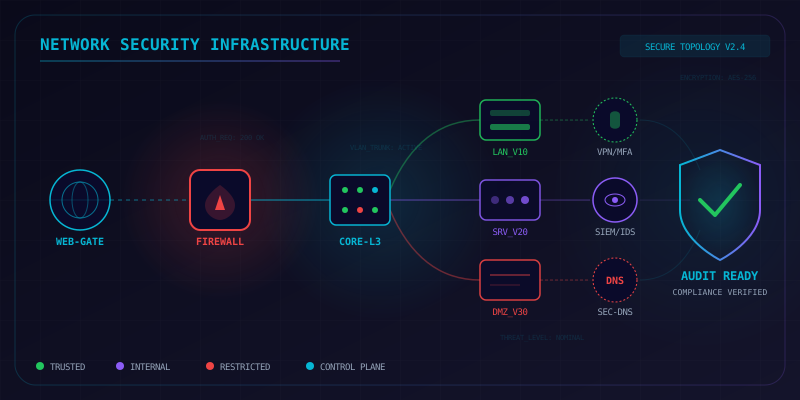
This checklist covers the key control areas for a thorough network security audit — from firewall rule hygiene and VLAN segmentation through to VPN hardening, DNS security, and continuous monitoring. Use it before compliance reviews (PCI-DSS, ISO 27001, SOC 2), after significant infrastructure changes, or as part of a quarterly security cadence.
1. Firewall Rule Review
Review all firewall policies for gaps, redundancy, and misconfigurations. An overly permissive or poorly ordered ruleset is one of the most common sources of network exposure.
-
Verify default-deny posture — Confirm inbound and outbound default rules are set to deny; no implicit allow at the bottom of any policy chain
# FortiGate CLI config firewall policy show | grep "action accept" end # Check implicit deny is last diagnose firewall policy list | tail -5 -
Audit rule ordering — Ensure most specific rules appear before broad rules; shadowed rules should be flagged and removed
# FortiGate: list all policies with hit counts diagnose firewall policy list get firewall policy -
Identify and remove unused rules — Any policy with zero hit count for 90+ days is a candidate for removal
# FortiGate: show policy hit counts diagnose firewall policy show-hit-count -
Remove any any/any permit rules — Replace with least-privilege equivalents scoped to specific source/destination/port
-
Verify egress filtering — Outbound traffic should be restricted; not all internal hosts need full internet access
-
Check for overly broad port ranges — Rules allowing 1-65535 or large ranges should be tightened
-
Confirm logging is enabled on deny rules — Blocked traffic should generate logs for SOC visibility
# FortiGate: enable logging on policy config firewall policy edit <policy-id> set logtraffic all next end -
Review NAT/PAT rules — Confirm no unintended services are exposed externally via DNAT
2. Network Segmentation
Flat networks are a lateral movement risk. Verify that VLANs and inter-zone policies enforce the principle of least connectivity.
-
Enumerate all VLANs — Confirm documented VLANs match live switch configuration; flag orphaned or undocumented VLANs
# Cisco IOS show vlan brief show interfaces trunk # Linux (for hypervisor/container hosts) ip link show type vlan -
Verify inter-VLAN routing policies — Traffic crossing VLAN boundaries should pass through firewall inspection, not a Layer 3 switch with ACLs only
-
Confirm VLAN tagging on trunk ports — Only authorized VLANs should be allowed on each trunk
# Cisco IOS show interfaces trunk | grep -A 3 "allowed" -
Validate DMZ isolation — DMZ hosts must not have direct routes to the internal LAN; all DMZ-to-LAN traffic goes through the firewall
-
Check for VLAN 1 usage — VLAN 1 should not carry production traffic; rename/repurpose native VLAN
# Cisco: change native VLAN interface GigabitEthernet0/1 switchport trunk native vlan 999 -
Review server-to-server micro-segmentation — High-value workloads (Domain Controllers, DB servers) should have host-based firewall rules or dedicated micro-segments
-
Test VLAN hopping resistance — Confirm double-tagging attacks are mitigated by non-default native VLAN and DTP disabled
# Cisco: disable DTP
interface GigabitEthernet0/1
 switchport nonegotiate
3. VPN Configuration
VPN misconfigurations are a leading initial access vector. Review cipher suites, authentication, and policy before every compliance period.
-
Audit IKE/IPsec cipher suites — Disable DES, 3DES, MD5, and DH groups 1/2/5; require AES-256, SHA-256+, and DH group 14+
# FortiGate: view phase 1 proposals config vpn ipsec phase1-interface show end # Look for: "set proposal aes256-sha256" -
Verify MFA is enforced on all VPN users — No exceptions; service accounts accessing VPN should use certificate-based auth
-
Review split-tunnel policy — Confirm split tunnel is intentional; if used, critical internal subnets should force-tunnel
# FortiGate: check split-tunnel config config vpn ssl settings show | grep "split-tunneling" end -
Check SSL-VPN TLS version — Minimum TLS 1.2; TLS 1.3 preferred; SSLv3/TLS 1.0/1.1 must be disabled
# FortiGate config vpn ssl settings set tlsv1-0 disable set tlsv1-1 disable end -
Audit VPN user accounts — Remove stale VPN accounts for departed employees; review group memberships
-
Certificate expiry review — Check all VPN gateway and client certificates for upcoming expiry (flag under 60 days)
# OpenSSL: check cert expiry openssl x509 -in vpn-cert.pem -noout -dates # FortiGate diagnose vpn ike gateway list -
Review idle-timeout and session-limit settings — VPN sessions should time out after inactivity; limit concurrent sessions per user
4. DNS Security
DNS is frequently abused for C2, data exfiltration, and phishing. Audit both internal resolvers and public-facing DNS.
-
Verify DNSSEC is enabled on public zones — Check that DS records are present at the registrar and zone signatures validate
# Verify DNSSEC chain of trust dig +dnssec example.com SOA dig +dnssec DS example.com @8.8.8.8 # PowerShell Resolve-DnsName example.com -Type SOA -Server 8.8.8.8 | Select-Object * -
Enforce DoH or DoT on internal resolvers — Internal clients should use encrypted DNS; legacy plaintext port 53 should be restricted for non-resolver hosts
# Test DoT connectivity kdig -d @1.1.1.1 +tls example.com -
Configure DNS sinkholing for known-bad domains — Threat intel feeds (e.g., Quad9, CISA) should be imported into internal resolver blocklists
-
Harden recursive resolvers — Disable open recursion; only allow queries from internal subnets
# BIND: restrict recursion # named.conf allow-recursion { 10.0.0.0/8; 172.16.0.0/12; 192.168.0.0/16; }; recursion yes; -
Audit DNS zone transfers — AXFR/IXFR should be restricted to authorized secondary nameservers only
# Test for open zone transfer dig axfr example.com @ns1.example.com # Should return "Transfer failed" for external hosts -
Review SPF, DKIM, and DMARC records — Ensure mail security DNS records are present, correct, and enforcing
p=rejectdig TXT example.com | grep -E "v=spf|v=DMARC" dig TXT _dmarc.example.com
5. Wireless Security
Wireless networks extend the physical perimeter. Verify configurations on all SSIDs including guest and IoT networks.
-
Confirm WPA3 is enabled on all SSIDs — WPA2-only should be flagged; WEP/TKIP must be disabled; use WPA3-SAE where supported
-
Verify SSID isolation (AP isolation) — Client-to-client traffic should be blocked on guest and IoT SSIDs
# FortiAP / FortiGate wireless profile config wireless-controller vap show | grep "intra-vap-privacy" # Should be: set intra-vap-privacy enable end -
Review SSID broadcast list — Remove or disable any unused/hidden SSIDs; hidden SSIDs are not a security control
-
Check Management Frame Protection (802.11w) — MFP should be required on WPA3 networks; optional minimum on WPA2-Enterprise
-
Audit wireless RADIUS/802.1X configuration — Certificate validation on the RADIUS server must be enforced; PEAP-MSCHAPv2 is acceptable but EAP-TLS is preferred
-
Run rogue AP detection scan — Review wireless IDS/WIPS alerts; any unrecognized BSSID near your facilities should be investigated
# With Linux + aircrack-ng sudo airmon-ng start wlan0 sudo airodump-ng wlan0mon --band abg -w scan-output -
Verify guest network segmentation — Guest SSID should land in an isolated VLAN with internet-only access and no route to internal subnets
6. Remote Access
Privileged remote access (RDP, SSH, web consoles) must be gated through controlled chokepoints with full session accountability.
-
Confirm all privileged access routes through a jump host / bastion — Direct RDP/SSH from the internet to production systems must be blocked at the firewall
# Verify no direct RDP exposure nmap -p 3389 -Pn <public-ip-range> # Verify no direct SSH exposure nmap -p 22 -Pn <public-ip-range> -
Verify PAM (Privileged Access Management) integration — Credentials for servers should be checked out from PAM; no static shared passwords
-
Confirm session recording is active — All privileged sessions should be recorded and stored for a minimum of 90 days
-
Enforce MFA on jump host authentication — The bastion itself must require MFA; hardware token or TOTP minimum
-
Review geo-restriction rules — Block authentication attempts from countries with no legitimate business presence
# FortiGate: create geo-blocking policy config firewall address edit "BLOCKED-COUNTRIES" set type geography set country "CN RU KP IR" next end -
Audit active remote access accounts — List all accounts with remote access rights; confirm each maps to an active employee
# Active Directory: list VPN group members Get-ADGroupMember -Identity "VPN-Users" | Select-Object Name, SamAccountName -
Check for RDP Network Level Authentication (NLA) — NLA must be enabled on all Windows servers; prevents unauthenticated connection attempts
# Check NLA setting
Get-ItemProperty "HKLM:\SYSTEM\CurrentControlSet\Control\Terminal Server\WinStations\RDP-Tcp" |
    Select-Object UserAuthentication
# UserAuthentication = 1 means NLA enabled
7. Network Monitoring
Detection is only as good as visibility. Verify that flow data, IDS/IPS, and alerting cover all critical segments.
-
Confirm NetFlow or sFlow is enabled on all core switches and routers — Flow data should be exported to a SIEM or flow analyzer; verify coverage gaps
# Cisco IOS: verify NetFlow show ip cache flow show ip flow export # FortiGate: verify flow export config system netflow show end -
Verify IDS/IPS signatures are current — Signature databases should be updated daily; last update timestamp should be within 24 hours
# FortiGate: check IPS signature update diagnose autoupdate status | grep "IPS" get system autoupdate schedule -
Review IPS policy — confirm blocking mode is active on critical segments — Detection-only mode on internet-facing segments is not acceptable; verify inline blocking
-
Establish and review traffic baselines — Document normal bandwidth, protocol distribution, and top talkers; deviations from baseline should trigger alerts
# View top talkers with ntopng or nfdump nfdump -r /var/cache/nfdump/nfcapd.current -s ip/bytes -n 20 -
Verify east-west traffic monitoring — Internal traffic between segments should be inspected; not just north-south internet traffic
-
Test alerting pipeline end-to-end — Generate a test event (e.g., EICAR file download, port scan against honeypot) and confirm alert fires within SLA
# EICAR test string download (safe anti-malware test file) curl -O https://www.eicar.org/download/eicar.com.txt -
Review SIEM retention and storage — Confirm log retention meets compliance requirements (e.g., PCI-DSS: 12 months); verify no gaps in ingestion
8. Documentation & Compliance
Accurate documentation is both an operational necessity and a compliance requirement. Stale diagrams and undocumented ACLs are audit findings.
-
Verify network diagrams are current — Layer 2 and Layer 3 diagrams should reflect the live environment; flag any undocumented segments or links
-
Confirm all firewall ACLs are documented — Each rule should have an owner, business justification, and review date in the change management system
-
Review change management records — Every firewall or network config change in the past quarter should have a corresponding approved change ticket
-
Validate asset inventory completeness — All network devices (switches, firewalls, APs, routers) should be in the CMDB with firmware version and owner
# Scan for network devices nmap -sn 192.168.0.0/16 -oG - | grep "Up" | awk '{print $2}' -
Check firmware versions against CVE database — Identify any devices running firmware with known critical CVEs
# FortiGate: check firmware version get system status | grep "Version" # Cross-reference: https://www.fortiguard.com/psirt -
Confirm audit log integrity — Logs should be forwarded off-device in real time; local log tampering should be detectable
-
Review third-party access agreements — Vendors with network access should have active NDAs and time-limited credentials; audit active third-party VPN accounts
Quick Reference
| Section | Key Risk | Priority |
|---|---|---|
| Firewall Rules | Overly permissive rules, no default deny | Critical |
| Segmentation | Flat network, unrestricted east-west | Critical |
| VPN Config | Weak ciphers, no MFA, stale certs | Critical |
| DNS Security | Open recursion, no DNSSEC, cleartext DNS | High |
| Wireless | WPA2/WEP, no SSID isolation, rogue APs | High |
| Remote Access | Direct RDP/SSH exposed, no session recording | Critical |
| Monitoring | Coverage gaps, detection-only IPS, stale signatures | High |
| Documentation | Stale diagrams, undocumented ACLs | Medium |