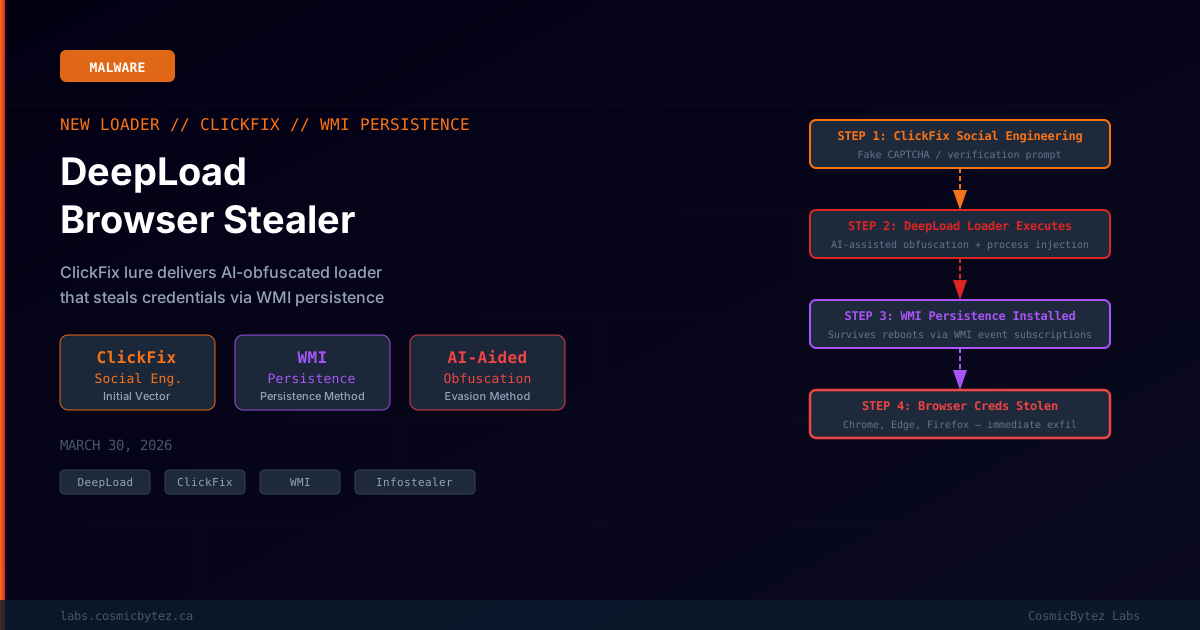
A new campaign has leveraged the ClickFix social engineering tactic to distribute a previously undocumented malware loader called DeepLoad, according to a new report from The Hacker News. The loader employs AI-assisted obfuscation and process injection to evade static security scanning, establishes persistent access via Windows Management Instrumentation (WMI) event subscriptions, and immediately begins stealing saved credentials from major browsers — including Chrome, Edge, and Firefox — upon execution.
What Is DeepLoad
DeepLoad is a multi-stage malware loader whose primary end payload is a browser credential stealer. The loader's design prioritizes two outcomes: survival (persisting across reboots and security tool responses) and speed (credential theft begins immediately upon execution without waiting for secondary stage delivery).
Key characteristics of DeepLoad based on researcher findings:
- ClickFix delivery: Uses a fake browser verification / CAPTCHA prompt to trick victims into running a malicious PowerShell command
- AI-assisted obfuscation: The loader's code appears to use AI-generated obfuscation techniques that vary the signature on each build, complicating static detection
- Process injection: Injects malicious code into legitimate host processes to avoid behavioral detection by security tools monitoring process reputation
- WMI persistence: Uses Windows Management Instrumentation event subscriptions for persistence — a fileless, registry-light technique that survives reboots
- Immediate credential theft: Does not wait for a secondary C2 callback — begins extracting browser-stored credentials as soon as the injected code executes
The ClickFix Delivery Chain
ClickFix is a social engineering technique that has become widely adopted by malware distribution campaigns since 2024. The attack flow for DeepLoad follows the established ClickFix pattern:
1. Victim visits a compromised website, phishing page, or malicious ad
   — often themed as a document viewer, software update, or CAPTCHA

2. The page displays a fake "verification" or "fix" prompt instructing
   the user to:
     a. Press Win+R to open the Run dialog
     b. Paste a command (pre-loaded to clipboard by the page)
     c. Press Enter to "verify" or "fix the issue"

3. The pasted command is a PowerShell one-liner that:
     - Downloads the DeepLoad loader from an attacker-controlled server
     - Executes it in memory or writes it to a temp path

4. DeepLoad executes, performs process injection, establishes
WMI persistence, and immediately begins credential theftThe ClickFix technique is particularly effective because it bypasses browser-level download warnings (no file download occurs in many variants), exploits the user's own elevated context (the command runs as the logged-in user), and requires no exploit — just social engineering.
WMI Persistence: A Fileless Foothold
DeepLoad's use of WMI event subscriptions for persistence is a significant technical detail. WMI-based persistence is a well-known but still effective technique because:
- It survives reboots — WMI subscriptions are stored in the WMI repository, not the registry startup keys most defenders monitor
- It's semi-fileless — the payload can be stored directly in the WMI repository as a MOF object, leaving minimal file system footprint
- It's difficult to remove without tools — standard registry-based persistence cleaners miss WMI subscriptions
- It's often overlooked in incident response — many IR processes focus on registry Run keys and startup folders before checking WMI
DeepLoad's WMI persistence is structured as an event subscription that triggers re-execution of the credential stealer payload whenever a specific system event occurs (such as user logon, system startup, or a time-based trigger).
Detecting WMI Persistence
# List all WMI event subscriptions (run in elevated PowerShell)
Get-WMIObject -Namespace root\subscription -Class __EventFilter | Select-Object Name, Query
Get-WMIObject -Namespace root\subscription -Class __EventConsumer | Select-Object Name, CommandLineTemplate
Get-WMIObject -Namespace root\subscription -Class __FilterToConsumerBinding

# Remove suspicious subscriptions (replace <NAME> with identified subscription name)
Get-WMIObject -Namespace root\subscription -Class __FilterToConsumerBinding | Where-Object {$_.Filter -match "<NAME>"} | Remove-WmiObject
Get-WMIObject -Namespace root\subscription -Class __EventFilter -Filter "Name='<NAME>'" | Remove-WmiObject
Get-WMIObject -Namespace root\subscription -Class CommandLineEventConsumer -Filter "Name='<NAME>'" | Remove-WmiObjectBrowser Credential Theft
DeepLoad's final payload targets the credential stores of major web browsers. Modern browsers encrypt stored passwords using OS-level key derivation tied to the user's session — but this protection is ineffective against malware executing as the logged-in user:
| Browser | Credential Store Location |
|---|---|
| Chrome | %LOCALAPPDATA%\Google\Chrome\User Data\Default\Login Data |
| Edge | %LOCALAPPDATA%\Microsoft\Edge\User Data\Default\Login Data |
| Firefox | %APPDATA%\Mozilla\Firefox\Profiles\*.default\logins.json + key4.db |
DeepLoad accesses these stores while injected into a legitimate process running in the user's context, bypassing OS-level decryption restrictions. Stolen credentials are exfiltrated to the attacker's C2 server, where they can be used for account takeover, further network access, or sold on criminal marketplaces.
AI-Assisted Obfuscation
The report notes that DeepLoad "likely uses AI-assisted obfuscation" — a technique where machine learning tools are used to generate functionally equivalent but syntactically unique variants of malicious code. This complicates signature-based detection since each build may have a different hash and different string patterns, defeating many static antivirus signatures.
This is part of a broader trend of threat actors incorporating AI tools into their development and operational security workflows to increase the rate of new variant generation and evade static defenses.
Detection and Response
Indicators to Hunt
- PowerShell processes spawned from Explorer or Run dialog with encoded commands or web downloads
- Processes writing to or reading from browser
Login DataSQLite databases that are not the browser itself - WMI event subscriptions added or modified at unusual hours or by non-administrative users
- Outbound connections from injected processes (particularly to newly registered domains or unusual CDN endpoints)
SIEM / EDR Queries
-- Splunk: Detect PowerShell downloading and executing in single command
index=windows EventCode=4688 ParentProcessName="*explorer*"
  NewProcessName="*powershell*"
  CommandLine IN ("*IEX*", "*DownloadString*", "*WebClient*")

-- Detect access to Chrome Login Data by non-Chrome processes
index=windows EventCode=4663 ObjectName="*Login Data*"
NOT ProcessName IN ("*chrome.exe*", "*msedge.exe*")Remediation Steps
- Identify and remove WMI persistence — use the PowerShell queries above to enumerate and clean WMI event subscriptions
- Revoke all browser-stored credentials — assume all saved passwords in Chrome, Edge, and Firefox are compromised; initiate password resets for all accounts
- Check for additional persistence — look for registry Run keys, scheduled tasks, and startup folder entries added around the same time as the initial infection
- Enable browser on-device encryption — where available, enable device-bound passkey or Windows Hello-backed credential encryption to make future browser credential theft harder
- Deploy application control — block PowerShell from executing unsigned or internet-downloaded scripts via AppLocker or WDAC policies
Broader ClickFix Campaign Context
ClickFix has become one of the dominant initial access techniques of 2025-2026. Its effectiveness stems from exploiting user trust and bypassing technical controls simultaneously. Security awareness training that specifically covers:
- What ClickFix prompts look like
- The rule: "legitimate websites never ask you to run commands in Run or PowerShell"
- How to recognize and report suspicious browser verification prompts
...is now a necessary component of any modern security awareness program.
Source: The Hacker News — March 30, 2026