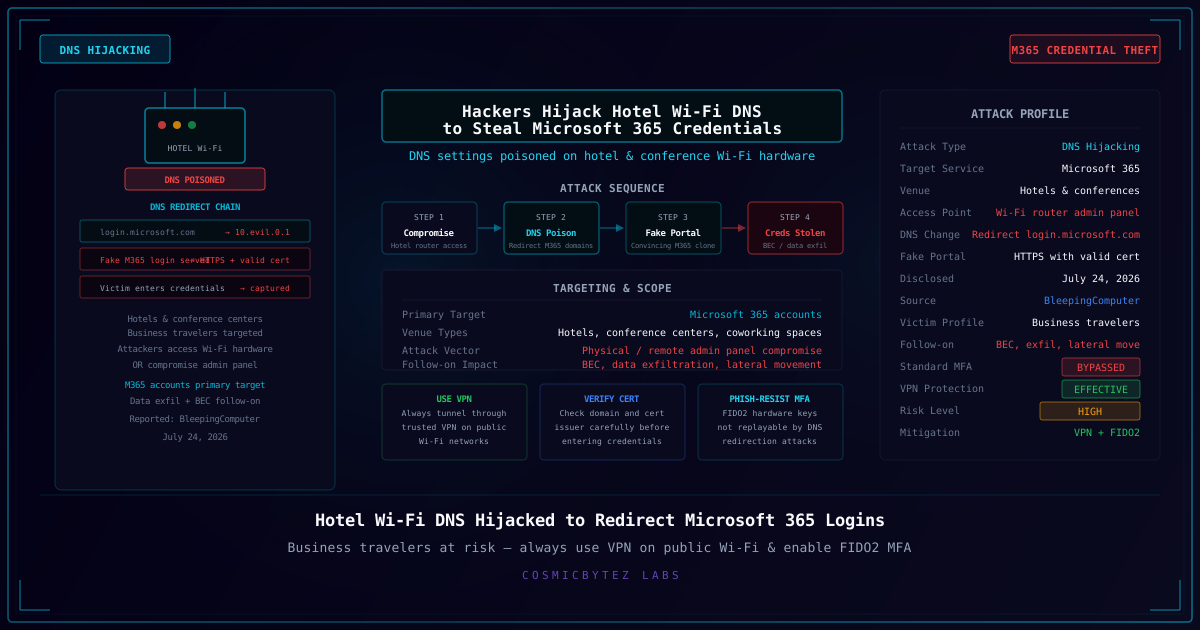
Attackers are targeting the DNS configurations of Wi-Fi networking equipment at hotels and conference centers, redirecting guests who attempt to reach Microsoft 365 login pages to attacker-controlled spoofed portals instead. The campaign, reported by BleepingComputer on July 24, 2026, poses a particular risk to business travelers who rely on public Wi-Fi and organizational Microsoft 365 accounts.
How the Attack Works
The attack exploits the trust users place in the network connection itself. When a guest connects to a hotel's Wi-Fi network and navigates to login.microsoft.com or any other Microsoft 365 authentication endpoint, the DNS lookup that translates the domain name to an IP address is handled by the hotel's own network equipment.
By compromising the Wi-Fi router or access point's DNS configuration — either through physical access, a default admin credential, or a vulnerability in the device's management interface — attackers substitute a malicious DNS record:
login.microsoft.com → [Attacker-controlled IP]
Instead of reaching Microsoft's servers, the victim's browser connects to the attacker's infrastructure. The fake portal is designed to closely mimic the real Microsoft 365 login experience, complete with HTTPS and a valid SSL certificate (obtained for a slightly different domain that the victim may not scrutinize carefully).
The victim enters their Microsoft 365 credentials. The attacker captures them. The fake portal typically displays an error or redirects to the real Microsoft page, giving the victim no indication that their credentials have been stolen.
Why Hotels Are Targeted
Hotels and conference centers are attractive targets for several reasons:
- High density of business users: Corporate travelers with access to valuable organizational systems are concentrated in one location
- Shared network infrastructure: A single compromised router serves hundreds of guests
- Inattention to network trust: Guests connecting to "hotel Wi-Fi" typically assume the network is safe
- Varied security postures: Hotel networking equipment ranges from enterprise-grade to consumer routers with default credentials
Conference centers are particularly attractive during major industry events, where the attendee list might include executives, IT professionals, and others with privileged access to high-value organizational systems.
Attack Vector: Gaining Access to the Router
Attackers gain access to the hotel Wi-Fi equipment through several methods:
- Default credentials: Many hospitality-grade access points ship with default admin usernames and passwords that are never changed
- Known vulnerabilities: Unpatched firmware in networking hardware may expose remote management interfaces
- Physical access: Hotel networking closets are often accessible with limited physical security
- Social engineering: Posing as maintenance personnel or ISP technicians to access equipment
Once inside the router's administration panel, changing DNS server addresses is a trivial operation that takes seconds and leaves no obvious visible indication for guests.
The Follow-On: BEC and Data Exfiltration
Stolen Microsoft 365 credentials unlock significantly more than email access. With a compromised M365 account, attackers can:
- Access email to monitor communications, steal sensitive information, and conduct business email compromise (BEC) — redirecting vendor payments or approving fraudulent invoices
- Access SharePoint and OneDrive for document and data exfiltration
- Move laterally to connected services through single sign-on integrations
- Establish persistence by registering additional authentication methods or creating forwarding rules
BEC remains one of the most financially damaging attack types tracked by the FBI, making M365 credential theft a high-ROI target for threat actors.
Standard MFA Offers Limited Protection Here
Unlike AiTM proxy attacks (which relay MFA codes in real time), DNS hijacking combined with a basic credential-harvesting portal typically only captures usernames and passwords. Standard MFA — TOTP, SMS, or push notifications — would still block account access if the attacker only has credentials.
However, more sophisticated versions of this attack can be combined with AiTM proxy techniques to capture session tokens after MFA completion. Organizations should not rely solely on standard MFA as a defense against this threat class.
How to Protect Yourself
Use a VPN — Always on Public Wi-Fi
A VPN encrypts all network traffic and routes DNS queries through the VPN provider's own servers, bypassing the compromised hotel DNS entirely. This is the most effective single defense against DNS hijacking attacks:
- The hotel DNS server's malicious records are never consulted
- All traffic appears to originate from the VPN endpoint, not the hotel network
- Even if the hotel network is monitoring or intercepting traffic, the VPN tunnel keeps the content private
Always connect to your VPN before opening any browser session on hotel Wi-Fi.
Verify Domain and Certificate Details
Before entering credentials on any Microsoft login page, verify:
- The exact domain in the address bar — not just that it starts with
microsoft, but the full domain.microsoft-login.authentication-portal.comis not Microsoft. - The certificate issuer — click the lock icon and verify the certificate is issued to
microsoft.comby a major CA like DigiCert or GlobalSign - The presence of HTTPS — necessary but not sufficient, as attackers can and do obtain SSL certificates for phishing domains
Enable FIDO2 / Passkeys for Microsoft 365
Microsoft 365 supports FIDO2 hardware security keys and passkeys. These are the only authentication methods that are cryptographically bound to the real Microsoft domain:
- A FIDO2 authenticator generates responses tied to the specific relying party domain (
login.microsoft.com) - A phishing page served from a different IP cannot produce a valid FIDO2 assertion for Microsoft's domain
- Even if DNS is hijacked, FIDO2 authentication to the fake portal will fail at the authentication layer
For IT Administrators
Enforce Conditional Access Policies in Microsoft Entra ID (Azure AD) that require compliant devices and known network locations. An authentication from an unexpected geolocation or network should trigger additional verification.
Enable sign-in risk policies that flag anomalous sign-in attempts for review.
Deploy FIDO2 authentication across the organization and deprecate SMS and TOTP where possible for privileged accounts.
Educate traveling employees about the risks of hotel Wi-Fi and the mandatory use of VPN before accessing corporate resources.
For Hotel and Venue IT Teams
Organizations running guest Wi-Fi infrastructure should:
- Change default admin credentials on all networking equipment immediately
- Segment guest Wi-Fi from any management or administrative networks
- Implement firmware update schedules to patch known vulnerabilities in access points and routers
- Enable management interface restrictions to limit admin access to specific IP ranges or require VPN for management
- Monitor DNS configuration for unauthorized changes
Key Takeaway
Public Wi-Fi at hotels and conference centers is not a safe network. Any DNS query, including lookups for major services like Microsoft 365, Google Workspace, or banking portals, can be intercepted and redirected by a compromised router. The only reliable defenses for end users are a VPN (which bypasses the local DNS entirely) and FIDO2/passkey authentication (which cannot be used against a spoofed domain). Business travelers should treat hotel Wi-Fi as a hostile network by default.