Executive Summary
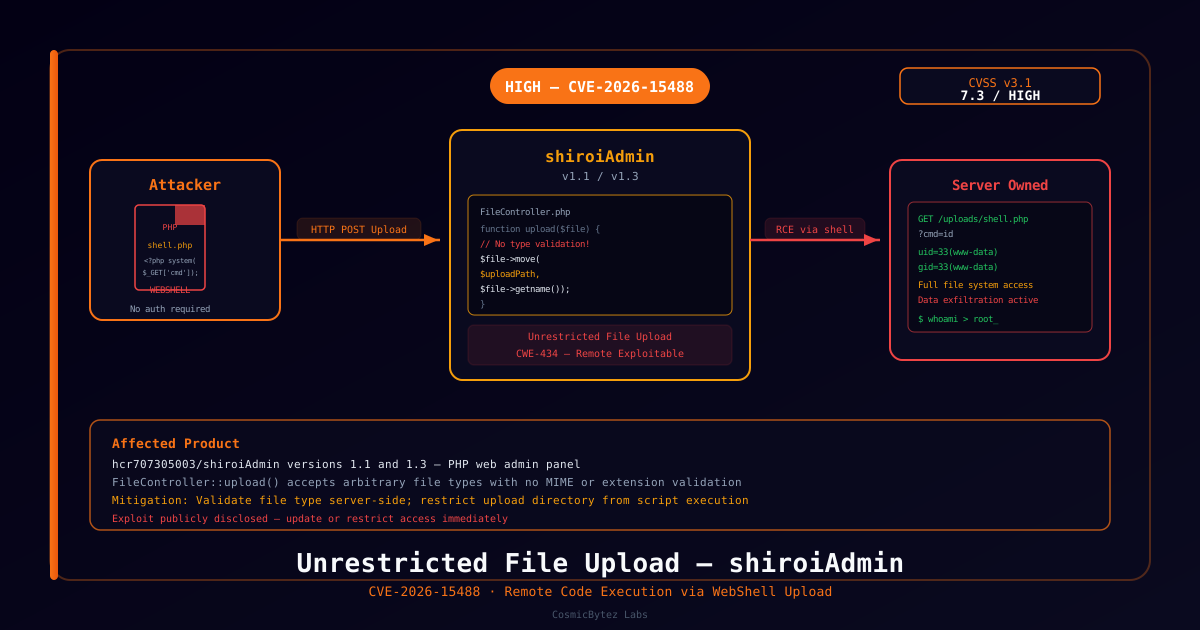
CVE-2026-15488 is a high-severity unrestricted file upload vulnerability affecting hcr707305003/shiroiAdmin versions 1.1 and 1.3. The flaw resides in the FileController::upload() function within app/common/controller/FileController.php. Because the function performs no file-type or extension validation, a remote attacker can upload a PHP webshell and subsequently execute arbitrary OS commands on the server.
CVSS v3.1 Score: 7.3 (High)
The exploit has been publicly disclosed and can be triggered remotely without authentication, making rapid remediation essential.
Vulnerability Overview
Root Cause
The upload() function in FileController.php accepts file uploads and moves them to the target directory without validating:
- MIME type
- File extension
- File content (magic bytes)
This allows an attacker to upload any file — including a PHP script — directly to a web-accessible path.
Attack Chain
1. Attacker identifies a shiroiAdmin instance exposed to the internet
2. Sends an HTTP POST request uploading a PHP webshell (e.g. shell.php)
3. FileController::upload() stores the file without restriction
4. Attacker sends a GET request to the uploaded file's URL with a command parameter
5. PHP executes the command with web server privileges (www-data / apache)
6. Full remote code execution achieved — lateral movement and data exfiltration possibleTechnical Details
Affected Versions
| Product | Version | Status |
|---|---|---|
| shiroiAdmin | 1.1 | Vulnerable |
| shiroiAdmin | 1.3 | Vulnerable |
Vulnerable Code Pattern
The FileController::upload() method moves files to the upload directory using the original filename without any validation:
// FileController.php (simplified)
public function upload($file) {
    // No MIME type check
    // No extension whitelist/blacklist
    // No content validation
    $file->move($this->uploadPath, $file->getOriginalName());
    return json(['status' => 1, 'url' => $this->uploadPath . $file->getOriginalName()]);
}Sample Exploit Payload
A minimal webshell upload followed by execution:
# Upload the webshell
curl -X POST http://target/common/upload \
  -F "file=@shell.php;type=image/jpeg"

# Trigger execution
curl "http://target/uploads/shell.php?cmd=id"
# Response: uid=33(www-data) gid=33(www-data) groups=33(www-data)Identifying Affected Systems
Indicators of Exposure
- shiroiAdmin deployment accessible from the internet
/common/uploadendpoint responds to unauthenticated POST requests- Upload directory (
uploads/or similar) is web-accessible and lacks PHP execution restrictions
Post-Compromise Indicators
- Unexpected
.phpfiles in the upload directory - Web server logs showing GET requests to uploaded files with query parameters (
?cmd=,?c=,?exec=) - Unusual outbound network connections from the web server process
- New cron jobs or SSH keys added under the web server user
Remediation
Option 1: Apply Vendor Patch (Recommended)
Check the shiroiAdmin repository for an updated release that includes file-type validation.
Option 2: Implement File-Type Validation
If a patch is unavailable, add validation server-side:
// Allowlist of safe extensions
$allowedExtensions = ['jpg', 'jpeg', 'png', 'gif', 'pdf', 'docx'];
$ext = strtolower(pathinfo($file->getOriginalName(), PATHINFO_EXTENSION));

if (!in_array($ext, $allowedExtensions)) {
    return json(['status' => 0, 'msg' => 'File type not allowed']);
}Option 3: Restrict Script Execution in Upload Directory
Prevent PHP execution in the upload directory via web server config:
# Nginx
location /uploads/ {
    location ~ \.php$ {
        return 403;
    }
}# Apache (.htaccess in /uploads/)
<FilesMatch "\.(php|php3|php4|php5|phtml|pl|py|cgi)$">
Deny from all
</FilesMatch>Option 4: Restrict External Access
If shiroiAdmin does not need to be internet-facing, place it behind a VPN or firewall immediately.
Detection Rules
SIEM Query (Splunk)
index=web sourcetype=access_combined
| where match(uri_path, "/uploads/.*\.php")
| stats count by src_ip, uri_path, method
| where count > 0WAF Rule
Block PHP file uploads and PHP execution in upload paths:
# Block PHP file uploads
if (file_extension in ["php","php3","php5","phtml"]) { deny; }

# Block requests to uploaded PHP files
if (uri_path matches "/uploads/.*\.php") { deny; }
References
- NVD — CVE-2026-15488
- CWE-434: Unrestricted Upload of File with Dangerous Type
- OWASP File Upload Cheat Sheet