Executive Summary
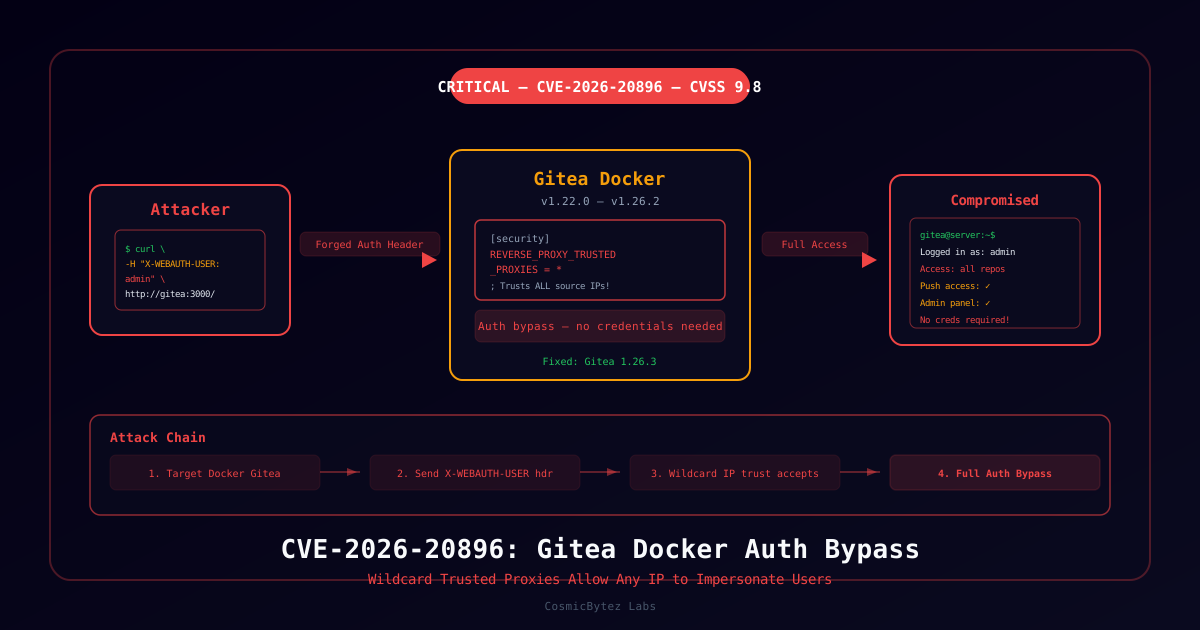
The official Gitea Docker image ships with a hardcoded misconfiguration that completely undermines its reverse proxy authentication feature. Every gitea/gitea Docker image through version 1.26.2 sets REVERSE_PROXY_TRUSTED_PROXIES = * in its app.ini template — meaning the application trusts authentication headers from any source IP, not just the local reverse proxy.
CVSS Score: 9.8 (Critical)
Attack Vector: Network | No Authentication Required | No User Interaction
The flaw is trivially exploitable with a single HTTP request. Gitea 1.26.3 fixes the issue.
Vulnerability Overview
Root Cause
Gitea's documented default for REVERSE_PROXY_TRUSTED_PROXIES is 127.0.0.0/8,::1/128 (loopback only). However, two Docker image template files override this with a wildcard:
docker/root/etc/templates/app.ini(line 55)docker/rootless/etc/templates/app.ini(line 52)
When ENABLE_REVERSE_PROXY_AUTHENTICATION = true is active — a common SSO configuration — Gitea reads user identity from the X-WEBAUTH-USER HTTP header. Because of the wildcard, this header is trusted from any IP on the network.
Binary installs and self-compiled builds are not affected. Only Docker image deployments.
Attack Chain
1. Attacker identifies Gitea instance deployed via Docker
2. Checks if reverse proxy authentication is enabled (often visible in UI)
3. Sends HTTP request with forged X-WEBAUTH-USER header
4. Gitea trusts the header from any source IP (wildcard config)
5. Attacker is authenticated as the target user — no credentials neededThe exploit is one command:
curl -H "X-WEBAUTH-USER: admin" http://target-gitea:3000/Technical Details
Affected Versions
| Image | Affected Versions | Fixed Version |
|---|---|---|
| gitea/gitea (standard) | All Docker releases ≤ 1.26.2 | 1.26.3 |
| gitea/gitea (rootless) | All Docker releases ≤ 1.26.2 | 1.26.3 |
| Binary / self-compiled | Not affected | — |
CVE Classification
| Field | Value |
|---|---|
| CVE ID | CVE-2026-20896 |
| CVSS 3.1 Score | 9.8 Critical |
| Vector | AV:N/AC:L/PR:N/UI:N/S:U/C:H/I:H/A:H |
| CWE | CWE-284 (Improper Access Control) |
| Reported by | Joshua Martinelle (Tenable), @rz1027 |
| Fixed in | Gitea PR #38151 → v1.26.3 |
Secondary Escalation: Account Creation
If ENABLE_REVERSE_PROXY_AUTO_REGISTRATION = true is also enabled, attackers can not only impersonate existing users but create arbitrary new accounts with any username by simply sending a forged header for a username that doesn't yet exist.
Identifying Affected Deployments
Check Your Configuration
# Check your running Gitea config for the vulnerable setting
docker exec <gitea-container> cat /data/gitea/conf/app.ini | grep -A5 REVERSE_PROXY

# Look for the dangerous wildcard:
# REVERSE_PROXY_TRUSTED_PROXIES = *

# Safe configuration restricts to your actual proxy:
# REVERSE_PROXY_TRUSTED_PROXIES = 172.17.0.0/16Vulnerable vs. Safe Configuration
| Configuration | Risk Level |
|---|---|
REVERSE_PROXY_TRUSTED_PROXIES = * + auth enabled | Critical — actively exploitable |
REVERSE_PROXY_TRUSTED_PROXIES = * + auth disabled | Moderate (no immediate bypass) |
REVERSE_PROXY_TRUSTED_PROXIES = 127.0.0.1 | Safe |
| Binary / non-Docker deployment | Not affected |
Immediate Remediation
Option 1: Upgrade to Gitea 1.26.3 (Recommended)
docker pull gitea/gitea:1.26.3
docker-compose up -d # or your deployment methodThe fix makes reverse proxy authentication explicitly opt-in and requires administrators to set trusted proxy IPs manually.
Option 2: Restrict Trusted Proxies Immediately
If you cannot upgrade right now, lock down the trusted proxy setting to your actual reverse proxy IP:
# /data/gitea/conf/app.ini
[security]
REVERSE_PROXY_TRUSTED_PROXIES = 127.0.0.1  ; loopback only
; Or your specific proxy:
; REVERSE_PROXY_TRUSTED_PROXIES = 192.168.1.10Then restart Gitea:
docker restart <gitea-container>Option 3: Disable Reverse Proxy Authentication
If SSO via reverse proxy is not actively in use, disable it entirely:
[service]
ENABLE_REVERSE_PROXY_AUTHENTICATION = false
ENABLE_REVERSE_PROXY_AUTO_REGISTRATION = falseDetection
Check for Exploitation Attempts
# Review Gitea access logs for logins missing standard credentials
docker exec <gitea-container> grep "X-WEBAUTH-USER" /data/gitea/log/gitea.log

# Look for unexpected admin logins or account creations
# Check Gitea Admin Panel → Users → filter by creation dateSIEM Detection (Splunk)
index=web sourcetype=access_combined
| where isnotnull(http_header_x_webauth_user)
| stats count by src_ip, http_header_x_webauth_user, dest_host
| where count > 1
| sort -count