Executive Summary
Microsoft has disclosed CVE-2026-21413, a critical server-side request forgery (SSRF) vulnerability in Exchange Server that is being actively exploited in combination with a deserialization flaw to achieve unauthenticated remote code execution. The exploit chain has been dubbed "ProxyRelay" by security researchers.
CVSS Score: 9.1 (Critical)
Microsoft released an emergency out-of-band security update on February 4, 2026, and CISA has mandated federal agencies patch by February 18, 2026.
Vulnerability Overview
Root Cause
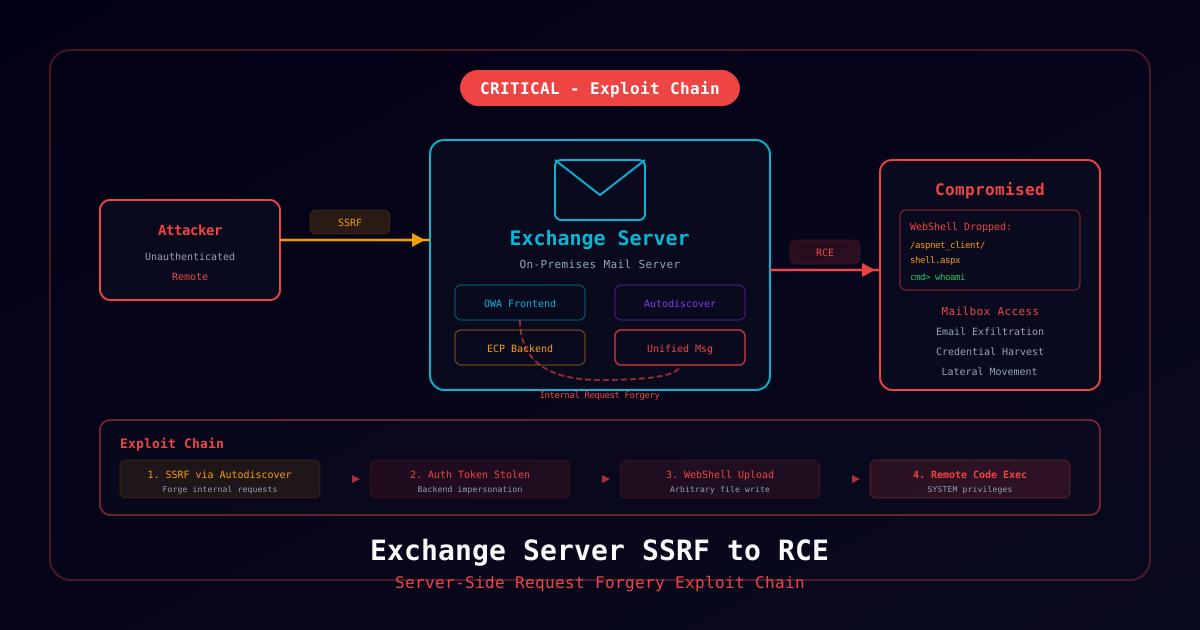
The SSRF vulnerability exists in Exchange Server's Autodiscover service. By sending specially crafted requests to the Autodiscover endpoint, an unauthenticated attacker can make the Exchange server issue requests to internal services, bypassing authentication. When chained with a known deserialization gadget in the Exchange backend, this achieves full remote code execution.
Attack Chain
1. Attacker sends crafted request to /autodiscover/autodiscover.json
2. SSRF allows internal request to Exchange backend service
3. Backend request includes serialized .NET payload
4. Deserialization executes arbitrary code as SYSTEM
5. Attacker gains complete control of Exchange server
6. Lateral movement to Active Directory via Exchange's privileged positionWhy Exchange Compromise Is Critical
Exchange Server typically has:
- Domain-joined machine account with elevated AD privileges
- Access to all organizational email (sensitive communications)
- Network position allowing lateral movement to domain controllers
- Service accounts often with excessive permissions
Technical Details
Affected Versions
| Exchange Version | Affected | Fixed Update |
|---|---|---|
| Exchange 2019 CU14 | < Feb 2026 SU | KB5035432 |
| Exchange 2019 CU13 | All | Upgrade to CU14 + SU |
| Exchange 2016 CU23 | < Feb 2026 SU | KB5035433 |
| Exchange Online | Not affected | N/A |
CVSS v3.1 Vector
CVSS:3.1/AV:N/AC:L/PR:N/UI:N/S:U/C:H/I:H/A:H
Indicators of Compromise
Exchange Log Analysis
# Check IIS logs for Autodiscover exploitation
Get-Content "C:\inetpub\logs\LogFiles\W3SVC1\*.log" |
    Select-String "autodiscover.json" |
    Where-Object { $_ -match "200" -and $_ -match "@" }

# Check for suspicious ECP activity
Get-Content "C:\inetpub\logs\LogFiles\W3SVC2\*.log" |
    Select-String "(powershell|cmd\.exe|certutil)"

# Review Exchange HttpProxy logs
Get-ChildItem "C:\Program Files\Microsoft\Exchange Server\V15\Logging\HttpProxy\Autodiscover" |
    Sort-Object LastWriteTime -Descending |
    Select-Object -First 5 |
ForEach-Object { Select-String "ServerInfo~" $_.FullName }Windows Event Logs
# Check for suspicious process creation from Exchange
Get-WinEvent -FilterHashtable @{
    LogName = 'Security'
    ID = 4688
    StartTime = (Get-Date).AddDays(-7)
} | Where-Object {
    $_.Properties[5].Value -like "*w3wp.exe*" -and
    ($_.Properties[5].Value -like "*cmd*" -or
     $_.Properties[5].Value -like "*powershell*")
}

# Check for web shell creation
Get-WinEvent -FilterHashtable @{
    LogName = 'Security'
    ID = 4663
    StartTime = (Get-Date).AddDays(-7)
} | Where-Object {
    $_.Message -like "*aspx*" -and
    $_.Message -like "*inetpub*"
}File System Checks
# Look for web shells
Get-ChildItem -Path "C:\inetpub\wwwroot\aspnet_client\" -Recurse -Include "*.aspx","*.ashx" |
    Where-Object { $_.LastWriteTime -gt (Get-Date).AddDays(-30) }

# Check for suspicious files in Exchange directories
Get-ChildItem -Path "C:\Program Files\Microsoft\Exchange Server\V15\FrontEnd\HttpProxy\owa\auth\" -Recurse -Include "*.aspx" |
Where-Object { $_.Name -notmatch "^(logon|signout|errorFE)" }Immediate Remediation
Option 1: Apply Security Update (Recommended)
# Download and install from Microsoft Update Catalog
# Exchange 2019 CU14: KB5035432
# Exchange 2016 CU23: KB5035433

# Run from elevated Exchange Management Shell
.\Setup.exe /PrepareSchema /IAcceptExchangeServerLicenseTerms_DiagnosticDataON
.\Setup.exe /PrepareAD /IAcceptExchangeServerLicenseTerms_DiagnosticDataON

# Verify installation
Get-ExchangeServer | Format-List Name, AdminDisplayVersionOption 2: Emergency Mitigation (URL Rewrite)
If immediate patching is not possible, apply a URL Rewrite rule:
- Open IIS Manager on the Exchange server
- Select Default Web Site > Autodiscover
- Open URL Rewrite > Add Rule(s) > Request Blocking
- Block pattern:
.*autodiscover\.json.*@.*Powershell.*in the URL Path - Apply to all Exchange servers
Option 3: Restrict External Access
Temporarily block external access to Autodiscover:
# Restrict Autodiscover to internal network only
# In Exchange Admin Center or via firewall rules
# Block external access to /autodiscover/ endpointsPost-Remediation Steps
- Scan for web shells using Microsoft's Exchange Emergency Mitigation Tool (EEMS)
- Reset all Exchange service account passwords
- Review Active Directory for unauthorized changes
- Check for persistence mechanisms (scheduled tasks, services, registry)
- Consider fresh Exchange installation if compromise confirmed
References
- Microsoft Security Advisory — CVE-2026-21413
- Microsoft Exchange Emergency Mitigation Service
- CISA KEV Catalog