Not All Data is Created Equal
Every organization handles data ranging from completely public information to highly sensitive secrets. A company blog post and a customer's Social Security number both live on company systems, but they need very different levels of protection. Data classification gives everyone a shared vocabulary and clear rules for how to handle each type.
Without classification, people guess. And when people guess, mistakes happen — sensitive customer records get emailed to the wrong person, confidential financial reports end up in shared folders, or internal strategies get discussed in public coffee shops.
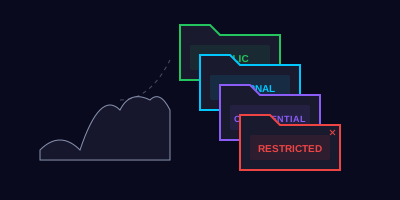
The Four Classification Levels
Most organizations use a system similar to this:
Public
- Definition: Information intended for public consumption
- Examples: Published blog posts, press releases, marketing materials, job postings
- Handling: No restrictions on sharing. Can be posted on websites, social media, or shared with anyone.
Internal
- Definition: Routine business information not intended for the public
- Examples: Internal memos, org charts, meeting notes, internal policies, project timelines
- Handling: Share freely within the organization. Don't post externally or share with outsiders without approval.
Confidential
- Definition: Sensitive business information that could cause harm if disclosed
- Examples: Financial reports, employee records, customer lists, contracts, strategic plans, source code
- Handling: Share only with authorized personnel on a need-to-know basis. Encrypt when sending externally. Store in access-controlled locations.
Restricted
- Definition: Highly sensitive data subject to regulatory requirements or with severe impact if disclosed
- Examples: Social Security numbers, credit card data, medical records, trade secrets, authentication credentials
- Handling: Strictest controls. Encrypt at rest and in transit. Access limited to specifically authorized individuals. Log all access. Never send via regular email.
An internal company org chart is classified as Confidential because it contains employee names.
Handling Data: The Rules That Matter
Sharing and Transmission
| Classification | Internal Sharing | External Sharing | Cloud Storage | |
|---|---|---|---|---|
| Public | Unrestricted | Unrestricted | Standard | Any platform |
| Internal | Any internal channel | Requires approval | Internal email only | Company-approved platforms |
| Confidential | Need-to-know basis | Encrypted + approval | Encrypted attachment | Approved + access-controlled |
| Restricted | Specifically authorized | Encrypted + legal approval | Never via standard email | Dedicated secure systems only |
Storage
- Public and Internal — Standard company file shares and approved cloud storage
- Confidential — Access-controlled folders, encrypted drives, approved systems with audit logging
- Restricted — Dedicated secure systems with encryption at rest, multi-factor access, and full audit trails
Disposal
When you no longer need data:
- Digital files — Use secure deletion tools (not just "Delete" which moves to the Recycle Bin)
- Printed documents — Cross-cut shred Confidential and Restricted documents. Regular recycling is fine for Public and Internal.
- Storage devices — Hard drives and USB drives containing Confidential or Restricted data must be securely wiped or physically destroyed
A partner company emails you asking for a copy of your organization's customer list to coordinate a joint marketing campaign. Your manager verbally approved sharing it last week. The customer list is classified as Confidential.
How would you respond? Choose the best option:
When You're Not Sure
If you're unsure how to classify or handle specific data:
- Ask your manager — They can help determine the appropriate classification
- Check your company's data classification policy — Most organizations publish detailed guidelines
- When in doubt, treat it as Confidential — Over-protecting data is far better than under-protecting it
- Contact your security team — They exist to help, not to judge
Key Takeaways
- Know the four levels — Public, Internal, Confidential, and Restricted each have specific handling rules
- Classify before you share — Always consider the data's sensitivity before sending, storing, or printing it
- Encrypt Confidential and Restricted data — Especially when sharing externally or storing in cloud systems
- Get written approval for external sharing — Verbal approvals don't create an audit trail
- When in doubt, protect it — Treating data as more sensitive than necessary is always safer than the alternative
- Shred, don't recycle — Sensitive printed documents need cross-cut shredding, not the recycling bin