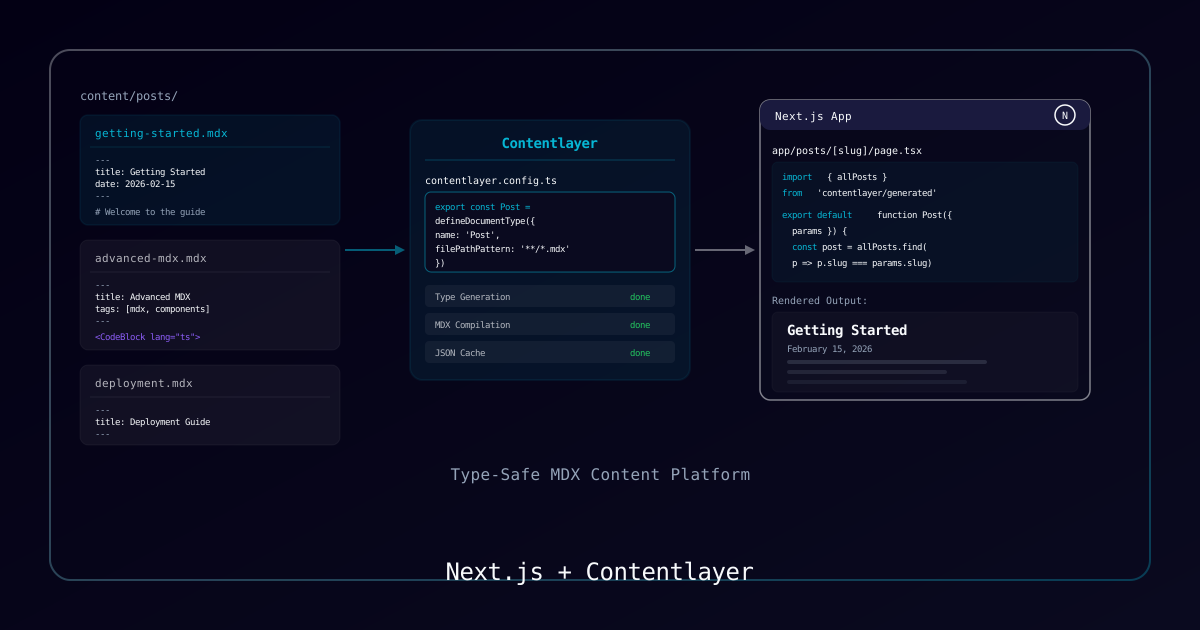
Overview
Contentlayer2 transforms MDX files into type-safe data that integrates seamlessly with Next.js. This guide builds a multi-category content platform with search, RSS feeds, and SEO — the same architecture powering CosmicBytez Labs.
Why Contentlayer2?
| Feature | Raw MDX | Contentlayer2 |
|---|---|---|
| Type Safety | Manual | Automatic TypeScript types |
| Validation | None | Schema validation at build |
| Computed Fields | Manual | Declarative (slugs, read time) |
| Hot Reload | Depends | Built-in content watching |
| Performance | Parse at runtime | Pre-processed at build |
Process
Step 1: Installation
npx create-next-app@latest my-blog --typescript --app
cd my-blog
npm install contentlayer2 next-contentlayer2
npm install rehype-pretty-code rehype-slug remark-gfm shikiStep 2: Next.js Configuration
// next.config.ts
import { withContentlayer } from "next-contentlayer2";

const nextConfig = {
  reactStrictMode: true,
};

export default withContentlayer(nextConfig);Update tsconfig.json paths:
{
  "compilerOptions": {
    "paths": {
      "@/*": ["./src/*"],
      "contentlayer/generated": ["./.contentlayer/generated"]
    }
  },
  "include": [".contentlayer/generated"]
}Step 3: Define Document Types
// contentlayer.config.ts
import { defineDocumentType, makeSource } from "contentlayer2/source-files";
import rehypePrettyCode from "rehype-pretty-code";
import rehypeSlug from "rehype-slug";
import remarkGfm from "remark-gfm";

export const Article = defineDocumentType(() => ({
  name: "Article",
  filePathPattern: "articles/**/*.mdx",
  contentType: "mdx",
  fields: {
    title: { type: "string", required: true },
    excerpt: { type: "string", required: true },
    date: { type: "date", required: true },
    author: { type: "string", required: true },
    category: {
      type: "enum",
      options: ["tutorial", "guide", "news", "review"],
      default: "tutorial",
    },
    tags: { type: "list", of: { type: "string" }, default: [] },
    featured: { type: "boolean", default: false },
    image: { type: "string" },
  },
  computedFields: {
    slug: {
      type: "string",
      resolve: (doc) => doc._raw.flattenedPath.replace("articles/", ""),
    },
    url: {
      type: "string",
      resolve: (doc) =>
        `/articles/${doc._raw.flattenedPath.replace("articles/", "")}`,
    },
    readTime: {
      type: "string",
      resolve: (doc) => {
        const words = doc.body.raw.split(/\s+/).length;
        return `${Math.ceil(words / 200)} min read`;
      },
    },
  },
}));

export default makeSource({
  contentDirPath: "content",
  documentTypes: [Article],
  mdx: {
    remarkPlugins: [remarkGfm],
    rehypePlugins: [
      rehypeSlug,
      [rehypePrettyCode, { theme: "github-dark" }],
    ],
  },
});Step 4: Article List Page
// src/app/articles/page.tsx
import { allArticles } from "contentlayer/generated";
import Link from "next/link";

export default function ArticlesPage() {
  const sorted = [...allArticles].sort(
    (a, b) => new Date(b.date).getTime() - new Date(a.date).getTime()
  );

  return (
    <div className="max-w-4xl mx-auto py-20 px-4">
      <h1 className="text-3xl font-bold mb-8">Articles</h1>
      <div className="space-y-6">
        {sorted.map((article) => (
          <article key={article.slug} className="border-b pb-6">
            <Link href={article.url}>
              <h2 className="text-xl font-semibold hover:text-blue-500">
                {article.title}
              </h2>
            </Link>
            <p className="text-gray-600 mt-2">{article.excerpt}</p>
            <div className="flex gap-4 mt-3 text-sm text-gray-400">
              <span>{article.readTime}</span>
              <span>{new Date(article.date).toLocaleDateString()}</span>
              <div className="flex gap-2">
                {article.tags.map((tag) => (
                  <span key={tag} className="bg-gray-800 px-2 py-0.5 rounded">
                    {tag}
                  </span>
                ))}
              </div>
            </div>
          </article>
        ))}
      </div>
    </div>
  );
}Step 5: Article Detail Page with MDX Rendering
// src/app/articles/[slug]/page.tsx
import { allArticles } from "contentlayer/generated";
import { useMDXComponent } from "next-contentlayer2/hooks";
import { notFound } from "next/navigation";
import type { Metadata } from "next";

interface Props {
  params: Promise<{ slug: string }>;
}

export async function generateStaticParams() {
  return allArticles.map((article) => ({ slug: article.slug }));
}

export async function generateMetadata({ params }: Props): Promise<Metadata> {
  const { slug } = await params;
  const article = allArticles.find((a) => a.slug === slug);
  if (!article) return {};

  return {
    title: article.title,
    description: article.excerpt,
    openGraph: {
      title: article.title,
      description: article.excerpt,
      type: "article",
      publishedTime: article.date,
    },
  };
}

function MDXContent({ code }: { code: string }) {
  const Component = useMDXComponent(code);
  return <Component />;
}

export default async function ArticlePage({ params }: Props) {
  const { slug } = await params;
  const article = allArticles.find((a) => a.slug === slug);
  if (!article) notFound();

  return (
    <article className="max-w-3xl mx-auto py-20 px-4">
      <header className="mb-8">
        <h1 className="text-3xl font-bold">{article.title}</h1>
        <div className="flex gap-4 mt-4 text-sm text-gray-400">
          <span>{article.author}</span>
          <span>{article.readTime}</span>
          <span>{new Date(article.date).toLocaleDateString()}</span>
        </div>
      </header>
      <div className="prose prose-invert max-w-none">
        <MDXContent code={article.body.code} />
      </div>
    </article>
  );
}Step 6: Search API Route
// src/app/api/search/route.ts
import { NextRequest, NextResponse } from "next/server";
import { allArticles } from "contentlayer/generated";

export async function GET(request: NextRequest) {
  const query = request.nextUrl.searchParams.get("q")?.toLowerCase() || "";
  if (!query || query.length < 2) {
    return NextResponse.json({ results: [], total: 0 });
  }

  const results = allArticles
    .filter((article) => {
      const titleMatch = article.title.toLowerCase().includes(query);
      const excerptMatch = article.excerpt.toLowerCase().includes(query);
      const tagMatch = article.tags.some((t) => t.toLowerCase().includes(query));
      return titleMatch || excerptMatch || tagMatch;
    })
    .sort((a, b) => {
      // Title matches rank higher
      const aTitle = a.title.toLowerCase().includes(query) ? 1 : 0;
      const bTitle = b.title.toLowerCase().includes(query) ? 1 : 0;
      return bTitle - aTitle || new Date(b.date).getTime() - new Date(a.date).getTime();
    })
    .slice(0, 20)
    .map(({ title, excerpt, url, tags, date, readTime }) => ({
      title, excerpt, url, tags, date, readTime,
    }));

  return NextResponse.json({ results, total: results.length });
}Step 7: RSS Feed
// src/app/api/rss/route.ts
import { allArticles } from "contentlayer/generated";

const BASE_URL = "https://yourdomain.com";

export async function GET() {
  const sorted = [...allArticles].sort(
    (a, b) => new Date(b.date).getTime() - new Date(a.date).getTime()
  );

  const items = sorted
    .slice(0, 50)
    .map((article) => `
    <item>
      <title><![CDATA[${article.title}]]></title>
      <description><![CDATA[${article.excerpt}]]></description>
      <link>${BASE_URL}${article.url}</link>
      <pubDate>${new Date(article.date).toUTCString()}</pubDate>
      <guid isPermaLink="true">${BASE_URL}${article.url}</guid>
      ${article.tags.map((t) => `<category>${t}</category>`).join("\n      ")}
    </item>`)
    .join("");

  const xml = `<?xml version="1.0" encoding="UTF-8"?>
<rss version="2.0" xmlns:atom="http://www.w3.org/2005/Atom">
  <channel>
    <title>My Blog</title>
    <link>${BASE_URL}</link>
    <description>Technical articles and tutorials</description>
    <atom:link href="${BASE_URL}/api/rss" rel="self" type="application/rss+xml"/>
    ${items}
  </channel>
</rss>`;

  return new Response(xml, {
    headers: {
      "Content-Type": "application/xml",
      "Cache-Control": "public, s-maxage=3600",
    },
  });
}Key Takeaways
- Contentlayer2 generates TypeScript types from your content schema at build time
- Computed fields handle slugs, URLs, and read times without manual calculation
- MDX enables React components inside Markdown content
- Pre-processing at build means zero runtime parsing cost
- Combine with rehype-pretty-code for syntax highlighting and rehype-slug for heading anchors