Overview
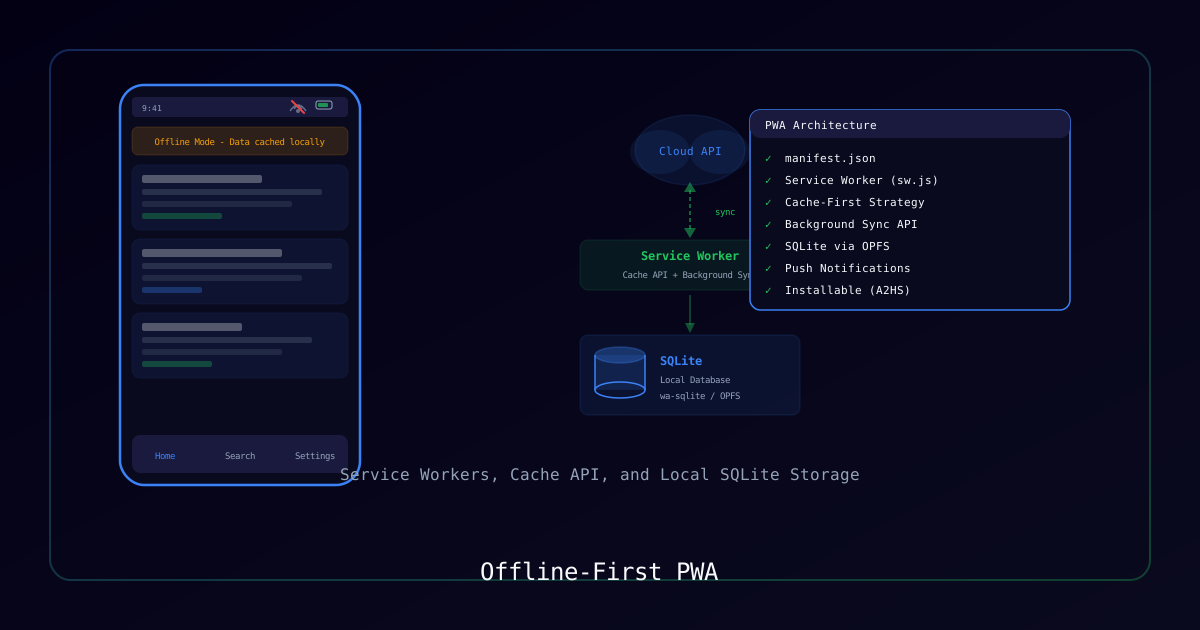
Offline-first architecture ensures your app works without an internet connection, syncing data when connectivity returns. This guide walks through building a production-grade PWA that stores data locally in SQLite and syncs to Supabase.
Architecture
┌─────────────────────────────────────────────────────┐
│                   Client (PWA)                       │
│  ┌─────────┐    ┌──────────┐    ┌───────────────┐   │
│  │ React UI│◄──►│ SQLite   │◄──►│ Sync Engine   │   │
│  │         │    │ (local)  │    │               │   │
│  └─────────┘    └──────────┘    └───────┬───────┘   │
│                                         │           │
│  ┌──────────────────────────────────────┘           │
│  │  Service Worker (cache + offline)                │
└──┼──────────────────────────────────────────────────┘
   │
   ▼
┌──────────────┐
│  Supabase    │
│  (cloud DB)  │
└──────────────┘Requirements
| Component | Version |
|---|---|
| Node.js | 18+ |
| Next.js | 15+ |
| better-sqlite3 | 11+ |
| Supabase | Any |
Process
Step 1: Project Setup
Initialize a Next.js project with PWA support:
npx create-next-app@latest my-pwa --typescript --app
cd my-pwa
npm install better-sqlite3 @supabase/supabase-js
npm install -D @types/better-sqlite3Step 2: Configure the Web App Manifest
Create public/manifest.json:
{
  "name": "My Offline PWA",
  "short_name": "MyPWA",
  "start_url": "/",
  "display": "standalone",
  "background_color": "#0a0a0a",
  "theme_color": "#06b6d4",
  "icons": [
    { "src": "/icon-192.png", "sizes": "192x192", "type": "image/png" },
    { "src": "/icon-512.png", "sizes": "512x512", "type": "image/png" }
  ]
}Step 3: SQLite Database Layer
Create a database abstraction that works in the browser using sql.js (WASM-compiled SQLite):
// lib/local-db.ts
import initSqlJs, { Database } from "sql.js";

let db: Database | null = null;

export async function getLocalDb(): Promise<Database> {
  if (db) return db;

  const SQL = await initSqlJs({
    locateFile: (file) => `/sql-wasm/${file}`,
  });

  // Try to load existing data from IndexedDB
  const saved = await loadFromIndexedDB("app-db");
  db = saved ? new SQL.Database(saved) : new SQL.Database();

  // Initialize schema
  db.run(`
    CREATE TABLE IF NOT EXISTS workouts (
      id TEXT PRIMARY KEY,
      name TEXT NOT NULL,
      date TEXT NOT NULL,
      data TEXT NOT NULL,
      synced INTEGER DEFAULT 0,
      updated_at TEXT DEFAULT (datetime('now')),
      deleted INTEGER DEFAULT 0
    )
  `);

  return db;
}

export async function saveToIndexedDB(key: string, data: Uint8Array) {
  const request = indexedDB.open("pwa-storage", 1);
  request.onupgradeneeded = () => {
    request.result.createObjectStore("databases");
  };
  return new Promise<void>((resolve) => {
    request.onsuccess = () => {
      const tx = request.result.transaction("databases", "readwrite");
      tx.objectStore("databases").put(data, key);
      tx.oncomplete = () => resolve();
    };
  });
}Step 4: Sync Engine
Build a bidirectional sync engine with conflict resolution:
// lib/sync-engine.ts
import { createClient } from "@supabase/supabase-js";
import { getLocalDb, saveToIndexedDB } from "./local-db";

const supabase = createClient(
  process.env.NEXT_PUBLIC_SUPABASE_URL!,
  process.env.NEXT_PUBLIC_SUPABASE_ANON_KEY!
);

export async function syncToCloud() {
  const db = await getLocalDb();

  // Get unsynced local records
  const unsynced = db.exec(
    "SELECT * FROM workouts WHERE synced = 0"
  );

  if (unsynced.length === 0) return;

  const rows = unsynced[0].values.map((row) => ({
    id: row[0] as string,
    name: row[1] as string,
    date: row[2] as string,
    data: JSON.parse(row[3] as string),
    updated_at: row[5] as string,
    deleted: row[6] as number,
  }));

  // Upsert to Supabase with conflict resolution (last-write-wins)
  const { error } = await supabase
    .from("workouts")
    .upsert(rows, { onConflict: "id" });

  if (!error) {
    // Mark as synced
    db.run("UPDATE workouts SET synced = 1 WHERE synced = 0");
    await persistDb();
  }
}

export async function pullFromCloud() {
  const db = await getLocalDb();

  // Get last sync timestamp
  const result = db.exec(
    "SELECT MAX(updated_at) FROM workouts WHERE synced = 1"
  );
  const lastSync = result[0]?.values[0]?.[0] as string | null;

  // Fetch newer records from cloud
  let query = supabase.from("workouts").select("*");
  if (lastSync) {
    query = query.gt("updated_at", lastSync);
  }

  const { data } = await query;
  if (!data?.length) return;

  // Merge into local DB
  for (const row of data) {
    db.run(
      `INSERT OR REPLACE INTO workouts
       (id, name, date, data, synced, updated_at, deleted)
       VALUES (?, ?, ?, ?, 1, ?, ?)`,
      [row.id, row.name, row.date, JSON.stringify(row.data), row.updated_at, row.deleted ? 1 : 0]
    );
  }

  await persistDb();
}

async function persistDb() {
  const db = await getLocalDb();
  const data = db.export();
  await saveToIndexedDB("app-db", data);
}Step 5: Service Worker for Caching
Register a service worker for offline asset caching:
// public/sw.js
const CACHE_NAME = "pwa-v1";
const STATIC_ASSETS = ["/", "/manifest.json", "/icon-192.png"];

self.addEventListener("install", (event) => {
  event.waitUntil(
    caches.open(CACHE_NAME).then((cache) => cache.addAll(STATIC_ASSETS))
  );
});

self.addEventListener("fetch", (event) => {
  // Network-first for API calls
  if (event.request.url.includes("/api/")) {
    event.respondWith(
      fetch(event.request).catch(() => caches.match(event.request))
    );
    return;
  }

  // Cache-first for static assets
  event.respondWith(
    caches.match(event.request).then((cached) => {
      return cached || fetch(event.request).then((response) => {
        const clone = response.clone();
        caches.open(CACHE_NAME).then((cache) => cache.put(event.request, clone));
        return response;
      });
    })
  );
});Step 6: Online/Offline Detection Hook
// hooks/useOnlineStatus.ts
import { useState, useEffect } from "react";
import { syncToCloud, pullFromCloud } from "@/lib/sync-engine";

export function useOnlineStatus() {
  const [isOnline, setIsOnline] = useState(
    typeof navigator !== "undefined" ? navigator.onLine : true
  );

  useEffect(() => {
    const handleOnline = async () => {
      setIsOnline(true);
      // Auto-sync when coming back online
      await syncToCloud();
      await pullFromCloud();
    };

    const handleOffline = () => setIsOnline(false);

    window.addEventListener("online", handleOnline);
    window.addEventListener("offline", handleOffline);

    return () => {
      window.removeEventListener("online", handleOnline);
      window.removeEventListener("offline", handleOffline);
    };
  }, []);

  return isOnline;
}Conflict Resolution Strategies
| Strategy | How It Works | Best For |
|---|---|---|
| Last-Write-Wins | Newest timestamp wins | Simple apps, non-critical data |
| Client-Wins | Local changes always take priority | Offline-heavy apps |
| Server-Wins | Cloud version always takes priority | Multi-user apps |
| Merge | Field-level comparison and merge | Complex collaborative apps |
Testing Offline Behavior
- Open Chrome DevTools → Application → Service Workers
- Check "Offline" checkbox
- Verify the app still loads and data operations work
- Uncheck "Offline" and verify sync triggers automatically
Key Takeaways
- Store data locally first, sync to cloud as a background operation
- Use
updated_attimestamps for conflict resolution - Service workers handle asset caching; IndexedDB/SQLite handles data
- Always test with network throttling and airplane mode
- Soft-delete records (set
deleted = 1) instead of hard deletes for reliable sync