Why Build Your Own Ping Monitor
ping -t answers one question: is it up right now. It will not tell you what the latency looked like twenty minutes ago, it cannot show you a distribution, and when a user says "the connection was bad this morning" you have nothing to hand your ISP.
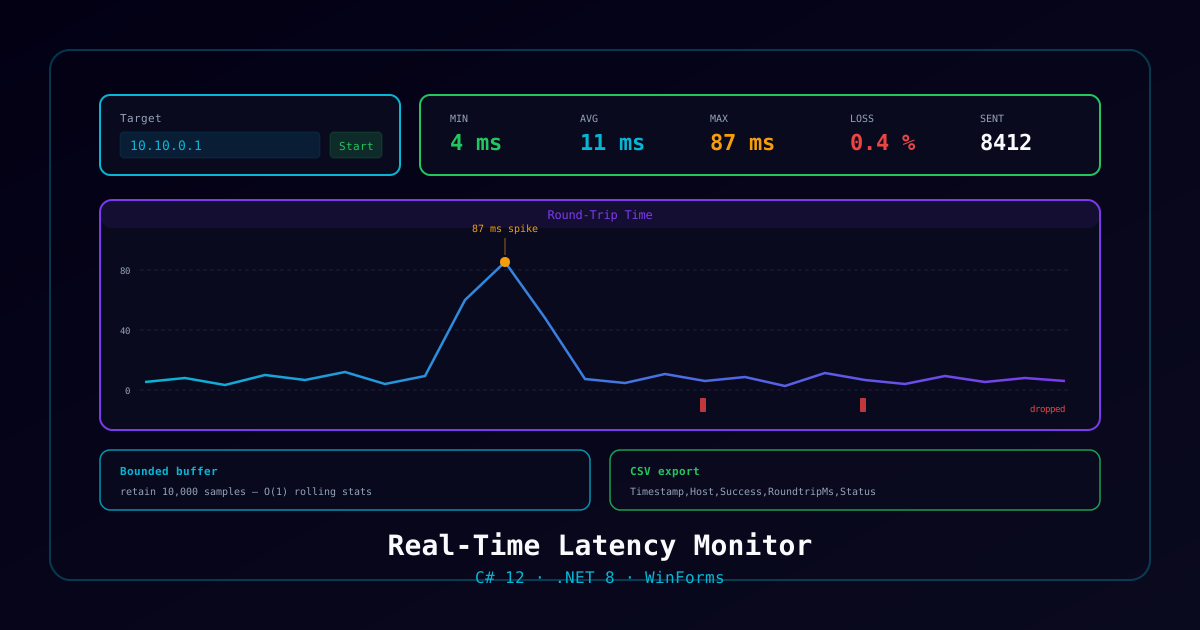
A purpose-built monitor fixes that. This project walks through building one in C# — continuous sampling, live statistics, a memory-safe result buffer, and CSV export you can drop into a ticket.
The finished reference implementation is CosmicPing on GitHub. Read it alongside this guide, or build from scratch and compare.
Project Overview
What you'll build:
- A WinForms app that pings a host continuously at a configurable interval
- Live min / max / average latency and packet-loss percentage
- A rolling result buffer with a hard retention cap
- Host validation stricter than the framework default
- CSV export for analysis in Excel
Time to complete: 3-4 hours
Prerequisites: Working C# knowledge, .NET 8 SDK, and a Windows 10/11 machine. ICMP must be permitted outbound by your firewall.
Step 1: Scaffold the Project
dotnet new winforms -n WinPing -f net8.0
cd WinPing
dotnet new xunit -n WinPing.Tests
dotnet sln add WinPing.TestsTargeting net8.0-windows with UseWindowsForms is what pulls in the designer types:
<PropertyGroup>
  <TargetFramework>net8.0-windows</TargetFramework>
  <UseWindowsForms>true</UseWindowsForms>
  <Nullable>enable</Nullable>
</PropertyGroup>Step 2: The Ping Loop
The single biggest mistake here is running the ping loop on the UI thread. Ping.Send() blocks for the full timeout — with a 4-second timeout on an unreachable host, your window freezes for four seconds per sample.
Use SendPingAsync and let the loop yield:
private async Task RunPingLoopAsync(string host, CancellationToken token)
{
    using var ping = new Ping();
    var buffer = new byte[_bufferSize];
    var options = new PingOptions { DontFragment = true };

    while (!token.IsCancellationRequested)
    {
        try
        {
            var reply = await ping.SendPingAsync(host, _timeoutMs, buffer, options);
            RecordResult(PingResult.From(reply));
        }
        catch (PingException ex)
        {
            RecordResult(PingResult.Failed(ex.Message));
        }

        await Task.Delay(_intervalMs, token);
    }
}Two details worth keeping:
- Catch
PingExceptioninside the loop, not outside. A single DNS hiccup should record one failed sample, not terminate the run. - Await
Task.Delaywith the token, so Stop is instant rather than waiting out the current interval.
Step 3: A Buffer That Cannot Leak
Leave a monitor running overnight at one sample per second and you have 86,400 result objects. Leave it running over a long weekend and the process is measured in gigabytes.
Cap retention at the point of insert:
private const int MaxRetainedResults = 10_000;
private readonly List<PingResult> _results = new();

private void RecordResult(PingResult result)
{
    _results.Add(result);
    if (_results.Count > MaxRetainedResults)
    {
        _results.RemoveRange(0, _results.Count - MaxRetainedResults);
    }
    UpdateStatistics(result);
}The important part is that running statistics are updated incrementally, not recomputed from the list. If your average is a LINQ .Average() over the whole buffer on every sample, you have quietly written an O(n²) monitor that degrades the longer it runs — exactly when you need it most.
Keep counters instead:
private long _sent, _received, _totalRtt;
private long _minRtt = long.MaxValue, _maxRtt;

private void UpdateStatistics(PingResult r)
{
    _sent++;
    if (!r.Success) return;

    _received++;
    _totalRtt += r.RoundtripTime;
    if (r.RoundtripTime < _minRtt) _minRtt = r.RoundtripTime;
    if (r.RoundtripTime > _maxRtt) _maxRtt = r.RoundtripTime;
}

public double PacketLossPercent =>
_sent == 0 ? 0 : 100.0 * (_sent - _received) / _sent;Step 4: Validate the Host Properly
This is where most hobby implementations are weakest, and it is worth doing carefully.
The obvious approach is Uri.CheckHostName(). It is permissive in ways that will surprise you: it accepts a hostname whose label ends in a hyphen, which RFC 1123 forbids, and it will happily classify a truncated dotted-quad as a name rather than rejecting it.
Layer your own rules on top:
public static bool ValidateHost(string host)
{
    if (string.IsNullOrWhiteSpace(host)) return false;
    host = host.Trim();

    // Anything shaped like a dotted quad must BE a valid dotted quad
    var parts = host.Split('.');
    if (parts.Length == 4 && parts.All(p => p.Length > 0 && p.All(char.IsDigit)))
        return TryParseIPv4(host, out _);

    var hostType = Uri.CheckHostName(host);
    if (hostType == UriHostNameType.Dns)
    {
        // RFC 1123: a label may not start or end with a hyphen
        foreach (var label in host.Split('.'))
        {
            if (string.IsNullOrEmpty(label)) return false;
            if (label.StartsWith('-') || label.EndsWith('-')) return false;
        }
        return true;
    }

    return hostType == UriHostNameType.IPv6 || hostType == UriHostNameType.Basic;
}Rejecting hostname-.com and 192.168.1 up front beats accepting them and surfacing a confusing failure several seconds later at ping time.
Step 5: CSV Export
Keep the export dumb and stream it. Building one giant string for a 10,000-row buffer allocates far more than it needs to:
public static void ExportCsv(string path, IReadOnlyList<PingResult> results)
{
    using var writer = new StreamWriter(path);
    writer.WriteLine("Timestamp,Host,Success,RoundtripMs,Status");

    foreach (var r in results)
    {
        writer.WriteLine(
            $"{r.Timestamp:O},{Escape(r.Host)},{r.Success},{r.RoundtripTime},{r.Status}");
    }
}

private static string Escape(string field) =>
    field.Contains(',') || field.Contains('"')
        ? $"\"{field.Replace("\"", "\"\"")}\""
: field;Use round-trip (:O) timestamps. Locale-formatted dates in a CSV are a support burden the first time someone opens it in a different region.
Step 6: Test the Validator, and Actually Run the Tests
Validation logic is pure, fast, and the easiest thing in the project to cover:
[Theory]
[InlineData("example.com")]
[InlineData("192.168.1.1")]
public void ValidateHost_ValidHosts_Accepted(string host)
    => Assert.True(InputValidator.ValidateHost(host));

[Theory]
[InlineData("hostname-.com")]   // trailing hyphen in a label
[InlineData("192.168.1")]       // truncated IPv4
[InlineData("host name.com")]   // space
public void ValidateHost_MalformedHosts_Rejected(string host)
=> Assert.False(InputValidator.ValidateHost(host));A word of hard-won advice: wire up CI before you write the second test. In the reference implementation, two assertions were committed asserting the opposite of what the validator did, and because the repository had no CI at all, they sat red for seven months without anyone noticing. Tests nobody runs are documentation that has quietly gone stale.
A minimal workflow is enough:
name: Build and Test
on:
  pull_request:
    branches: [ main ]
jobs:
  build:
    runs-on: windows-latest
    steps:
      - uses: actions/checkout@v7
      - uses: actions/setup-dotnet@v6
        with:
          dotnet-version: '8.0.x'
- run: dotnet test WinPing.sln --configuration ReleaseNote windows-latest — a net8.0-windows WinForms project will not build on a Linux runner.
Where to Take It Next
- Traceroute integration —
Pingwith an incrementingPingOptions.Ttlgives you per-hop latency - Threshold alerting — fire a notification when the rolling average crosses a limit
- Multi-target — one loop per host, one tab per target
- Persist to SQLite instead of an in-memory buffer, and you have long-run trend data
Reference Implementation
The complete source, including the WinForms UI, chart rendering, and the full test suite, is at CosmicBytez/CosmicPing. It is MIT licensed — read it, fork it, or lift the validator wholesale.