Overview
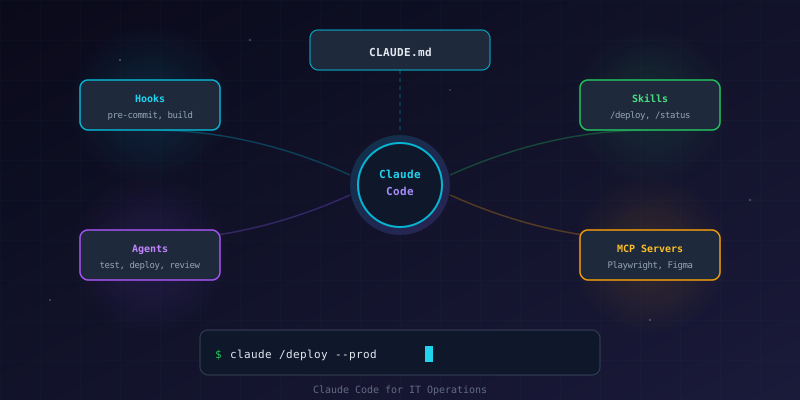
Most developers use Claude Code as a conversational coding assistant — ask a question, get an answer. But Claude Code has a full extensibility system (hooks, agents, skills, MCP servers, and CLAUDE.md files) that turns it into an autonomous DevOps co-pilot capable of managing builds, deployments, testing, and multi-project workflows.
This project builds a reusable automation framework from scratch. By the end, you'll have a template system that drops into any project and gives Claude Code the context and tooling to operate independently.
What We're Building
┌─────────────────────────────────────────────────────────────┐
│            Claude Code Automation Framework                  │
├─────────────────────────────────────────────────────────────┤
│                                                             │
│  ┌──────────────────────────────────────────────────────┐   │
│  │                   CLAUDE.md                           │   │
│  │  Project context · Stack · Routes · Commands          │   │
│  └──────────────────────┬───────────────────────────────┘   │
│                         │                                    │
│  ┌──────────┐  ┌───────┴────────┐  ┌──────────────────┐   │
│  │  Hooks   │  │  Claude Code   │  │   MCP Servers    │   │
│  │  ───────  │  │   ──────────   │  │   ──────────     │   │
│  │  pre-     │◀─│  Orchestrator  │─▶│  Playwright     │   │
│  │  commit   │  │                │  │  Figma          │   │
│  │  build    │  │                │  │  Custom         │   │
│  └──────────┘  └───────┬────────┘  └──────────────────┘   │
│                         │                                    │
│            ┌────────────┼────────────┐                      │
│            ▼            ▼            ▼                      │
│     ┌──────────┐ ┌──────────┐ ┌──────────┐                │
│     │  Agents  │ │  Skills  │ │  Plugins │                │
│     │  ──────  │ │  ──────  │ │  ──────  │                │
│     │  test    │ │ /deploy  │ │ superpow │                │
│     │  review  │ │ /status  │ │ context7 │                │
│     │  deploy  │ │ /dev     │ │ figma    │                │
│     └──────────┘ └──────────┘ └──────────┘                │
│                                                             │
└─────────────────────────────────────────────────────────────┘Prerequisites
- Claude Code CLI installed (
npm install -g @anthropic-ai/claude-code) - At least one project repository initialized with Git
- GitHub CLI (
gh) installed for PR workflows - Basic terminal proficiency
Part 1: CLAUDE.md — The Project Brain
CLAUDE.md is a markdown file at the root of your project that Claude Code reads at the start of every session. Think of it as the project's operating manual — it tells Claude what the project is, how it's built, and how to work with it.
Step 1: Create the Template
Every CLAUDE.md should cover these sections:
# CLAUDE.md

## Project Name

One-line description of what this project does.

## Project Overview

- **Stack**: Next.js 15 + React 19 + TypeScript + Tailwind CSS
- **Type**: Web application / API / CLI tool
- **Deployed**: Platform (e.g., Vercel, Docker, AWS)
- **Purpose**: What problem this solves

## Architecture

2-3 sentences about how the project is structured. Mention the key
patterns (App Router, REST API, event-driven, etc.) and any unusual
design decisions.

## Key Files

| File | Purpose |
|------|---------|
| `src/app/layout.tsx` | Root layout |
| `src/lib/constants.ts` | Site-wide constants |
| `next.config.ts` | Build configuration |

## Development Commands

\`\`\`bash
npm run dev        # Start dev server
npm run build      # Production build
npm test           # Run test suite
npm run lint       # ESLint
\`\`\`

## Environment Variables

| Variable | Description | Required |
|----------|-------------|----------|
| `DATABASE_URL` | DB connection string | Yes |
| `API_SECRET` | Auth signing key | Yes (prod) |

Copy `.env.example` → `.env.local` for local development.

## Routes

| Route | Purpose |
|-------|---------|
| `/` | Home page |
| `/api/health` | Health check endpoint |

## Before Committing

1. Run `npm run build` — catch type errors
2. Run `npm test` — verify no regressions
3. Run `npm run lint` — fix style issues
4. No API keys or secrets committedStep 2: Multi-Project Workspace CLAUDE.md
If you manage multiple projects from a parent directory, create a workspace-level CLAUDE.md:
# Workspace

## Structure

\`\`\`
workspace/
├── project-web/        # Next.js frontend
├── project-api/        # Express API
├── project-infra/      # Terraform/Docker
└── CLAUDE.md           # This file
\`\`\`

## Conventions

- **Commits**: Conventional commit style (fix:, feat:, perf:)
- **Branches**: main for all projects
- **Deploy**: `npx vercel --prod` for web, `docker compose up -d` for API

## Per-Project CLAUDE.md

Each project has its own CLAUDE.md. Always read the project-level
CLAUDE.md before working on that project.Why This Matters
Without CLAUDE.md, Claude Code starts every session blind — it doesn't know your stack, your conventions, or where anything lives. With it, Claude can:
- Run the right build commands without asking
- Follow your commit conventions automatically
- Know which files matter for a given task
- Avoid deprecated patterns specific to your project
Part 2: Hooks — Automated Guardrails
Hooks are shell commands that execute automatically when Claude Code uses specific tools. They enforce standards without manual intervention.
Understanding Hook Types
| Hook | When It Runs | Use Case |
|---|---|---|
PreToolUse | Before a tool executes | Block dangerous commands, validate inputs |
PostToolUse | After a tool executes | Run linting, verify outputs |
Notification | When Claude sends a message | Alert on specific keywords |
Step 1: Git Guardian Hook
Prevent accidental pushes to protected branches:
{
  "hooks": {
    "PreToolUse": [
      {
        "matcher": "Bash",
        "command": "if echo '$TOOL_INPUT' | grep -qE 'git push.*(main|master|production)'; then echo 'BLOCKED: Direct push to protected branch. Use a PR instead.' && exit 1; fi; exit 0"
      }
    ]
  }
}Step 2: Build Verification Hook
Automatically run the build after significant file changes:
#!/bin/bash
# .claude/hooks/verify-build.sh
FILE_PATH=$(echo "$TOOL_INPUT" | jq -r '.file_path // empty')

# Only trigger for source files
case "$FILE_PATH" in
  *.ts|*.tsx|*.js|*.jsx)
    echo "Source file modified. Consider running 'npm run build' to verify."
    ;;
  package.json)
    echo "Dependencies changed. Run 'npm install' then 'npm run build'."
    ;;
esac
exit 0Step 3: Test Runner Hook
Run relevant tests after implementation changes:
{
  "hooks": {
    "PostToolUse": [
      {
        "matcher": "Write|Edit",
        "command": ".claude/hooks/suggest-tests.sh"
      }
    ]
  }
}#!/bin/bash
# .claude/hooks/suggest-tests.sh
FILE_PATH=$(echo "$TOOL_INPUT" | jq -r '.file_path // empty')
# Check if a corresponding test file exists
TEST_FILE=$(echo "$FILE_PATH" | sed 's/\/src\//\/src\/__tests__\//' | sed 's/\.tsx\?/.test.ts/')
if [ -f "$TEST_FILE" ]; then
echo "Test file exists: $TEST_FILE — consider running it."
fi
exit 0Part 3: Custom Agents — Specialized Workers
Agents are markdown files that define specialized Claude sub-processes. They're dispatched for specific tasks and run with their own context.
Step 1: Code Review Agent
Create .claude/agents/code-reviewer.md:
---
name: code-reviewer
description: Review code changes for quality, bugs, and best practices
model: sonnet
---

You are a code reviewer. Analyze the provided code for:

1. **Bugs**: Logic errors, off-by-one, null/undefined risks
2. **Performance**: Unnecessary re-renders, O(n²) loops, missing memoization
3. **Conventions**: Naming, file structure, import ordering
4. **Types**: Missing types, overly broad `any` usage
5. **Tests**: Missing test coverage for critical paths

Report findings by severity:
- **CRITICAL**: Will cause bugs in production
- **IMPORTANT**: Should fix before merge
- **SUGGESTION**: Nice to have improvements

Be concise. Only report issues you're confident about.Step 2: Deployment Agent
Create .claude/agents/deploy-verifier.md:
---
name: deploy-verifier
description: Verify a deployment is healthy after pushing to production
model: haiku
---

Verify the deployment is healthy:

1. Check that the site responds with HTTP 200
2. Verify key pages load without errors
3. Check for console errors using browser automation
4. Confirm API health endpoint returns OK
5. Report any issues found

Use curl for basic checks and Playwright (if available) for browser tests.Step 3: Using Agents
Agents are dispatched using the Agent tool in conversation:
You: Review the changes on this branch

Claude: [dispatches code-reviewer agent with git diff]

Agent returns: 2 IMPORTANT issues found:
1. Missing null check in user lookup (src/api/users.ts:45)
2. SQL query uses string interpolation (src/db/queries.ts:23)
You can also reference agents from skills (Part 4).
Part 4: Skills — Reusable Commands
Skills are user-invocable slash commands. Type /deploy and Claude executes a predefined workflow.
Step 1: Deploy Skill
Create .claude/skills/deploy.md:
---
name: deploy
description: Build, test, and deploy to production
user-invocable: true
---

Deploy the application to production.

Steps:
1. Run `npm run lint` — abort if errors
2. Run `npm test` — abort if failures
3. Run `npm run build` — abort if build fails
4. Run `git status` — check for uncommitted changes
5. If clean, deploy:
   - For Vercel: `npx vercel --prod`
   - For Docker: `docker compose up -d --build`
6. After deploy, verify the production URL responds with HTTP 200
7. Report success or failure with the deployment URLStep 2: Status Skill
Create .claude/skills/status.md:
---
name: status
description: Show project health status
user-invocable: true
---

Report the current project health.

Check and report:
1. `git status` — uncommitted changes?
2. `git log --oneline -5` — recent commits
3. `npm test` — test suite status
4. `npm run build` — build status
5. `npm audit --production` — vulnerability count
6. Check if production URL is responding

Format as a status dashboard:
| Check | Status |
|-------|--------|
| Git | Clean / X uncommitted |
| Tests | X/Y passing |
| Build | Pass/Fail |
| Vulnerabilities | X high, Y moderate |
| Production | Online/Offline |Step 3: Dev Server Skill
Create .claude/skills/dev-server.md:
---
name: dev
description: Start the development server
user-invocable: true
---

Start the development environment.

1. Check if port 3000 is already in use
2. If `.env.local` is missing, warn (don't create — may contain secrets)
3. Run `npm run dev` in background
4. Wait for the server to be ready
5. Report the local URLPart 5: MCP Servers — External Integrations
Model Context Protocol (MCP) servers extend Claude Code with external tool capabilities. They run as separate processes and provide tools Claude can call.
Available MCP Servers
| Server | Purpose | Install |
|---|---|---|
| Playwright | Browser automation, testing, screenshots | npx @anthropic-ai/claude-code mcp add playwright |
| Figma | Read designs, generate code from mockups | npx @anthropic-ai/claude-code mcp add figma |
| Context7 | Fetch up-to-date library documentation | npx @anthropic-ai/claude-code mcp add context7 |
Step 1: Add Playwright for Testing
npx @anthropic-ai/claude-code mcp add playwright -- npx @anthropic-ai/mcp-server-playwrightNow Claude can:
- Navigate to URLs and take screenshots
- Click elements and fill forms
- Check console errors
- Verify deployments visually
Step 2: Add Context7 for Docs
npx @anthropic-ai/claude-code mcp add context7 -- npx -y @anthropic-ai/mcp-server-context7This gives Claude access to current documentation for any library, preventing outdated API suggestions.
Step 3: Configure in settings.json
MCP servers are stored in .claude/settings.json:
{
  "mcpServers": {
    "playwright": {
      "command": "npx",
      "args": ["@anthropic-ai/mcp-server-playwright"]
    },
    "context7": {
      "command": "npx",
      "args": ["-y", "@anthropic-ai/mcp-server-context7"]
    }
  }
}Part 6: Plugins — Community Extensions
Plugins are curated collections of skills, agents, and tools published as npm packages or GitHub repos.
Installing Plugins
# Add the superpowers plugin (planning, TDD, code review workflows)
npx @anthropic-ai/claude-code plugins add superpowers

# List installed plugins
npx @anthropic-ai/claude-code plugins listPopular Plugins
| Plugin | What It Adds |
|---|---|
| superpowers | Brainstorming, plan writing, TDD, code review, debugging workflows |
| context7 | Library documentation lookup |
Creating Your Own Plugin
A plugin is a directory with a manifest.json and skill/agent files:
my-plugin/
├── manifest.json
├── skills/
│   ├── deploy.md
│   └── status.md
└── agents/
    └── reviewer.md
{
  "name": "my-ops-plugin",
  "version": "1.0.0",
  "description": "IT operations automation for Claude Code",
  "skills": ["skills/deploy.md", "skills/status.md"],
  "agents": ["agents/reviewer.md"]
}Part 7: Complete Framework Template
Directory Structure
your-project/
├── .claude/
│   ├── settings.json       # Hooks, MCP servers, permissions
│   ├── agents/
│   │   ├── code-reviewer.md
│   │   ├── deploy-verifier.md
│   │   └── security-scanner.md
│   ├── skills/
│   │   ├── deploy.md
│   │   ├── status.md
│   │   └── dev.md
│   └── hooks/
│       ├── security-lint.sh
│       ├── verify-build.sh
│       └── suggest-tests.sh
├── CLAUDE.md                # Project context and rules
├── .env.example             # Template for environment variables
└── src/                     # Your application code
Quick Start for New Projects
- Copy the
.claude/directory template into your project - Create a
CLAUDE.mdusing the template from Part 1 - Install gitleaks for secret detection
- Add MCP servers you need (Playwright, Context7)
- Run
claude— the framework is active immediately
Scaling to Multiple Projects
For a workspace with several projects:
workspace/
├── CLAUDE.md                    # Workspace conventions
├── project-a/
│   ├── CLAUDE.md                # Project-specific context
│   └── .claude/settings.json    # Project-specific hooks
├── project-b/
│   ├── CLAUDE.md
│   └── .claude/settings.json
└── ~/.claude/
    └── settings.json            # Global hooks (apply everywhere)
Global hooks (in ~/.claude/settings.json) enforce standards across all projects. Project hooks (in .claude/settings.json) add project-specific behavior.
Key Takeaways
- CLAUDE.md is the foundation — without project context, Claude Code is just a generic assistant. With it, Claude knows your stack, conventions, and constraints
- Hooks enforce standards automatically — git protection, secret scanning, and build verification run without manual intervention
- Agents handle specialized tasks — code review, security scanning, and deployment verification are better handled by focused sub-processes
- Skills create repeatable workflows —
/deploy,/status, and/devstandardize operations across your team - MCP servers extend capabilities — browser testing, design tools, and documentation access make Claude Code a complete development platform
- Start simple, add layers — begin with
CLAUDE.mdand one hook, then add agents and skills as your workflow matures
Further Reading
- Claude Code Documentation
- Claude Code Hooks Guide
- Claude Code Custom Agents
- Model Context Protocol (MCP)
- Conventional Commits