Introduction
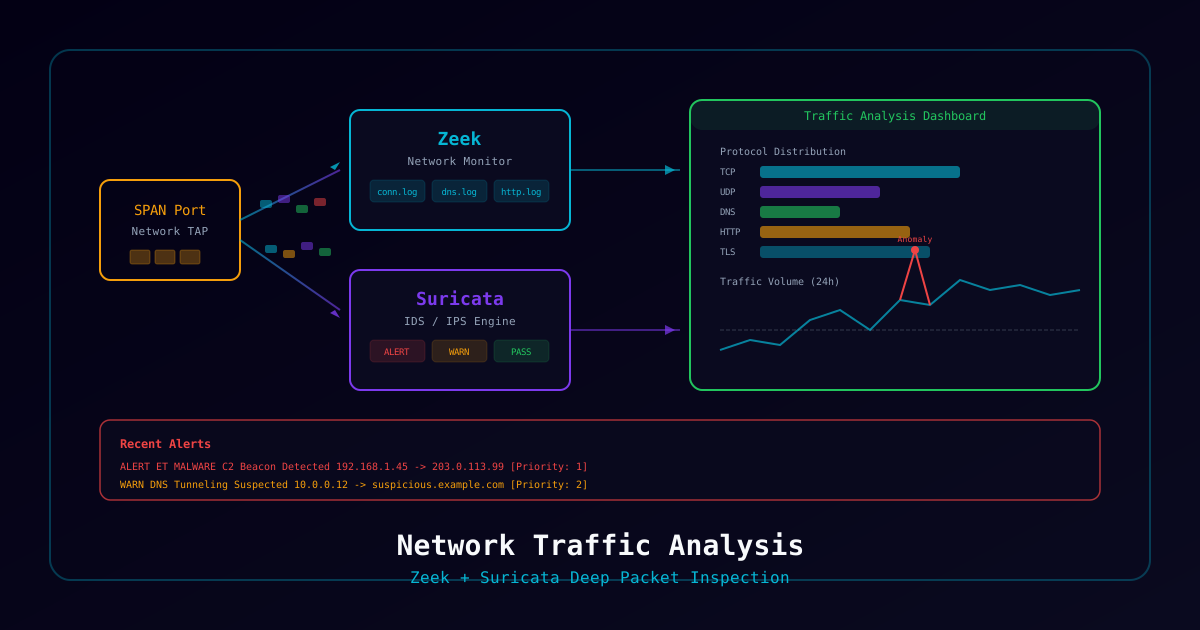
Understanding what's happening on your network is fundamental to security. This project deploys two complementary tools — Zeek for deep protocol analysis and metadata extraction, and Suricata for signature-based intrusion detection — feeding into an ELK stack for visualization and hunting.
What You'll Build
- Zeek network analyzer generating rich connection logs
- Suricata IDS with ET Open and custom rulesets
- Elasticsearch + Kibana for log storage and visualization
- Pre-built dashboards for security monitoring
- Automated alerting on suspicious activity
- Pcap replay capability for training and testing
Who This Is For
- SOC analysts building detection capabilities
- Network engineers adding security visibility
- Security engineers deploying IDS/NSM
- Homelab enthusiasts learning network forensics
Time to complete: 6-8 hours
Prerequisites
Hardware Requirements
| Component | Minimum | Recommended |
|---|---|---|
| RAM | 8 GB | 16 GB |
| CPU | 4 cores | 8 cores |
| Storage | 100 GB | 500 GB SSD |
| Network | Monitoring port/tap | SPAN port or network TAP |
Software Requirements
- Ubuntu 22.04 LTS (or similar)
- Docker and Docker Compose
- Network interface in promiscuous mode
Architecture Overview
                    Network Traffic
                         │
                    ┌────▼────┐
                    │ Network │
                    │  TAP /  │
                    │  SPAN   │
                    └────┬────┘
                         │
              ┌──────────┴──────────┐
              │                     │
         ┌────▼────┐          ┌────▼────┐
         │  Zeek   │          │Suricata │
         │Protocol │          │  IDS    │
         │Analysis │          │Signatures│
         └────┬────┘          └────┬────┘
              │                     │
              │  JSON Logs          │  EVE JSON
              │                     │
         ┌────▼─────────────────────▼────┐
         │        Filebeat               │
         │     (Log Shipper)             │
         └──────────┬────────────────────┘
                    │
              ┌─────▼─────┐
              │Elasticsearch│
              │  (Storage)  │
              └─────┬──────┘
                    │
              ┌─────▼─────┐
              │  Kibana    │
              │(Dashboards)│
└────────────┘Part 1: Deploy ELK Stack
Docker Compose Configuration
# docker-compose.yml
version: '3.8'

services:
  elasticsearch:
    image: docker.elastic.co/elasticsearch/elasticsearch:8.12.0
    container_name: elasticsearch
    environment:
      - discovery.type=single-node
      - xpack.security.enabled=false
      - "ES_JAVA_OPTS=-Xms2g -Xmx2g"
    volumes:
      - es-data:/usr/share/elasticsearch/data
    ports:
      - "9200:9200"
    networks:
      - monitoring

  kibana:
    image: docker.elastic.co/kibana/kibana:8.12.0
    container_name: kibana
    environment:
      - ELASTICSEARCH_HOSTS=http://elasticsearch:9200
    ports:
      - "5601:5601"
    depends_on:
      - elasticsearch
    networks:
      - monitoring

  filebeat:
    image: docker.elastic.co/beats/filebeat:8.12.0
    container_name: filebeat
    user: root
    volumes:
      - ./filebeat.yml:/usr/share/filebeat/filebeat.yml:ro
      - /var/log/zeek:/var/log/zeek:ro
      - /var/log/suricata:/var/log/suricata:ro
    depends_on:
      - elasticsearch
    networks:
      - monitoring

volumes:
  es-data:

networks:
  monitoring:
driver: bridgeFilebeat Configuration
# filebeat.yml
filebeat.inputs:
  # Zeek logs
  - type: log
    enabled: true
    paths:
      - /var/log/zeek/current/*.log
    json.keys_under_root: true
    json.add_error_key: true
    fields:
      source: zeek
    fields_under_root: true

  # Suricata EVE JSON
  - type: log
    enabled: true
    paths:
      - /var/log/suricata/eve.json
    json.keys_under_root: true
    json.add_error_key: true
    fields:
      source: suricata
    fields_under_root: true

output.elasticsearch:
  hosts: ["elasticsearch:9200"]
  indices:
    - index: "zeek-%{+yyyy.MM.dd}"
      when.equals:
        source: zeek
    - index: "suricata-%{+yyyy.MM.dd}"
      when.equals:
        source: suricata

setup.kibana:
host: "kibana:5601"# Start the stack
docker compose up -d
# Verify Elasticsearch is running
curl -s http://localhost:9200/_cluster/health | jqPart 2: Install and Configure Zeek
Install Zeek
# Add Zeek repository
echo 'deb http://download.opensuse.org/repositories/security:/zeek/xUbuntu_22.04/ /' | \
    sudo tee /etc/apt/sources.list.d/zeek.list
wget -qO - https://download.opensuse.org/repositories/security:/zeek/xUbuntu_22.04/Release.key | \
    sudo apt-key add -

sudo apt update && sudo apt install -y zeek

# Add Zeek to PATH
echo 'export PATH=/opt/zeek/bin:$PATH' >> ~/.bashrc
source ~/.bashrcConfigure Zeek
# Edit node configuration
sudo nano /opt/zeek/etc/node.cfg# /opt/zeek/etc/node.cfg
[zeek]
type=standalone
host=localhost
interface=eth0 # Change to your monitoring interface# Configure JSON output for ELK integration
sudo nano /opt/zeek/share/zeek/site/local.zeekAdd to local.zeek:
# JSON logging for ELK integration
@load policy/tuning/json-logs

# Additional protocol analyzers
@load policy/protocols/ssl/validate-certs
@load policy/protocols/ssl/log-hostcerts-only
@load policy/protocols/http/detect-sqli
@load policy/protocols/dns/detect-external-names
@load policy/frameworks/notice/community-id

# File extraction
@load policy/frameworks/files/hash-all-files

# Detect traceroute
@load policy/misc/detect-traceroute
Start Zeek
# Deploy Zeek
sudo zeekctl deploy

# Check status
sudo zeekctl status

# Verify logs are being generated
ls -la /opt/zeek/logs/current/Key Zeek Log Files
| Log File | Contents |
|---|---|
conn.log | All network connections (source of truth) |
dns.log | DNS queries and responses |
http.log | HTTP requests and responses |
ssl.log | TLS/SSL handshakes and certificates |
files.log | Files transferred over network |
notice.log | Zeek-generated alerts |
weird.log | Unusual protocol behavior |
x509.log | Certificate details |
smtp.log | Email transactions |
ssh.log | SSH connections |
Part 3: Install and Configure Suricata
Install Suricata
sudo apt install -y software-properties-common
sudo add-apt-repository ppa:oisf/suricata-stable
sudo apt update && sudo apt install -y suricataConfigure Suricata
sudo nano /etc/suricata/suricata.yamlKey settings to modify:
# Network variables
vars:
  address-groups:
    HOME_NET: "[192.168.0.0/16,10.0.0.0/8,172.16.0.0/12]"
    EXTERNAL_NET: "!$HOME_NET"

# Interface configuration
af-packet:
  - interface: eth0  # Your monitoring interface
    cluster-id: 99
    defrag: yes

# EVE JSON output (for ELK)
outputs:
  - eve-log:
      enabled: yes
      filetype: regular
      filename: /var/log/suricata/eve.json
      types:
        - alert
        - http
        - dns
        - tls
        - files
        - flow
- statsUpdate Rule Sets
# Update Emerging Threats Open rules
sudo suricata-update

# Enable additional rule sources
sudo suricata-update enable-source et/open
sudo suricata-update enable-source oisf/trafficid

# Update and restart
sudo suricata-update
sudo systemctl restart suricataStart Suricata
# Start Suricata
sudo systemctl enable suricata
sudo systemctl start suricata

# Verify it's running
sudo systemctl status suricata

# Check for alerts
sudo tail -f /var/log/suricata/eve.json | jq 'select(.event_type=="alert")'Part 4: Testing the Stack
Replay Pcap Files
# Download sample pcap files for testing
wget https://www.malware-traffic-analysis.net/training-exercises.html
# Or use Zeek's sample pcaps

# Replay through Zeek
zeek -r sample.pcap local

# Replay through Suricata
suricata -r sample.pcap -l /var/log/suricata/

# Test with EICAR (safe malware test)
curl -o /dev/null http://www.eicar.org/download/eicar.comVerify Data in Kibana
- Open Kibana at
http://localhost:5601 - Create index patterns:
zeek-*andsuricata-* - Verify data appears in Discover
Part 5: Threat Hunting Queries
Kibana KQL Examples
# Find DNS queries to suspicious TLDs
source: zeek AND type: "dns" AND query: (*.tk OR *.ml OR *.ga OR *.cf)

# Find large data transfers (potential exfiltration)
source: zeek AND type: "conn" AND orig_bytes: > 100000000

# Find Suricata alerts by severity
source: suricata AND event_type: "alert" AND alert.severity: 1

# Find beaconing behavior (regular interval connections)
source: zeek AND type: "conn" AND id.resp_p: (443 OR 80)

# Find connections to known-bad ports
source: zeek AND type: "conn" AND id.resp_p: (4444 OR 1337 OR 31337 OR 8888)
Security Considerations
- Run Zeek and Suricata on a dedicated monitoring interface (not the management interface)
- Use a network TAP for production deployments (SPAN ports can drop packets under load)
- Encrypt Elasticsearch communications in production
- Restrict Kibana access to authorized security personnel
- Ensure adequate storage — network logs grow fast (plan 5-20 GB/day depending on traffic)