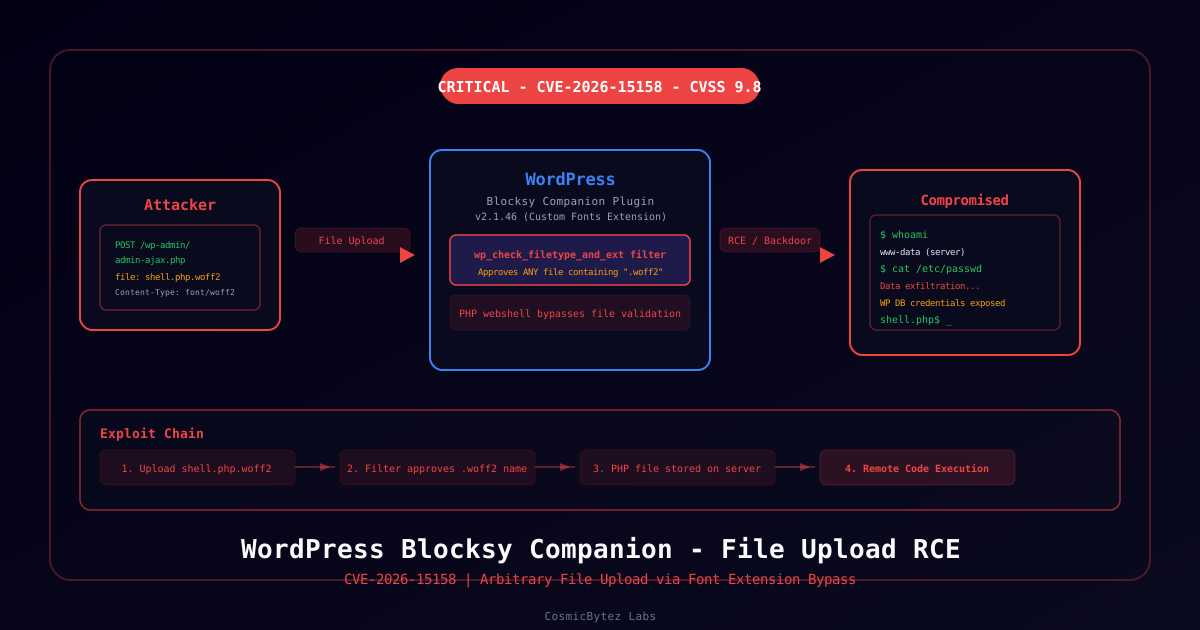
Executive Summary
CVE-2026-15158 is a critical arbitrary file upload vulnerability affecting the Blocksy Companion plugin for WordPress, present in all versions up to and including 2.1.46. The flaw resides in the Custom Fonts extension's save_attachments function, which registers a wp_check_filetype_and_ext filter that incorrectly approves any file whose name contains .woff2 or .woff — regardless of the file's actual content or extension.
CVSS Score: 9.8 (Critical)
An unauthenticated attacker can exploit this flaw to upload a PHP webshell disguised as a font file (e.g., shell.php.woff2), which is then stored on the server and executable via a direct HTTP request — resulting in full remote code execution.
Vulnerability Overview
Root Cause
The Blocksy Companion plugin's Custom Fonts extension registers a WordPress filter hook (wp_check_filetype_and_ext) to permit font file uploads. The filter's logic is flawed: it checks whether the filename contains the string .woff2 or .woff, rather than verifying that the file extension ends with an allowed value.
This means a file named malicious.php.woff2 satisfies the filter check and is uploaded successfully, but the server interprets and executes it as PHP.
Attack Vector
1. Attacker crafts a PHP webshell file named shell.php.woff2
2. Attacker sends POST request to WordPress AJAX endpoint (wp-admin/admin-ajax.php)
3. Blocksy's save_attachments handler processes the upload
4. wp_check_filetype_and_ext filter sees ".woff2" in filename — approves the file
5. shell.php.woff2 is stored in the WordPress uploads directory
6. Attacker sends GET request to the uploaded file URL
7. PHP interpreter executes the shell, granting full server accessAuthentication Required?
No — exploitation may be possible without authentication depending on how the AJAX action is registered. The NVD listing confirms this affects all versions up to 2.1.46 with no authentication requirement noted.
Technical Details
Affected Component
| Component | Detail |
|---|---|
| Plugin | Blocksy Companion |
| Extension | Custom Fonts |
| Vulnerable Function | save_attachments |
| Vulnerable Hook | wp_check_filetype_and_ext |
| Affected Versions | All versions ≤ 2.1.46 |
| Fixed Version | 2.1.47+ (verify with plugin changelog) |
CVSS Vector
CVSS:3.1/AV:N/AC:L/PR:N/UI:N/S:U/C:H/I:H/A:H
- Attack Vector: Network
- Attack Complexity: Low
- Privileges Required: None
- User Interaction: None
- Scope: Unchanged
- Confidentiality / Integrity / Availability: High / High / High
Example Exploit Filename Pattern
shell.php.woff2
cmd.php.woff
backdoor.phtml.woff2
Any filename containing .woff2 or .woff will bypass the filter, regardless of what precedes it.
Identifying Exposure
Check if Blocksy Companion is Installed
# On the WordPress server
ls wp-content/plugins/blocksy-companion/

# Check version
grep -i "version" wp-content/plugins/blocksy-companion/blocksy-companion.php | head -5Check if Custom Fonts Extension is Active
The Custom Fonts extension must be enabled within the plugin for this attack path to exist. Check the Blocksy Companion settings in the WordPress admin panel under Blocksy > Extensions > Custom Fonts.
Look for Suspicious Uploaded Files
# Search for PHP files in uploads directory
find wp-content/uploads/ -name "*.php*" -o -name "*.phtml*" | grep -i woff

# Check recent uploads
find wp-content/uploads/ -newer wp-content/plugins/blocksy-companion/blocksy-companion.php -name "*.woff*"Remediation
Option 1: Update the Plugin (Recommended)
Update Blocksy Companion to version 2.1.47 or later via the WordPress admin panel:
Dashboard → Plugins → Updates → Update Blocksy Companion
Or via WP-CLI:
wp plugin update blocksy-companionOption 2: Disable Custom Fonts Extension
If an immediate update is not possible, disable the Custom Fonts extension within Blocksy Companion:
Blocksy → Extensions → Custom Fonts → Disable
This removes the vulnerable filter hook until the plugin is patched.
Option 3: Restrict AJAX Access (Temporary)
Add a WAF rule or server-side restriction to block unauthenticated POST requests to admin-ajax.php for the specific action used by the Custom Fonts extension.
Detection
Scan Uploads for Webshells
# Search for PHP code in woff files
grep -rl "<?php\|eval(\|base64_decode\|system(\|exec(" wp-content/uploads/ 2>/dev/null

# Find double-extension files in uploads
find wp-content/uploads/ -name "*.php.*" -o -name "*.phtml.*"SIEM / Log Query
index=webserver sourcetype=access_combined
| where match(uri_path, "admin-ajax\.php") AND match(request_method, "POST")
| where match(user_agent, ".*") AND status=200
| stats count by src_ip, uri_path, _timeWordfence / Security Plugin
Users running Wordfence or similar WordPress security plugins should ensure file upload scanning is enabled and set to block double-extension files.
Impact
If exploited, an attacker gains the ability to:
- Execute arbitrary PHP code with the privileges of the web server user
- Read, modify, or delete files accessible to the web process
- Access WordPress database credentials from
wp-config.php - Pivot to other services on the server
- Establish persistent backdoor access
- Exfiltrate customer data, posts, and plugin configuration
References
- NVD — CVE-2026-15158
- WordPress Plugin Directory — Blocksy Companion
- OWASP — Unrestricted File Upload